



-
DİKKAT DOSYA İndirmek/Yüklemek için ÜCRETLİ ALTIN ÜYELİK Gereklidir!
Altın Üyelik Hakkında Bilgi
Çok eski bir web tarayıcısı kullanıyorsunuz. Bu veya diğer siteleri görüntülemekte sorunlar yaşayabilirsiniz..
Tarayıcınızı güncellemeli veya alternatif bir tarayıcı kullanmalısınız.
Tarayıcınızı güncellemeli veya alternatif bir tarayıcı kullanmalısınız.
Sayfayı pdf kaydedip mail olarak göndermek
- Konbuyu başlatan lapot
- Başlangıç tarihi

- Katılım
- 15 Mart 2005
- Mesajlar
- 43,833
- Excel Vers. ve Dili
- Microsoft 365 Tr-En 64 Bit
Aşağıdaki kodu deneyiniz.
Kod:
Sub PDF_KAYDET_MAIL_GONDER()
    Dim S1 As Worksheet, S2 As Worksheet, Kriter As String
    Dim K1 As Workbook, S3 As Worksheet, Son As Long, Yol As String
    Dim Uygulama As Object, Yeni_Mail As Object, Dosya_Adi As String

    Application.ScreenUpdating = False

    Set S1 = Sheets("Remitance")
    Set S2 = Sheets("Lists")

    Yol = ThisWorkbook.Path
    Dosya_Adi = Yol & "\Dosya.pdf"
    ChDir Yol

    On Error Resume Next
    S1.ShowAllData
    S2.ShowAllData
    On Error GoTo 0

    Kriter = S2.Range("B2").Value

    S1.Range("A1").AutoFilter 2, Kriter
    Son = S1.Cells(S1.Rows.Count, 1).End(3).Row

    Set K1 = Workbooks.Add(1)
    Set S3 = K1.Sheets(1)
    S1.Range("A1:Q" & Son).Copy S3.Range("A1")

    With S3.Range("A1:Q" & Son)
        .Borders(xlEdgeLeft).LineStyle = xlContinuous
        .Borders(xlEdgeTop).LineStyle = xlContinuous
        .Borders(xlEdgeBottom).LineStyle = xlContinuous
        .Borders(xlEdgeRight).LineStyle = xlContinuous
        .Borders(xlInsideVertical).LineStyle = xlContinuous
        .Borders(xlEdgeLeft).Weight = xlThick
        .Borders(xlEdgeTop).Weight = xlThick
        .Borders(xlEdgeBottom).Weight = xlThick
        .Borders(xlEdgeRight).Weight = xlThick
        .Borders(xlInsideVertical).Weight = xlThick
        .Borders(xlEdgeLeft).ColorIndex = xlAutomatic
        .Borders(xlEdgeTop).ColorIndex = xlAutomatic
        .Borders(xlEdgeBottom).ColorIndex = xlAutomatic
        .Borders(xlEdgeRight).ColorIndex = xlAutomatic
        .Borders(xlInsideVertical).ColorIndex = xlAutomatic
    End With

    Son = Son + 3
    S3.Range("J1:Q1").Copy S3.Cells(Son, 2)
    S3.Cells(Son + 1, 2) = "=Sum(J:J)"
    S3.Range("B" & Son + 1 & ":I" & Son + 1).FillRight

    With S3.Range("B" & Son & ":I" & Son + 1)
        .Borders(xlEdgeLeft).LineStyle = xlContinuous
        .Borders(xlEdgeTop).LineStyle = xlContinuous
        .Borders(xlEdgeBottom).LineStyle = xlContinuous
        .Borders(xlEdgeRight).LineStyle = xlContinuous
        .Borders(xlInsideVertical).LineStyle = xlContinuous
        .Borders(xlEdgeLeft).Weight = xlThick
        .Borders(xlEdgeTop).Weight = xlThick
        .Borders(xlEdgeBottom).Weight = xlThick
        .Borders(xlEdgeRight).Weight = xlThick
        .Borders(xlInsideVertical).Weight = xlThick
        .Borders(xlEdgeLeft).ColorIndex = xlAutomatic
        .Borders(xlEdgeTop).ColorIndex = xlAutomatic
        .Borders(xlEdgeBottom).ColorIndex = xlAutomatic
        .Borders(xlEdgeRight).ColorIndex = xlAutomatic
        .Borders(xlInsideVertical).ColorIndex = xlAutomatic
        .HorizontalAlignment = xlCenter
        .VerticalAlignment = xlCenter
    End With

    S3.Cells.VerticalAlignment = xlCenter
    S3.Cells.EntireColumn.AutoFit

    With S3.PageSetup
        .PrintArea = "$A$1:$I$" & Son + 1
        .LeftMargin = Application.InchesToPoints(0)
        .RightMargin = Application.InchesToPoints(0)
        .TopMargin = Application.InchesToPoints(0)
        .BottomMargin = Application.InchesToPoints(0)
        .HeaderMargin = Application.InchesToPoints(0)
        .FooterMargin = Application.InchesToPoints(0)
        .Zoom = False
        .FitToPagesWide = 1
        .FitToPagesTall = 1
    End With

    S3.Range("A1:I" & Son + 1).ExportAsFixedFormat Type:=xlTypePDF, Filename:= _
    Dosya_Adi, Quality:=xlQualityStandard, IncludeDocProperties:=True, _
    IgnorePrintAreas:=False, OpenAfterPublish:=False

    K1.Close 0

    Set Uygulama = CreateObject("Outlook.Application")
    Set Yeni_Mail = Uygulama.CreateItem(0)

    Mesaj = "Sayın Yetkili,<br><br>" & "Aylık hesap ekstreniz ektedir.<br><br>" & _
            "İnceleyip mutabakat konusunda bilgi vermenizi rica ederim."

    Mesaj = "<p style='color:blue;font-family:Calibri (Gövde);font-size:14.5'>" & Mesaj & "</font></p>"

    With Yeni_Mail
        .Display
        .To = "aaaa@bbbb.com"
        .CC = ""
        .BCC = ""
        .Subject = "Hesap Ekstresi"
        .HTMLBody = Mesaj & .HTMLBody
        .Attachments.Add Dosya_Adi
        .BodyFormat = 2
        .Save
        '.Send
    End With

    Application.ScreenUpdating = True

    MsgBox "İşleminiz tamamlanmıştır.", vbInformation
End Sub- Katılım
- 15 Mart 2005
- Mesajlar
- 43,833
- Excel Vers. ve Dili
- Microsoft 365 Tr-En 64 Bit
Ben dosyanızın nasıl çalıştığını bilmiyorum. Sizin yönlendirmenize göre kodu revize ediyorum.
Mesajlarınız ne kadar açıklayıcı olursa konuda o kadar çabuk çözüme ulaşacaktır.
Ek olarak önerdiğim PDF kaydetme kodları güncel excel versiyonlarında kullanılabilmektedir. Sizin versiyonunuz "Excel 2000" olarak görünüyor. Eski bir bilgiyse güncellemenizde fayda var.
Mesajlarınız ne kadar açıklayıcı olursa konuda o kadar çabuk çözüme ulaşacaktır.
Ek olarak önerdiğim PDF kaydetme kodları güncel excel versiyonlarında kullanılabilmektedir. Sizin versiyonunuz "Excel 2000" olarak görünüyor. Eski bir bilgiyse güncellemenizde fayda var.
- Katılım
- 15 Mart 2005
- Mesajlar
- 43,833
- Excel Vers. ve Dili
- Microsoft 365 Tr-En 64 Bit
Senaryo nasıl işleyecek tarif eder misiniz?
- Katılım
- 15 Mart 2005
- Mesajlar
- 43,833
- Excel Vers. ve Dili
- Microsoft 365 Tr-En 64 Bit
Gönderim yapılacak mail adresleri hangi alanda bulunuyor.
- Katılım
- 15 Mart 2005
- Mesajlar
- 43,833
- Excel Vers. ve Dili
- Microsoft 365 Tr-En 64 Bit
"Sanırım" derken tablo size ait değil mi?
sanirim AK stununda, her kodun basliktan sonraki ilk srada AK stununda , yani AK2 de olacak
- Katılım
- 15 Mart 2005
- Mesajlar
- 43,833
- Excel Vers. ve Dili
- Microsoft 365 Tr-En 64 Bit
Aşağıdaki kodu deneyiniz.
Kod:
Sub PDF_KAYDET_MAIL_GONDER()
    Dim S1 As Worksheet, S2 As Worksheet, Kriter As Range, Bul As Range, Mail_Adresi As String
    Dim K1 As Workbook, S3 As Worksheet, Son As Long, Yol As String
    Dim Uygulama As Object, Yeni_Mail As Object, Dosya_Adi As String

    Application.ScreenUpdating = False

    Set S1 = Sheets("Remitance")
    Set S2 = Sheets("Lists")

    Yol = ThisWorkbook.Path
    Dosya_Adi = Yol & "\Dosya.pdf"
    ChDir Yol

    On Error Resume Next
    S1.ShowAllData
    S2.ShowAllData
    S1.ListObjects("Tablo1").Unlist
    On Error GoTo 0


    For Each Kriter In S2.Range("B2:B" & S2.Cells(S2.Rows.Count, 2).End(3).Row)
        S1.Range("A1").AutoFilter 2, Kriter.Value
        Set Bul = S1.Range("B:B").Find(Kriter.Value, , , xlWhole)
        If Not Bul Is Nothing Then
            Mail_Adresi = S1.Cells(Bul.Row, "AK").Value
        End If

        Set K1 = Workbooks.Add(1)
        Set S3 = K1.Sheets(1)
        S1.Range("A1").CurrentRegion.Copy S3.Range("A1")

        Son = S3.Cells(S3.Rows.Count, 1).End(3).Row

        With S3.Range("A1:Q" & Son)
            .Borders(xlEdgeLeft).LineStyle = xlContinuous
            .Borders(xlEdgeTop).LineStyle = xlContinuous
            .Borders(xlEdgeBottom).LineStyle = xlContinuous
            .Borders(xlEdgeRight).LineStyle = xlContinuous
            .Borders(xlInsideVertical).LineStyle = xlContinuous
            .Borders(xlEdgeLeft).Weight = xlThick
            .Borders(xlEdgeTop).Weight = xlThick
            .Borders(xlEdgeBottom).Weight = xlThick
            .Borders(xlEdgeRight).Weight = xlThick
            .Borders(xlInsideVertical).Weight = xlThick
            .Borders(xlEdgeLeft).ColorIndex = xlAutomatic
            .Borders(xlEdgeTop).ColorIndex = xlAutomatic
            .Borders(xlEdgeBottom).ColorIndex = xlAutomatic
            .Borders(xlEdgeRight).ColorIndex = xlAutomatic
            .Borders(xlInsideVertical).ColorIndex = xlAutomatic
        End With

        Son = Son + 3
        S3.Range("J1:Q1").Copy S3.Cells(Son, 2)
        S3.Cells(Son + 1, 2) = "=Sum(J:J)"
        S3.Range("B" & Son + 1 & ":I" & Son + 1).FillRight

        With S3.Range("B" & Son & ":I" & Son + 1)
            .Borders(xlEdgeLeft).LineStyle = xlContinuous
            .Borders(xlEdgeTop).LineStyle = xlContinuous
            .Borders(xlEdgeBottom).LineStyle = xlContinuous
            .Borders(xlEdgeRight).LineStyle = xlContinuous
            .Borders(xlInsideVertical).LineStyle = xlContinuous
            .Borders(xlEdgeLeft).Weight = xlThick
            .Borders(xlEdgeTop).Weight = xlThick
            .Borders(xlEdgeBottom).Weight = xlThick
            .Borders(xlEdgeRight).Weight = xlThick
            .Borders(xlInsideVertical).Weight = xlThick
            .Borders(xlEdgeLeft).ColorIndex = xlAutomatic
            .Borders(xlEdgeTop).ColorIndex = xlAutomatic
            .Borders(xlEdgeBottom).ColorIndex = xlAutomatic
            .Borders(xlEdgeRight).ColorIndex = xlAutomatic
            .Borders(xlInsideVertical).ColorIndex = xlAutomatic
            .HorizontalAlignment = xlCenter
            .VerticalAlignment = xlCenter
        End With

        S3.Cells.VerticalAlignment = xlCenter
        S3.Cells.EntireColumn.AutoFit
        S3.Range("A:A").ColumnWidth = 8
        S3.Range("B:C").ColumnWidth = 10
        S3.Range("D:D").ColumnWidth = 12
        S3.Range("E:G").ColumnWidth = 10
        S3.Range("H:H").ColumnWidth = 12
        S3.Range("I:I").ColumnWidth = 15
        S3.Range("J:Q").ColumnWidth = 8

        With S3.PageSetup
            .PrintArea = "$A$1:$I$" & Son + 1
            .LeftMargin = Application.InchesToPoints(0)
            .RightMargin = Application.InchesToPoints(0)
            .TopMargin = Application.InchesToPoints(0)
            .BottomMargin = Application.InchesToPoints(0)
            .HeaderMargin = Application.InchesToPoints(0)
            .FooterMargin = Application.InchesToPoints(0)
            .Zoom = False
            .FitToPagesWide = 1
            .FitToPagesTall = 1
        End With

        S3.Range("A1:I" & Son + 1).ExportAsFixedFormat Type:=xlTypePDF, Filename:= _
        Dosya_Adi, Quality:=xlQualityStandard, IncludeDocProperties:=True, _
        IgnorePrintAreas:=False, OpenAfterPublish:=False

        K1.Close 0

        Set Uygulama = CreateObject("Outlook.Application")
        Set Yeni_Mail = Uygulama.CreateItem(0)

        Mesaj = "Sayın Yetkili,<br><br>" & "Aylık hesap ekstreniz ektedir.<br><br>" & _
                "İnceleyip mutabakat konusunda bilgi vermenizi rica ederim."

        Mesaj = "<p style='color:blue;font-family:Calibri (Gövde);font-size:14.5'>" & Mesaj & "</font></p>"

        With Yeni_Mail
            .Display
            .To = Mail_Adresi
            .CC = ""
            .BCC = ""
            .Subject = "Hesap Ekstresi"
            .HTMLBody = Mesaj & .HTMLBody
            .Attachments.Add Dosya_Adi
            .BodyFormat = 2
            .Save
            .Send
        End With
    Next


    On Error Resume Next
    S1.ShowAllData
    On Error GoTo 0

    S1.ListObjects.Add(xlSrcRange, S1.Range("$A$1:$AK$" & S1.Cells(S1.Rows.Count, 1).End(3).Row), , xlYes).Name = "Tablo1"

    Application.ScreenUpdating = True

    MsgBox "İşleminiz tamamlanmıştır.", vbInformation
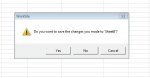
End Subharika calisiyor cok tesekkur ederim Korhan arkadasim fakat 1.resimdeki mesaj cikiyor her defasinda, bunu nasil giderebirlirim cunku yuzlerce musteriye email gidecek , her defasinda bu meseja tik yapmam gerekir bu sekilde.
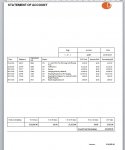
2. resimdeki formata donusturmek cok ugras istermi?
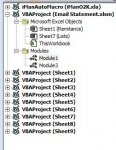
ayrica 3. resimdeki sayfalari otomatik silebilirmiyiz, yoksa yuzlerce sayfa olusacak?
sayagilar
2. resimdeki formata donusturmek cok ugras istermi?
ayrica 3. resimdeki sayfalari otomatik silebilirmiyiz, yoksa yuzlerce sayfa olusacak?
sayagilar
Ekli dosyalar
- Katılım
- 15 Mart 2005
- Mesajlar
- 43,833
- Excel Vers. ve Dili
- Microsoft 365 Tr-En 64 Bit
Bahsettiğiniz uyarı bende oluşmuyor.
Üstteki mesajımda ki kodda küçük revizeler yaptım. Tekrar deneyiniz.
Eğer yine uyarı verirse bilgisayarınıza bağlanıp bakabilirim.
Üstteki mesajımda ki kodda küçük revizeler yaptım. Tekrar deneyiniz.
Eğer yine uyarı verirse bilgisayarınıza bağlanıp bakabilirim.
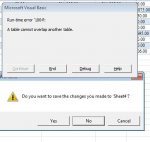
Resimdeki hatayi Verdi ve bu sirayi isaretledi
S1.ListObjects.Add(xlSrcRange, S1.Range("$A$1:$AK$" & S1.Cells(S1.Rows.Count, 1).End(3).Row), , xlYes).Name = "Tablo1"
ayrica iki degisik kodu bir PDF kaydedip iki emaile ayni sayfa olarak ekledi.
S1.ListObjects.Add(xlSrcRange, S1.Range("$A$1:$AK$" & S1.Cells(S1.Rows.Count, 1).End(3).Row), , xlYes).Name = "Tablo1"
ayrica iki degisik kodu bir PDF kaydedip iki emaile ayni sayfa olarak ekledi.
Ekli dosyalar
- Katılım
- 15 Mart 2005
- Mesajlar
- 43,833
- Excel Vers. ve Dili
- Microsoft 365 Tr-En 64 Bit
Son önerdiğim kodlar bende çalışıyor. Sizde olmamasının sebebini merak ettim.
Müsait olduğunuzda TeamViewer ile bağlanıp bakabilirim.
Müsait olduğunuzda TeamViewer ile bağlanıp bakabilirim.
- Katılım
- 15 Mart 2005
- Mesajlar
- 43,833
- Excel Vers. ve Dili
- Microsoft 365 Tr-En 64 Bit
Deneyiniz.
Kod:
Sub PDF_KAYDET_MAIL_GONDER()
    Dim S1 As Worksheet, S2 As Worksheet, Kriter As Range, Bul As Range, Mail_Adresi As String
    Dim K1 As Workbook, S3 As Worksheet, Son As Long, Yol As String, Tablo As ListObject
    Dim Uygulama As Object, Yeni_Mail As Object, Dosya_Adi As String, Alan As Range

    Application.ScreenUpdating = False

    Set S1 = Sheets("Remitance")
    Set S2 = Sheets("Lists")

    Yol = ThisWorkbook.Path
    Dosya_Adi = Yol & "\Dosya.pdf"
    ChDir Yol

    On Error Resume Next
    S1.ShowAllData
    S2.ShowAllData
    On Error GoTo 0

    Set Tablo = S1.ListObjects(1)

    For Each Kriter In S2.Range("B2:B" & S2.Cells(S2.Rows.Count, 2).End(3).Row)
        S1.Range("A1").AutoFilter 2, Kriter.Value
        With Tablo.AutoFilter.Range
            On Error Resume Next
            Set Alan = .SpecialCells(xlCellTypeVisible)
            On Error GoTo 0
        End With

        Set Bul = S1.Range("B:B").Find(Kriter.Value, , , xlWhole)
        If Not Bul Is Nothing Then
            Mail_Adresi = S1.Cells(Bul.Row, "AK").Value
        End If

        Set K1 = Workbooks.Add(1)
        Set S3 = K1.Sheets(1)
        Alan.Copy S3.Range("A1")

        Son = S3.Cells(S3.Rows.Count, 1).End(3).Row

        With S3.Range("A1:Q" & Son)
            .Borders(xlEdgeLeft).LineStyle = xlContinuous
            .Borders(xlEdgeTop).LineStyle = xlContinuous
            .Borders(xlEdgeBottom).LineStyle = xlContinuous
            .Borders(xlEdgeRight).LineStyle = xlContinuous
            .Borders(xlInsideVertical).LineStyle = xlContinuous
            .Borders(xlEdgeLeft).Weight = xlMedium
            .Borders(xlEdgeTop).Weight = xlMedium
            .Borders(xlEdgeBottom).Weight = xlMedium
            .Borders(xlEdgeRight).Weight = xlMedium
            .Borders(xlInsideVertical).Weight = xlMedium
            .Borders(xlEdgeLeft).ColorIndex = xlAutomatic
            .Borders(xlEdgeTop).ColorIndex = xlAutomatic
            .Borders(xlEdgeBottom).ColorIndex = xlAutomatic
            .Borders(xlEdgeRight).ColorIndex = xlAutomatic
            .Borders(xlInsideVertical).ColorIndex = xlAutomatic
        End With

        Son = Son + 3
        S3.Range("J1:Q1").Copy S3.Cells(Son, 2)
        S3.Cells(Son + 1, 2) = "=Sum(J:J)"
        S3.Range("B" & Son + 1 & ":I" & Son + 1).FillRight
        S3.Range("G" & Son + 3) = "Grang Total Outstanding"
        S3.Range("I" & Son + 3) = "=Sum(B" & Son + 1 & ":I" & Son + 1 & ")"
        S3.Range("G" & Son + 3 & ":I" & Son + 3).HorizontalAlignment = xlCenter
        S3.Range("G" & Son + 3 & ":H" & Son + 3).MergeCells = True
        S3.Range("G" & Son + 3 & ":I" & Son + 3).Borders.LineStyle = xlContinuous
        S3.Range("G" & Son + 3 & ":I" & Son + 3).Borders.Weight = xlMedium
        S3.Range("G" & Son + 3 & ":I" & Son + 3).Font.Bold = True
        S3.Range("G" & Son + 3 & ":I" & Son + 3).Interior.ColorIndex = 6

        With S3.Range("B" & Son & ":I" & Son + 1)
            .Borders(xlEdgeLeft).LineStyle = xlContinuous
            .Borders(xlEdgeTop).LineStyle = xlContinuous
            .Borders(xlEdgeBottom).LineStyle = xlContinuous
            .Borders(xlEdgeRight).LineStyle = xlContinuous
            .Borders(xlInsideVertical).LineStyle = xlContinuous
            .Borders(xlEdgeLeft).Weight = xlMedium
            .Borders(xlEdgeTop).Weight = xlMedium
            .Borders(xlEdgeBottom).Weight = xlMedium
            .Borders(xlEdgeRight).Weight = xlMedium
            .Borders(xlInsideVertical).Weight = xlMedium
            .Borders(xlEdgeLeft).ColorIndex = xlAutomatic
            .Borders(xlEdgeTop).ColorIndex = xlAutomatic
            .Borders(xlEdgeBottom).ColorIndex = xlAutomatic
            .Borders(xlEdgeRight).ColorIndex = xlAutomatic
            .Borders(xlInsideVertical).ColorIndex = xlAutomatic
            .HorizontalAlignment = xlCenter
            .VerticalAlignment = xlCenter
        End With

        S3.Cells.VerticalAlignment = xlCenter
        S3.Cells.EntireColumn.AutoFit
        S3.Range("A:A").HorizontalAlignment = xlCenter
        S3.Range("A:A").ColumnWidth = 8
        S3.Range("B:C").ColumnWidth = 10
        S3.Range("D:D").ColumnWidth = 12
        S3.Range("E:G").ColumnWidth = 10
        S3.Range("H:H").ColumnWidth = 12
        S3.Range("I:I").ColumnWidth = 15
        S3.Range("J:Q").ColumnWidth = 8

        With S3.PageSetup
            .PrintArea = "$A$1:$I$" & Son + 3
            .LeftMargin = Application.InchesToPoints(0)
            .RightMargin = Application.InchesToPoints(0)
            .TopMargin = Application.InchesToPoints(0)
            .BottomMargin = Application.InchesToPoints(0)
            .HeaderMargin = Application.InchesToPoints(0)
            .FooterMargin = Application.InchesToPoints(0)
            .Zoom = False
            .FitToPagesWide = 1
            .FitToPagesTall = 1
        End With

        S3.Range("A1:I" & Son + 3).ExportAsFixedFormat Type:=xlTypePDF, Filename:= _
        Dosya_Adi, Quality:=xlQualityStandard, IncludeDocProperties:=True, _
        IgnorePrintAreas:=False, OpenAfterPublish:=False

        K1.Close 0

        Set Uygulama = CreateObject("Outlook.Application")
        Set Yeni_Mail = Uygulama.CreateItem(0)

        Mesaj = "Sayın Yetkili,<br><br>" & "Aylık hesap ekstreniz ektedir.<br><br>" & _
                "İnceleyip mutabakat konusunda bilgi vermenizi rica ederim."

        Mesaj = "<p style='color:blue;font-family:Calibri (Gövde);font-size:14.5'>" & Mesaj & "</font></p>"

        With Yeni_Mail
            .Display
            .To = Mail_Adresi
            .CC = ""
            .BCC = ""
            .Subject = "Hesap Ekstresi"
            .HTMLBody = Mesaj & .HTMLBody
            .Attachments.Add Dosya_Adi
            .BodyFormat = 2
            .Save
            .Send
        End With
    Next


    On Error Resume Next
    S1.ShowAllData
    On Error GoTo 0

    Application.ScreenUpdating = True

    MsgBox "İşleminiz tamamlanmıştır.", vbInformation
End Sub-
Sizlere daha iyi bir deneyim sunabilmek icin sitemizde çerez konumlandırmaktayız, web sitemizi kullanmaya devam ettiğinizde çerezler ile toplanan kişisel verileriniz Veri Politikamız / Bilgilendirmelerimizde belirtilen amaçlar ve yöntemlerle mevzuatına uygun olarak kullanılacaktır.