gicimi
Altın Üye
- Katılım
- 3 Şubat 2008
- Mesajlar
- 593
- Excel Vers. ve Dili
- Office 2016 Eng. 64 Bit
Merhaba;
Aşağıdaki kodu çalıştırdığımda resimdeki hata ile karşılaşıyorum.
Microsoft Object Library x.x referansi tool menusunden seçmeme rağmen hata ile karşılaşıyorum.
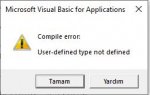
Aşağıdaki kodu çalıştırdığımda resimdeki hata ile karşılaşıyorum.
Microsoft Object Library x.x referansi tool menusunden seçmeme rağmen hata ile karşılaşıyorum.
HTML:
Option Explicit

Sub Create_Task()

Dim olApp As Outlook.Application
Dim olTask As Outlook.TaskItem
Dim X As Long

Set olApp = New Outlook.Application

Application.ScreenUpdating = False

For X = 2 To Range("A65536").End(3).Row
    Set olTask = olApp.CreateItem(3)
    With olTask
        .Subject = Cells(X, "C").Value
        .Body = Cells(X, "B").Value
        .StartDate = Cells(X, "D").Value
        .DueDate = Cells(X, "E").Value
        .Status = olTaskWaiting
        .Importance = olImportanceHigh
        .ReminderSet = True
        .ReminderTime = Cells(X, "F").Value
        .ReminderPlaySound = True
        .Save
    End With
Next

Set olTask = Nothing
Set olApp = Nothing

Application.ScreenUpdating = True

MsgBox "Outlook Task Kuruldu.", vbInformation
End Sub