- Katılım
- 11 Mart 2005
- Mesajlar
- 3,202
- Excel Vers. ve Dili
- Office 2013 İngilizce
DOSYA İndirmek/Yüklemek için ÜCRETLİ ALTIN ÜYELİK Gereklidir!
Altın Üyelik Hakkında Bilgi

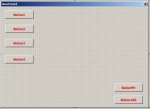
Butonları UserForm'a yan yana sığdıracak mısınız ? Yoksa aşağıya doğru uzayıp gidecek mi ?
Private Sub CommandButton1_Click()
    Dim Cmd As CommandButton
    Dim i As Integer, a As Integer
    For i = 1 To 100
    a = a + 1
    Set Cmd = Me.Controls.Add("Forms.CommandButton.1")
        With Cmd
            .Height = 24
            .Width = 72
            .Left = 10
            .Top = -10 + (a * 24)
            .Caption = a
        End With
    Next i
End SubManuel yaparım diyorsanız bu kodlar işinizi görür;
Kod:Private Sub CommandButton1_Click() Dim Cmd As CommandButton Dim i As Integer, a As Integer For i = 1 To 100 a = a + 1 Set Cmd = Me.Controls.Add("Forms.CommandButton.1") With Cmd .Height = 24 .Width = 72 .Left = 10 .Top = -10 + (a * 24) .Caption = a End With Next i End Sub
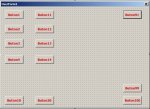
.Top = -10 + (a * 24).Left = 10Private Sub CommandButton1_Click()
Dim Cmd As MSForms.CommandButton
Dim i As Integer, a As Integer, t As Integer
For t = 1 To 10
For i = 1 To 10
a = a + 1
Set Cmd = Me.Controls.Add("Forms.CommandButton.1")
With Cmd
.Height = 24
.Width = 72
.Left = -67 + (t * 72)
.Top = -10 + (a * 24)
If a > 10 And a < 21 Then
.Top = -250 + (a * 24)
ElseIf a > 20 And a < 31 Then
.Top = -490 + (a * 24)
ElseIf a > 30 And a < 41 Then
.Top = -730 + (a * 24)
ElseIf a > 40 And a < 51 Then
.Top = -970 + (a * 24)
ElseIf a > 50 And a < 61 Then
.Top = -1210 + (a * 24)
ElseIf a > 60 And a < 71 Then
.Top = -1450 + (a * 24)
ElseIf a > 70 And a < 81 Then
.Top = -1690 + (a * 24)
ElseIf a > 80 And a < 91 Then
.Top = -1930 + (a * 24)
ElseIf a > 90 And a < 101 Then
.Top = -2170 + (a * 24)
End If
.Caption = a
End With
Next i
Next t
t = Empty: a = Empty: i = Empty
End Sub c = a Mod 10Private Sub CommandButton1_Click()
Dim Cmd As CommandButton
Dim b, c As Integer
Dim i As Integer, a As Integer
b = 1
For i = 1 To 100
a = a + 1
c = a Mod 10
If c = 0 Then
a = 1
b = b + 1
End If
Set Cmd = Me.Controls.Add("Forms.CommandButton.1")
With Cmd
.Height = 24
.Width = 36
.Left = -45 + (b * 50)
.Top = -10 + (a * 30)
.Caption = i
End With
Next i
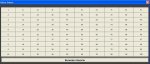
End SubDaha basit bir çözüm olmuş. Tebrik ederim.
Bu şekilde 100. buton dışarıda kalıyor...
If c = 1 Then ya da
c = a Mod 11 yapmak gerekiyor...
Hoşça kalın !!!
With Cmd
....
......
........
End With

    c = a Mod 10

    If c = 0 Then
    a = 0
    b = b + 1
    End If

Next i
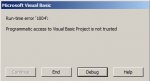
Private Sub CommandButton1_Click()
Dim Form
Set Form = ThisWorkbook.VBProject.VBComponents.Add(3)
Form.Properties("Width") = 501
Form.Properties("Height") = 325
Dim Cmd As CommandButton
Dim b, c As Integer
Dim i As Integer, a As Integer
b = 1
For i = 1 To 100
a = a + 1
c = a Mod 11
If c = 0 Then
a = 1
b = b + 1
End If
Set Cmd = Form.Designer.Controls.Add("forms.CommandButton.1")
With Cmd
.Height = 24
.Width = 36
.Left = -45 + (b * 50)
.Top = -25 + (a * 30)
.Caption = i
End With
Next i
VBA.UserForms.Add(Form.Name).Show
[COLOR=red]ThisWorkbook.VBProject.VBComponents.Remove VBComponent:=Form[/COLOR]
End SubPrivate Sub CommandButton1_Click()
Dim Form
Set Form = ThisWorkbook.VBProject.VBComponents.Add(3)
Form.Properties("Width") = 501
Form.Properties("Height") = 325
Dim Cmd As CommandButton
Dim b, c As Integer
Dim i As Integer, a As Integer
b = 1
For i = 1 To 100
a = a + 1
c = a Mod 11
If c = 0 Then
a = 1
b = b + 1
End If
Set Cmd = Form.Designer.Controls.Add("forms.CommandButton.1")
With Cmd
.Height = 24
.Width = 36
.Left = -45 + (b * 50)
.Top = -25 + (a * 30)
.Caption = i
End With
With Form.CodeModule
x = .CountOfLines
.InsertLines x + 1, "Sub CommandButton" & i & "_Click()"
.InsertLines x + 2, "msgbox " & i
.InsertLines x + 3, "End Sub"
End With
Next i
VBA.UserForms.Add(Form.Name).Show
ThisWorkbook.VBProject.VBComponents.Remove VBComponent:=Form
End SubSn halit3 çok teşekkürler,
bir konu daha sorabilir miyim,
UserForm' da herhangi bir butona tıladığımıza Butonun adını MsgBox olarak vermesini istiyorum.
Örnek: CommandButton1' e tıkladığımıza Mesaj kutusunda "CommandButton1" yazacak
iyi çalışmalar.
Private Sub CommandButton1_Click()
Dim Form
Set Form = ThisWorkbook.VBProject.VBComponents.Add(3)
Form.Properties("Width") = 501
Form.Properties("Height") = 325
Dim Cmd As CommandButton
Dim b, c As Integer
Dim i As Integer, a As Integer
b = 1
For i = 1 To 100
a = a + 1
c = a Mod 11
If c = 0 Then
a = 1
b = b + 1
End If
Set Cmd = Form.Designer.Controls.Add("forms.CommandButton.1")
With Cmd
.Height = 24
.Width = 36
.Left = -45 + (b * 50)
.Top = -25 + (a * 30)
.Caption = i
End With

With Form.CodeModule
x = .CountOfLines
.InsertLines x + 1, "Sub CommandButton" & i & "_Click()"
.InsertLines x + 2, "msgbox " & """CommandButton" & i & """"
.InsertLines x + 3, "End Sub"
End With
Next i
VBA.UserForms.Add(Form.Name).Show
ThisWorkbook.VBProject.VBComponents.Remove VBComponent:=Form
End SubSub CommandButton1_Click()
MsgBox "CommandButton1"
End Sub Dim NESNE As Control
For Each NESNE In Me.Controls
If TypeName(NESNE) = "CommandButton" Then MsgBox NESNE.ControlTipText
NextSn Halit Çok teşekkürler,
Benim düşündüğüm her bir buton Klik olayına yazmak yerine
Kod:Sub CommandButton1_Click() MsgBox "CommandButton1" End Sub
UserForm üzerine bir kere yazmak
bu şekilde,Kod:Dim NESNE As Control For Each NESNE In Me.Controls If TypeName(NESNE) = "CommandButton" Then MsgBox NESNE.ControlTipText Next
CommandButton' a tıklandığını algılayıp; hangi CommandButton' a tıklandı ise onun adını msgbox olarak verecek.
iyi çalışmalar.
Dim CommandButton() As New Class1
Public form As UserForm
Private Sub CommandButton2_Click()
Dim form
Set form = ThisWorkbook.VBProject.VBComponents.Add(3)
form.Properties("Width") = 501
form.Properties("Height") = 325
Dim Cmd As CommandButton
Dim b, c As Integer
Dim i As Integer, a As Integer
b = 1
For i = 1 To 100
a = a + 1
c = a Mod 11
If c = 0 Then
a = 1
b = b + 1
End If
Set Cmd = form.Designer.Controls.Add("forms.CommandButton.1")
With Cmd
.Height = 24
.Width = 36
.Left = -45 + (b * 50)
.Top = -25 + (a * 30)
.Caption = i
End With
Next i

Dim form2 As Object
Set form2 = UserForms.Add(form.Name)
Dim Kontrol As Control
Dim say2 As Integer
For Each Kontrol In form2.Controls
If TypeName(Kontrol) = "CommandButton" Then
say2 = say2 + 1
ReDim Preserve CommandButton(1 To say2)
Set CommandButton(say2).CommandButtonGrup = Kontrol
End If
Next
form2.Show
ThisWorkbook.VBProject.VBComponents.Remove VBComponent:=form
End SubPublic WithEvents CommandButtonGrup As MSForms.CommandButton
Private Sub CommandButtonGrup_Click()
MsgBox CommandButtonGrup.Name
End Sub ' ' ThisWorkbook.VBProject.VBComponents.Remove VBComponent:=formSub CommandButton1_Click()
MsgBox "CommandButton1"
End Sub