



- Katılım
- 3 Temmuz 2011
- Mesajlar
- 44
- Excel Vers. ve Dili
- 2016
Merhaba aşağıdaki ekran görüntüsünde combobox a veri girdiğimde aşağıda bulunan 35 textbox a otomatik sayılar geliyor. Texbox a otomatik sayı gelmesini istemiyorum ufak bir makro cod ile çözebilirmiyiz veya ayarlardanmıdır.
ÖRNEK RESİM:
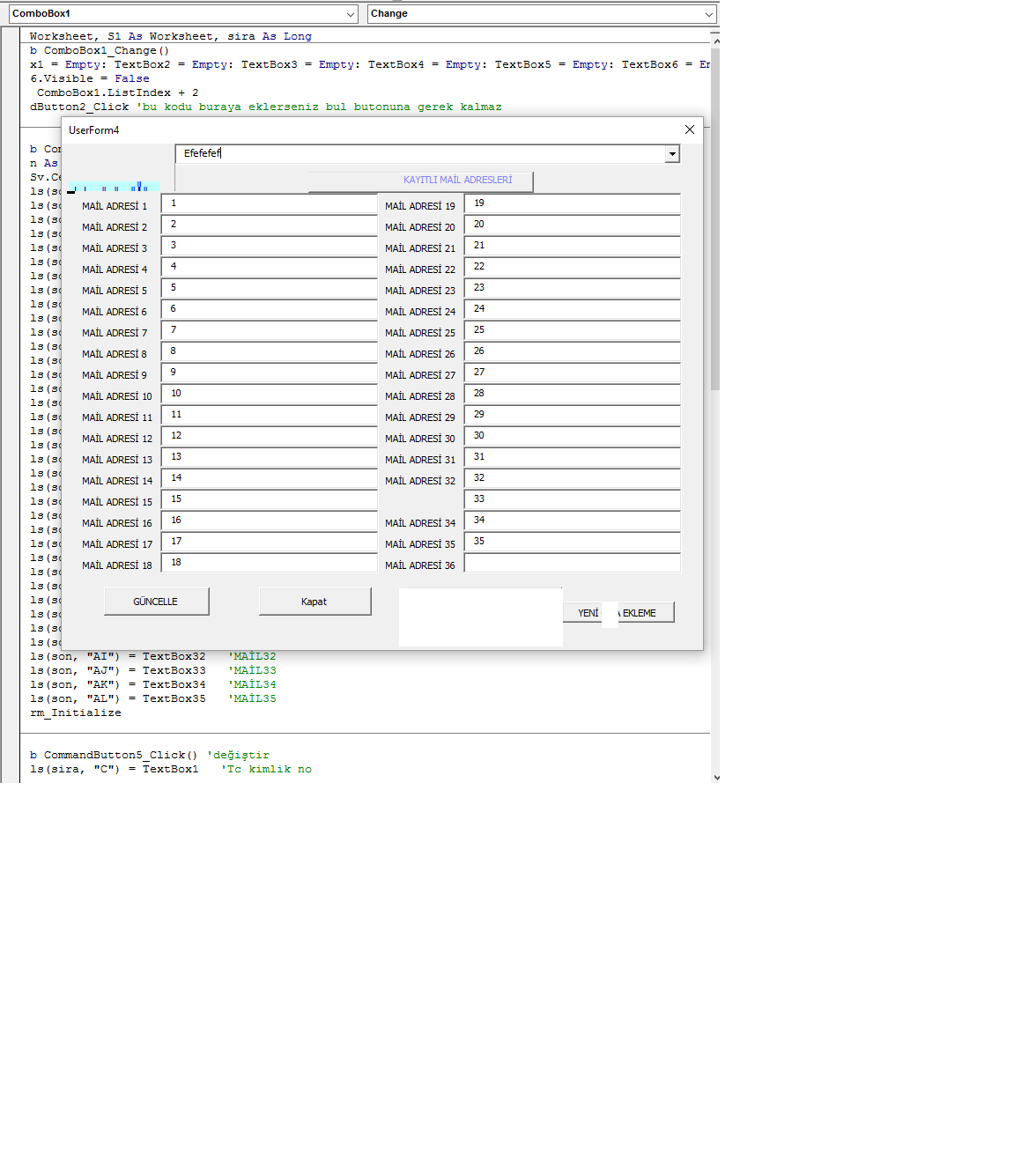
KOD:
ÖRNEK RESİM:
KOD:
Kod:
Private Sub ComboBox1_Change()
    TextBox1 = Empty: TextBox2 = Empty: TextBox3 = Empty: TextBox4 = Empty: TextBox5 = Empty: TextBox6 = Empty: TextBox7 = Empty: TextBox8 = Empty: TextBox9 = Empty: TextBox10 = Empty: TextBox11 = Empty: TextBox12 = Empty: TextBox13 = Empty: TextBox14 = Empty: TextBox15 = Empty: TextBox16 = Empty: TextBox17 = Empty: TextBox18 = Empty: TextBox19 = Empty: TextBox20 = Empty: TextBox21 = Empty: TextBox22 = Empty: TextBox23 = Empty: TextBox24 = Empty: TextBox25 = Empty: TextBox26 = Empty: TextBox27 = Empty: TextBox28 = Empty: TextBox29 = Empty: TextBox30 = Empty: TextBox31 = Empty: TextBox32 = Empty: TextBox33 = Empty: TextBox34 = Empty: TextBox35 = Empty
    Label36.Visible = False
    sira = ComboBox1.ListIndex + 2
    CommandButton2_Click 'bu kodu buraya eklerseniz bul butonuna gerek kalmaz
End Sub

Private Sub CommandButton1_Click() 'kaydet
    Dim son As Long
    son = Sv.Cells(Rows.Count, "A").End(xlUp).Row + 1
    Sv.Cells(son, "A") = son - 1
    Sv.Cells(son, "B") = ComboBox1  'SİCİL
    Sv.Cells(son, "D") = TextBox1   'MAİL1
    Sv.Cells(son, "E") = TextBox2   'MAİL2
    Sv.Cells(son, "F") = TextBox3   'MAİL3
    Sv.Cells(son, "G") = TextBox4   'MAİL4
    Sv.Cells(son, "H") = TextBox5   'MAİL5
    Sv.Cells(son, "I") = TextBox6   'MAİL6
    Sv.Cells(son, "J") = TextBox7   'MAİL7
    Sv.Cells(son, "K") = TextBox8   'MAİL8
    Sv.Cells(son, "L") = TextBox9   'MAİL9
    Sv.Cells(son, "M") = TextBox10   'MAİL10
    Sv.Cells(son, "N") = TextBox11   'MAİL11
    Sv.Cells(son, "O") = TextBox12   'MAİL12
    Sv.Cells(son, "P") = TextBox13   'MAİL13
    Sv.Cells(son, "Q") = TextBox14   'MAİL14
    Sv.Cells(son, "R") = TextBox15   'MAİL15
    Sv.Cells(son, "S") = TextBox16   'MAİL16
    Sv.Cells(son, "T") = TextBox17   'MAİL17
    Sv.Cells(son, "U") = TextBox18   'MAİL18
    Sv.Cells(son, "V") = TextBox19   'MAİL19
    Sv.Cells(son, "W") = TextBox20   'MAİL20
    Sv.Cells(son, "X") = TextBox21   'MAİL21
    Sv.Cells(son, "Y") = TextBox22   'MAİL22
    Sv.Cells(son, "Z") = TextBox23   'MAİL23
    Sv.Cells(son, "AA") = TextBox24   'MAİL24
    Sv.Cells(son, "AB") = TextBox25   'MAİL25
    Sv.Cells(son, "AC") = TextBox26   'MAİL26
    Sv.Cells(son, "AD") = TextBox27   'MAİL27
    Sv.Cells(son, "AE") = TextBox28   'MAİL28
    Sv.Cells(son, "AF") = TextBox29   'MAİL29
    Sv.Cells(son, "AG") = TextBox30   'MAİL30
    Sv.Cells(son, "AH") = TextBox31   'MAİL31
    Sv.Cells(son, "AI") = TextBox32   'MAİL32
    Sv.Cells(son, "AJ") = TextBox33   'MAİL33
    Sv.Cells(son, "AK") = TextBox34   'MAİL34
    Sv.Cells(son, "AL") = TextBox35   'MAİL35
    UserForm_Initialize
End Sub

Private Sub CommandButton2_Click() 'bul 35 HÜCREDE
    TextBox1 = Sv.Cells(sira, "D") 'MAİL1
    TextBox2 = Sv.Cells(sira, "E") 'MAİL2
    TextBox3 = Sv.Cells(sira, "F") 'MAİL3
    TextBox4 = Sv.Cells(sira, "G") 'MAİL4
    TextBox5 = Sv.Cells(sira, "H") 'MAİL5
    TextBox6 = Sv.Cells(sira, "I") 'MAİL6
    TextBox7 = Sv.Cells(sira, "J") 'MAİL7
    TextBox8 = Sv.Cells(sira, "K") 'MAİL8
    TextBox9 = Sv.Cells(sira, "L") 'MAİL9
    TextBox10 = Sv.Cells(sira, "M") 'MAİL10
    TextBox11 = Sv.Cells(sira, "N") 'MAİL11
    TextBox12 = Sv.Cells(sira, "O") 'MAİL12
    TextBox13 = Sv.Cells(sira, "P") 'MAİL13
    TextBox14 = Sv.Cells(sira, "Q") 'MAİL14
    TextBox15 = Sv.Cells(sira, "R") 'MAİL15
    TextBox16 = Sv.Cells(sira, "S") 'MAİL16
    TextBox17 = Sv.Cells(sira, "T") 'MAİL17
    TextBox18 = Sv.Cells(sira, "U") 'MAİL18
    TextBox19 = Sv.Cells(sira, "V") 'MAİL19
    TextBox20 = Sv.Cells(sira, "W") 'MAİL20
    TextBox21 = Sv.Cells(sira, "X") 'MAİL21
    TextBox22 = Sv.Cells(sira, "Y") 'MAİL22
    TextBox23 = Sv.Cells(sira, "Z") 'MAİL23
    TextBox24 = Sv.Cells(sira, "AA") 'MAİL24
    TextBox25 = Sv.Cells(sira, "AB") 'MAİL25
    TextBox26 = Sv.Cells(sira, "AC") 'MAİL26
    TextBox27 = Sv.Cells(sira, "AD") 'MAİL27
    TextBox28 = Sv.Cells(sira, "AE") 'MAİL28
    TextBox29 = Sv.Cells(sira, "AF") 'MAİL29
    TextBox30 = Sv.Cells(sira, "AG") 'MAİL30
    TextBox31 = Sv.Cells(sira, "AH") 'MAİL31
    TextBox32 = Sv.Cells(sira, "AI") 'MAİL32
    TextBox33 = Sv.Cells(sira, "AJ") 'MAİL33
    TextBox34 = Sv.Cells(sira, "AK") 'MAİL34
    TextBox35 = Sv.Cells(sira, "AL") 'MAİL35
End Sub

Private Sub CommandButton3_Click() 'kapanış
    Unload Me
End Sub

Private Sub UserForm_Initialize() 'açılış
    Dim i As Byte
    Set Sv = Sheets("sicmd")
    Set S1 = Sheets("SİCİLM")
    ComboBox1.Clear
    For i = 2 To Sv.Cells(Rows.Count, "A").End(xlUp).Row
        ComboBox1.AddItem Sv.Cells(i, "B")
    Next i
End Sub
Son düzenleme: