



-
DİKKAT DOSYA İndirmek/Yüklemek için ÜCRETLİ ALTIN ÜYELİK Gereklidir!
Altın Üyelik Hakkında Bilgi
Çok eski bir web tarayıcısı kullanıyorsunuz. Bu veya diğer siteleri görüntülemekte sorunlar yaşayabilirsiniz..
Tarayıcınızı güncellemeli veya alternatif bir tarayıcı kullanmalısınız.
Tarayıcınızı güncellemeli veya alternatif bir tarayıcı kullanmalısınız.
Outlooka Gelen Mail Excel Dosyasını Açabilir mi ?
- Konbuyu başlatan baydeniro
- Başlangıç tarihi

- Katılım
- 15 Mart 2005
- Mesajlar
- 43,866
- Excel Vers. ve Dili
- Microsoft 365 Tr-En 64 Bit
Bana yapılabilir gibi geldi..

- Katılım
- 24 Nisan 2005
- Mesajlar
- 3,683
- Excel Vers. ve Dili
- Office 2016 EN 64 Bit
Outlook da makrolar etkin olmalı.
aşağıdaki kodu ThisOutlook Session bölümüne kopyalayın.
Outlook için yazdığım özel işlemler programından oluşturdum.
Kodu denemedim ancak çalışması lazım.
mail_konu_kurallari bölümünde gönderen mail ve mail konusunu düzenleyin. Konu değişebiliyor ise instr kullanılabilir.
References i aşağıdaki şekilde ayarlayın. Forms işaretlemenize gerek yok.
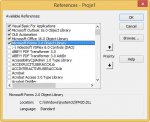
aşağıdaki kodu ThisOutlook Session bölümüne kopyalayın.
Outlook için yazdığım özel işlemler programından oluşturdum.
Kodu denemedim ancak çalışması lazım.
mail_konu_kurallari bölümünde gönderen mail ve mail konusunu düzenleyin. Konu değişebiliyor ise instr kullanılabilir.
References i aşağıdaki şekilde ayarlayın. Forms işaretlemenize gerek yok.
Kod:
   'https://www.tachytelic.net/2017/10/how-to-run-a-vba-macro-when-new-mail-is-received-in-outlook/
    Option Explicit
    Private WithEvents inboxItems As Outlook.Items
    Public mnesne As MailItem

    Private Sub Application_Startup()
      Dim outlookApp As Outlook.Application
      Dim objectNS As Outlook.NameSpace

      Set outlookApp = Outlook.Application
      Set objectNS = outlookApp.GetNamespace("MAPI")
      Set inboxItems = objectNS.GetDefaultFolder(olFolderInbox).Items
    End Sub

    Private Sub inboxItems_ItemAdd(ByVal Item As Object)
    On Error GoTo ErrorHandler
    Dim Msg As Outlook.MailItem
    Dim MessageInfo
    Dim Result
    If TypeName(Item) = "MailItem" Then
       Set mnesne = Item
       Call konuya_gore_dosyaac
    End If

ExitNewItem:
        Exit Sub
ErrorHandler:
        MsgBox Err.Number & " - " & Err.Description
        Resume ExitNewItem
    End Sub

Sub konuya_gore_dosyaac()
  If fnGetSMTPAddress(mnesne.SenderEmailAddress) = "gonderenmailadresi@" And mnesne.Subject = "Deneme" Then
     Call excelac
  End If
End Sub

Sub excelac()
    Dim xlApp As Object
    Dim sourceWB
    Dim sourceWS
    Dim strfile As String

    Set xlApp = CreateObject("Excel.Application")

    With xlApp
        .Visible = True
        .EnableEvents = True
    End With

    strfile = "C:\deneme\liste.xlsx"

    Set sourceWB = xlApp.Workbooks.Open(strfile, , False, , , , , , , True)
    Set sourceWS = sourceWB.Worksheets(1)
    sourceWB.Activate

End Sub

Public Function fnGetSMTPAddress(ExchangeMailAddress As String) As String
Dim objOutlook As Outlook.Application
Dim objMailItem As Outlook.MailItem

Set objOutlook = New Outlook.Application
Set objMailItem = objOutlook.CreateItem(0)
objMailItem.To = ExchangeMailAddress
objMailItem.Recipients.ResolveAll
On Error Resume Next
If objMailItem.Recipients.Item(1).Resolved Then
fnGetSMTPAddress = objMailItem.Recipients.Item(1).AddressEntry.GetExchangeUser.PrimarySmtpAddress
If Err.Number <> 0 Then fnGetSMTPAddress = ExchangeMailAddress
Else
fnGetSMTPAddress = ExchangeMailAddress
End If
Set objMailItem = Nothing
Set objOutlook = Nothing

End Function
Son düzenleme:
- Katılım
- 24 Nisan 2005
- Mesajlar
- 3,683
- Excel Vers. ve Dili
- Office 2016 EN 64 Bit
asri üstadım ilgine çok teşekkür ederim. şu satırda hata veriyor;
If fnGetSMTPAddress
Kod güncellendi. En alt bölüme fnGetSMTPAddress fonksiyonu eklendi.
asri üstadım çalışmadı, içinde bol miktarda kırmızı satır var. ilgine, emeğine çok teşekkür ederim.
peki dosya açmak yerine bir excel dosyasından örneğin "c:\deneme\liste.xlsx" dosyası Sayfa1 B4 hücresinde yazılı olan veriyi geri mail atması şeklinde bir kural oluşturabiilir miyiz
peki dosya açmak yerine bir excel dosyasından örneğin "c:\deneme\liste.xlsx" dosyası Sayfa1 B4 hücresinde yazılı olan veriyi geri mail atması şeklinde bir kural oluşturabiilir miyiz
- Katılım
- 24 Nisan 2005
- Mesajlar
- 3,683
- Excel Vers. ve Dili
- Office 2016 EN 64 Bit
asri üstadım çalışmadı, içinde bol miktarda kırmızı satır var. ilgine, emeğine çok teşekkür ederim.
peki dosya açmak yerine bir excel dosyasından örneğin "c:\deneme\liste.xlsx" dosyası Sayfa1 B4 hücresinde yazılı olan veriyi geri mail atması şeklinde bir kural oluşturabiilir miyiz
Excel açma ile ilgili test yapıp bilgi veririm.

-
Sizlere daha iyi bir deneyim sunabilmek icin sitemizde çerez konumlandırmaktayız, web sitemizi kullanmaya devam ettiğinizde çerezler ile toplanan kişisel verileriniz Veri Politikamız / Bilgilendirmelerimizde belirtilen amaçlar ve yöntemlerle mevzuatına uygun olarak kullanılacaktır.