• DİKKAT

    DOSYA İndirmek/Yüklemek için ÜCRETLİ ALTIN ÜYELİK Gereklidir!
    Altın Üyelik Hakkında Bilgi

Çözüldü MSGBOX Buton İsimleri Değiştirme

Katılım
10 Ocak 2022
Mesajlar
50
Excel Vers. ve Dili
2019 vrs / ing-tr
Merhaba Arkadaşlar;

VBAMsgBox1min.jpg


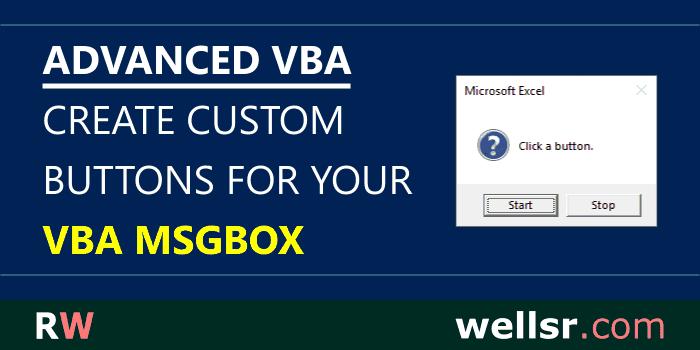
Msgbox kutusunda bulunan butonların isimlerini değiştirmek ve hangi butona basarsam ona bağlı makronun çalışmasını istiyoruz bu konuda bişey yapabilirmiyiz.

NOT: BU işlem listbox ile kullanılmıyor direk VBA da msgbox komutuna bağlı olarak çalışıyor.

ÖRN:
EVET yerine Yurtiçi
HAYIR yerine Yurtdışı
İPTAL yerine MY yazsın gibi.

Bu konuda yardımcı olurmusunuz?
 
Merhaba.
Normalde değişmiyor ama belki Apilerle yapılabilir.
Kendiniz bir form oluşturup, msgbox gibi kullanabilirsiniz. Hem daha verimli ve özelleştirilebilir olur.
 
Merhaba.
Normalde değişmiyor ama belki Apilerle yapılabilir.
Kendiniz bir form oluşturup, msgbox gibi kullanabilirsiniz. Hem daha verimli ve özelleştirilebilir olur.

Merhaba Muzaffer Bey

İlginiz için teşekkür ederim öncelikle;

Form üzerinden msgbox ı çalıştırmayı hiç denemedim Bu kutucuğa bağlı 3 ayrı makro çalışacak aynı zamanda vereceğimiz komuta göre ilgili makroyu çalıştıracak. İlgili form konusunda örnek verebilir misiniz?
 
'*************Bir modüle içerisine aşağıdaki kodları yazınız...


#If VBA7 Then
Private Declare PtrSafe Function GetCurrentThreadId Lib "kernel32" _
() As Long
Private Declare PtrSafe Function SetWindowsHookEx Lib "user32" Alias "SetWindowsHookExA" _
(ByVal idHook As Long, ByVal lpfn As LongPtr, ByVal hmod As LongPtr, ByVal dwThreadId As Long) As LongPtr
Private Declare PtrSafe Function SetDlgItemText Lib "user32" Alias "SetDlgItemTextA" _
(ByVal hDlg As LongPtr, ByVal nIDDlgItem As Long, ByVal lpString As String) As Long
Private Declare PtrSafe Function CallNextHookEx Lib "user32" _
(ByVal hHook As LongPtr, ByVal ncode As Long, ByVal wParam As LongPtr, lParam As Any) As LongPtr
Private Declare PtrSafe Function UnhookWindowsHookEx Lib "user32" _
(ByVal hHook As LongPtr) As Long
Private hHook As LongPtr ' handle to the Hook procedure (global variable)
#Else
Private Declare Function GetCurrentThreadId Lib "kernel32" _
() As Long
Private Declare Function SetWindowsHookEx Lib "user32" Alias "SetWindowsHookExA" _
(ByVal idHook As Long, ByVal lpfn As Long, ByVal hmod As Long, ByVal dwThreadId As Long) As Long
Private Declare Function SetDlgItemText Lib "user32" Alias "SetDlgItemTextA" _
(ByVal hDlg As Long, ByVal nIDDlgItem As Long, ByVal lpString As String) As Long
Private Declare Function CallNextHookEx Lib "user32" _
(ByVal hHook As Long, ByVal ncode As Long, ByVal wParam As Long, lParam As Any) As Long
Private Declare Function UnhookWindowsHookEx Lib "user32" _
(ByVal hHook As Long) As Long
Private hHook As Long ' handle to the Hook procedure (global variable)
#End If
' Hook flags (Computer Based Training)
Private Const WH_CBT = 5 ' hook type
Private Const HCBT_ACTIVATE = 5 ' activate window
' MsgBox constants (these are enumerated by VBA)
' vbOK = 1, vbCancel = 2, vbAbort = 3, vbRetry = 4, vbIgnore = 5, vbYes = 6, vbNo = 7 (these are button IDs)
' for 1 button, use vbOKOnly = 0 (OK button with ID vbOK returned)
' for 2 buttons, use vbOKCancel = 1 (vbOK, vbCancel) or vbYesNo = 4 (vbYes, vbNo) or vbRetryCancel = 5 (vbRetry, vbCancel)
' for 3 buttons, use vbAbortRetryIgnore = 2 (vbAbort, vbRetry, vbIgnore) or vbYesNoCancel = 3 (vbYes, vbNo, vbCancel)
' Module level global variables
Private sMsgBoxDefaultLabel(1 To 7) As String
Private sMsgBoxCustomLabel(1 To 7) As String
Private bMsgBoxCustomInit As Boolean

Private Sub MsgBoxCustom_Init()
' Initialize default button labels for Public Sub MsgBoxCustom
Dim nID As Integer
Dim vA As Variant ' base 0 array populated by Array function (must be Variant)
vA = VBA.Array(vbNullString, "OK", "Cancel", "Abort", "Retry", "Ignore", "Yes", "No")
For nID = 1 To 7
sMsgBoxDefaultLabel(nID) = vA(nID)
sMsgBoxCustomLabel(nID) = sMsgBoxDefaultLabel(nID)
Next nID
bMsgBoxCustomInit = True
End Sub

Public Sub MsgBoxCustom_Set(ByVal nID As Integer, Optional ByVal vLabel As Variant)
' Set button nID label to CStr(vLabel) for Public Sub MsgBoxCustom
' vbOK = 1, vbCancel = 2, vbAbort = 3, vbRetry = 4, vbIgnore = 5, vbYes = 6, vbNo = 7
' If nID is zero, all button labels will be set to default
' If vLabel is missing, button nID label will be set to default
' vLabel should not have more than 10 characters (approximately)
If nID = 0 Then Call MsgBoxCustom_Init
If nID < 1 Or nID > 7 Then Exit Sub
If Not bMsgBoxCustomInit Then Call MsgBoxCustom_Init
If IsMissing(vLabel) Then
sMsgBoxCustomLabel(nID) = sMsgBoxDefaultLabel(nID)
Else
sMsgBoxCustomLabel(nID) = CStr(vLabel)
End If
End Sub

Public Sub MsgBoxCustom_Reset(ByVal nID As Integer)
' Reset button nID to default label for Public Sub MsgBoxCustom
' vbOK = 1, vbCancel = 2, vbAbort = 3, vbRetry = 4, vbIgnore = 5, vbYes = 6, vbNo = 7
' If nID is zero, all button labels will be set to default
Call MsgBoxCustom_Set(nID)
End Sub

#If VBA7 Then
Private Function MsgBoxCustom_Proc(ByVal lMsg As Long, ByVal wParam As LongPtr, ByVal lParam As LongPtr) As LongPtr
#Else
Private Function MsgBoxCustom_Proc(ByVal lMsg As Long, ByVal wParam As Long, ByVal lParam As Long) As Long
#End If
' Hook callback function for Public Function MsgBoxCustom
Dim nID As Integer
If lMsg = HCBT_ACTIVATE And bMsgBoxCustomInit Then
For nID = 1 To 7
SetDlgItemText wParam, nID, sMsgBoxCustomLabel(nID)
Next nID
End If
MsgBoxCustom_Proc = CallNextHookEx(hHook, lMsg, wParam, lParam)
End Function

Public Sub MsgBoxCustom( _
ByRef vID As Variant, _
ByVal sPrompt As String, _
Optional ByVal vButtons As Variant = 0, _
Optional ByVal vTitle As Variant, _
Optional ByVal vHelpfile As Variant, _
Optional ByVal vContext As Variant = 0)
' Display standard VBA MsgBox with custom button labels
' Return vID as result from MsgBox corresponding to clicked button (ByRef...Variant is compatible with any type)
' vbOK = 1, vbCancel = 2, vbAbort = 3, vbRetry = 4, vbIgnore = 5, vbYes = 6, vbNo = 7
' Arguments sPrompt, vButtons, vTitle, vHelpfile, and vContext match arguments of standard VBA MsgBox function
' This is Public Sub instead of Public Function so it will not be listed as a user-defined function (UDF)
hHook = SetWindowsHookEx(WH_CBT, AddressOf MsgBoxCustom_Proc, 0, GetCurrentThreadId)
If IsMissing(vHelpfile) And IsMissing(vTitle) Then
vID = MsgBox(sPrompt, vButtons)
ElseIf IsMissing(vHelpfile) Then
vID = MsgBox(sPrompt, vButtons, vTitle)
ElseIf IsMissing(vTitle) Then
vID = MsgBox(sPrompt, vButtons, , vHelpfile, vContext)
Else
vID = MsgBox(sPrompt, vButtons, vTitle, vHelpfile, vContext)
End If
If hHook <> 0 Then UnhookWindowsHookEx hHook
End Sub


'*** Bu deeneme kodu

sub deneme ()
MsgBoxCustom ans, "Isleme Devam Edilsin mi?", vbYesNoCancel, "Trilenium"
MsgBoxCustom_Set vbYes, "Yurtici"
MsgBoxCustom_Set vbNo, "Yurtdisi"
MsgBoxCustom_Set vbCancel, "MY"
end sub
 
Örnek ekte.
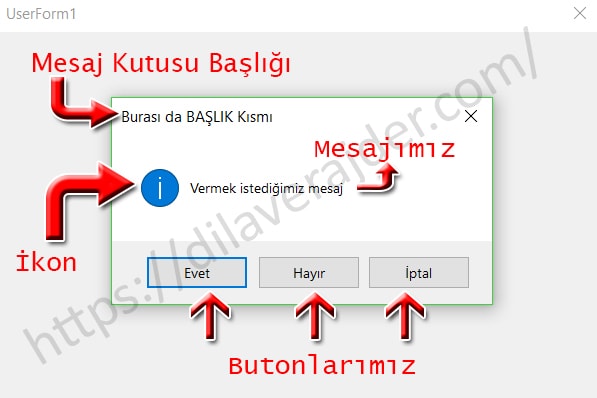
Mesaj formunu resim ve renklerle süsleyebilirsiniz.
 

Ekli dosyalar

Aşağıdaki linkte yer alan makalede bu konu anlatılmış;


Orada yer alan bilgilere göre hazırlandığında;


Bunun için yeni bir modül ilave edip, içine aşağıdakileri yerleştirin;

C#:
' This module includes Private declarations for GetCurrentThreadId, SetWindowsHookEx, SetDlgItemText, CallNextHookEx, UnhookWindowsHookEx
' plus code for Public Sub MsgBoxCustom, Public Sub MsgBoxCustom_Set, Public Sub MsgBoxCustom_Reset
' plus code for Private Sub MsgBoxCustom_Init, Private Function MsgBoxCustom_Proc
' DEVELOPER: J. Woolley (for wellsr.com)
#If VBA7 Then
    Private Declare PtrSafe Function GetCurrentThreadId Lib "kernel32" _
        () As Long
    Private Declare PtrSafe Function SetWindowsHookEx Lib "user32" Alias "SetWindowsHookExA" _
        (ByVal idHook As Long, ByVal lpfn As LongPtr, ByVal hmod As LongPtr, ByVal dwThreadId As Long) As LongPtr
    Private Declare PtrSafe Function SetDlgItemText Lib "user32" Alias "SetDlgItemTextA" _
        (ByVal hDlg As LongPtr, ByVal nIDDlgItem As Long, ByVal lpString As String) As Long
    Private Declare PtrSafe Function CallNextHookEx Lib "user32" _
        (ByVal hHook As LongPtr, ByVal ncode As Long, ByVal wParam As LongPtr, lParam As Any) As LongPtr
    Private Declare PtrSafe Function UnhookWindowsHookEx Lib "user32" _
        (ByVal hHook As LongPtr) As Long
    Private hHook As LongPtr        ' handle to the Hook procedure (global variable)
#Else
    Private Declare Function GetCurrentThreadId Lib "kernel32" _
        () As Long
    Private Declare Function SetWindowsHookEx Lib "user32" Alias "SetWindowsHookExA" _
        (ByVal idHook As Long, ByVal lpfn As Long, ByVal hmod As Long, ByVal dwThreadId As Long) As Long
    Private Declare Function SetDlgItemText Lib "user32" Alias "SetDlgItemTextA" _
        (ByVal hDlg As Long, ByVal nIDDlgItem As Long, ByVal lpString As String) As Long
    Private Declare Function CallNextHookEx Lib "user32" _
        (ByVal hHook As Long, ByVal ncode As Long, ByVal wParam As Long, lParam As Any) As Long
    Private Declare Function UnhookWindowsHookEx Lib "user32" _
        (ByVal hHook As Long) As Long
    Private hHook As Long           ' handle to the Hook procedure (global variable)
#End If
' Hook flags (Computer Based Training)
Private Const WH_CBT = 5            ' hook type
Private Const HCBT_ACTIVATE = 5     ' activate window
' MsgBox constants (these are enumerated by VBA)
' vbOK = 1, vbCancel = 2, vbAbort = 3, vbRetry = 4, vbIgnore = 5, vbYes = 6, vbNo = 7 (these are button IDs)
' for 1 button, use vbOKOnly = 0 (OK button with ID vbOK returned)
' for 2 buttons, use vbOKCancel = 1 (vbOK, vbCancel) or vbYesNo = 4 (vbYes, vbNo) or vbRetryCancel = 5 (vbRetry, vbCancel)
' for 3 buttons, use vbAbortRetryIgnore = 2 (vbAbort, vbRetry, vbIgnore) or vbYesNoCancel = 3 (vbYes, vbNo, vbCancel)
' Module level global variables
Private sMsgBoxDefaultLabel(1 To 7) As String
Private sMsgBoxCustomLabel(1 To 7) As String
Private bMsgBoxCustomInit As Boolean

Private Sub MsgBoxCustom_Init()
' Initialize default button labels for Public Sub MsgBoxCustom
    Dim nID As Integer
    Dim vA As Variant               ' base 0 array populated by Array function (must be Variant)
    vA = VBA.Array(vbNullString, "OK", "Cancel", "Abort", "Retry", "Ignore", "Yes", "No")
    For nID = 1 To 7
        sMsgBoxDefaultLabel(nID) = vA(nID)
        sMsgBoxCustomLabel(nID) = sMsgBoxDefaultLabel(nID)
    Next nID
    bMsgBoxCustomInit = True
End Sub

Public Sub MsgBoxCustom_Set(ByVal nID As Integer, Optional ByVal vLabel As Variant)
' Set button nID label to CStr(vLabel) for Public Sub MsgBoxCustom
' vbOK = 1, vbCancel = 2, vbAbort = 3, vbRetry = 4, vbIgnore = 5, vbYes = 6, vbNo = 7
' If nID is zero, all button labels will be set to default
' If vLabel is missing, button nID label will be set to default
' vLabel should not have more than 10 characters (approximately)
    If nID = 0 Then Call MsgBoxCustom_Init
    If nID < 1 Or nID > 7 Then Exit Sub
    If Not bMsgBoxCustomInit Then Call MsgBoxCustom_Init
    If IsMissing(vLabel) Then
        sMsgBoxCustomLabel(nID) = sMsgBoxDefaultLabel(nID)
    Else
        sMsgBoxCustomLabel(nID) = CStr(vLabel)
    End If
End Sub

Public Sub MsgBoxCustom_Reset(ByVal nID As Integer)
' Reset button nID to default label for Public Sub MsgBoxCustom
' vbOK = 1, vbCancel = 2, vbAbort = 3, vbRetry = 4, vbIgnore = 5, vbYes = 6, vbNo = 7
' If nID is zero, all button labels will be set to default
    Call MsgBoxCustom_Set(nID)
End Sub

#If VBA7 Then
    Private Function MsgBoxCustom_Proc(ByVal lMsg As Long, ByVal wParam As LongPtr, ByVal lParam As LongPtr) As LongPtr
#Else
    Private Function MsgBoxCustom_Proc(ByVal lMsg As Long, ByVal wParam As Long, ByVal lParam As Long) As Long
#End If
' Hook callback function for Public Function MsgBoxCustom
    Dim nID As Integer
    If lMsg = HCBT_ACTIVATE And bMsgBoxCustomInit Then
        For nID = 1 To 7
            SetDlgItemText wParam, nID, sMsgBoxCustomLabel(nID)
        Next nID
    End If
    MsgBoxCustom_Proc = CallNextHookEx(hHook, lMsg, wParam, lParam)
End Function

Public Sub MsgBoxCustom( _
    ByRef vID As Variant, _
    ByVal sPrompt As String, _
    Optional ByVal vButtons As Variant = 0, _
    Optional ByVal vTitle As Variant, _
    Optional ByVal vHelpfile As Variant, _
    Optional ByVal vContext As Variant = 0)
' Display standard VBA MsgBox with custom button labels
' Return vID as result from MsgBox corresponding to clicked button (ByRef...Variant is compatible with any type)
' vbOK = 1, vbCancel = 2, vbAbort = 3, vbRetry = 4, vbIgnore = 5, vbYes = 6, vbNo = 7
' Arguments sPrompt, vButtons, vTitle, vHelpfile, and vContext match arguments of standard VBA MsgBox function
' This is Public Sub instead of Public Function so it will not be listed as a user-defined function (UDF)
    hHook = SetWindowsHookEx(WH_CBT, AddressOf MsgBoxCustom_Proc, 0, GetCurrentThreadId)
    If IsMissing(vHelpfile) And IsMissing(vTitle) Then
        vID = MsgBox(sPrompt, vButtons)
    ElseIf IsMissing(vHelpfile) Then
        vID = MsgBox(sPrompt, vButtons, vTitle)
    ElseIf IsMissing(vTitle) Then
        vID = MsgBox(sPrompt, vButtons, , vHelpfile, vContext)
    Else
        vID = MsgBox(sPrompt, vButtons, vTitle, vHelpfile, vContext)
    End If
    If hHook <> 0 Then UnhookWindowsHookEx hHook
End Sub


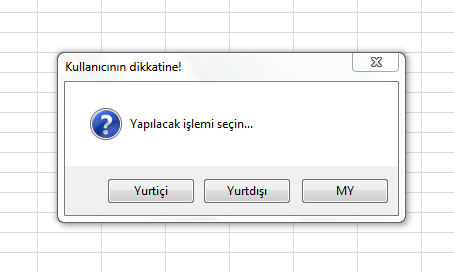
Ortalık karışmasın diye, başka bir modül daha ilave edip ona da aşağıdakini yerleştirip, "Test" isimli makroyu çalıştırın....


C#:
Sub Test()
    MsgBoxCustom_Set vbYes, "Yurtiçi"
    MsgBoxCustom_Set vbNo, "Yurtdışı"
    MsgBoxCustom_Set vbCancel, "MY"
    MsgBoxCustom secim, "Yapılacak işlemi seçin...", (vbYesNoCancel + vbQuestion), "Kullanıcının dikkatine!"
    
    Select Case secim
        Case 6
            MsgBox "Yurtiçi seçildi...."
        Case 7
            MsgBox "Yurtdışı seçildi...."
        Case 2
            MsgBox "MY seçildi...."
    End Select
End Sub

.
 
'*************Bir modüle içerisine aşağıdaki kodları yazınız...


#If VBA7 Then
Private Declare PtrSafe Function GetCurrentThreadId Lib "kernel32" _
() As Long
Private Declare PtrSafe Function SetWindowsHookEx Lib "user32" Alias "SetWindowsHookExA" _
(ByVal idHook As Long, ByVal lpfn As LongPtr, ByVal hmod As LongPtr, ByVal dwThreadId As Long) As LongPtr
Private Declare PtrSafe Function SetDlgItemText Lib "user32" Alias "SetDlgItemTextA" _
(ByVal hDlg As LongPtr, ByVal nIDDlgItem As Long, ByVal lpString As String) As Long
Private Declare PtrSafe Function CallNextHookEx Lib "user32" _
(ByVal hHook As LongPtr, ByVal ncode As Long, ByVal wParam As LongPtr, lParam As Any) As LongPtr
Private Declare PtrSafe Function UnhookWindowsHookEx Lib "user32" _
(ByVal hHook As LongPtr) As Long
Private hHook As LongPtr ' handle to the Hook procedure (global variable)
#Else
Private Declare Function GetCurrentThreadId Lib "kernel32" _
() As Long
Private Declare Function SetWindowsHookEx Lib "user32" Alias "SetWindowsHookExA" _
(ByVal idHook As Long, ByVal lpfn As Long, ByVal hmod As Long, ByVal dwThreadId As Long) As Long
Private Declare Function SetDlgItemText Lib "user32" Alias "SetDlgItemTextA" _
(ByVal hDlg As Long, ByVal nIDDlgItem As Long, ByVal lpString As String) As Long
Private Declare Function CallNextHookEx Lib "user32" _
(ByVal hHook As Long, ByVal ncode As Long, ByVal wParam As Long, lParam As Any) As Long
Private Declare Function UnhookWindowsHookEx Lib "user32" _
(ByVal hHook As Long) As Long
Private hHook As Long ' handle to the Hook procedure (global variable)
#End If
' Hook flags (Computer Based Training)
Private Const WH_CBT = 5 ' hook type
Private Const HCBT_ACTIVATE = 5 ' activate window
' MsgBox constants (these are enumerated by VBA)
' vbOK = 1, vbCancel = 2, vbAbort = 3, vbRetry = 4, vbIgnore = 5, vbYes = 6, vbNo = 7 (these are button IDs)
' for 1 button, use vbOKOnly = 0 (OK button with ID vbOK returned)
' for 2 buttons, use vbOKCancel = 1 (vbOK, vbCancel) or vbYesNo = 4 (vbYes, vbNo) or vbRetryCancel = 5 (vbRetry, vbCancel)
' for 3 buttons, use vbAbortRetryIgnore = 2 (vbAbort, vbRetry, vbIgnore) or vbYesNoCancel = 3 (vbYes, vbNo, vbCancel)
' Module level global variables
Private sMsgBoxDefaultLabel(1 To 7) As String
Private sMsgBoxCustomLabel(1 To 7) As String
Private bMsgBoxCustomInit As Boolean

Private Sub MsgBoxCustom_Init()
' Initialize default button labels for Public Sub MsgBoxCustom
Dim nID As Integer
Dim vA As Variant ' base 0 array populated by Array function (must be Variant)
vA = VBA.Array(vbNullString, "OK", "Cancel", "Abort", "Retry", "Ignore", "Yes", "No")
For nID = 1 To 7
sMsgBoxDefaultLabel(nID) = vA(nID)
sMsgBoxCustomLabel(nID) = sMsgBoxDefaultLabel(nID)
Next nID
bMsgBoxCustomInit = True
End Sub

Public Sub MsgBoxCustom_Set(ByVal nID As Integer, Optional ByVal vLabel As Variant)
' Set button nID label to CStr(vLabel) for Public Sub MsgBoxCustom
' vbOK = 1, vbCancel = 2, vbAbort = 3, vbRetry = 4, vbIgnore = 5, vbYes = 6, vbNo = 7
' If nID is zero, all button labels will be set to default
' If vLabel is missing, button nID label will be set to default
' vLabel should not have more than 10 characters (approximately)
If nID = 0 Then Call MsgBoxCustom_Init
If nID < 1 Or nID > 7 Then Exit Sub
If Not bMsgBoxCustomInit Then Call MsgBoxCustom_Init
If IsMissing(vLabel) Then
sMsgBoxCustomLabel(nID) = sMsgBoxDefaultLabel(nID)
Else
sMsgBoxCustomLabel(nID) = CStr(vLabel)
End If
End Sub

Public Sub MsgBoxCustom_Reset(ByVal nID As Integer)
' Reset button nID to default label for Public Sub MsgBoxCustom
' vbOK = 1, vbCancel = 2, vbAbort = 3, vbRetry = 4, vbIgnore = 5, vbYes = 6, vbNo = 7
' If nID is zero, all button labels will be set to default
Call MsgBoxCustom_Set(nID)
End Sub

#If VBA7 Then
Private Function MsgBoxCustom_Proc(ByVal lMsg As Long, ByVal wParam As LongPtr, ByVal lParam As LongPtr) As LongPtr
#Else
Private Function MsgBoxCustom_Proc(ByVal lMsg As Long, ByVal wParam As Long, ByVal lParam As Long) As Long
#End If
' Hook callback function for Public Function MsgBoxCustom
Dim nID As Integer
If lMsg = HCBT_ACTIVATE And bMsgBoxCustomInit Then
For nID = 1 To 7
SetDlgItemText wParam, nID, sMsgBoxCustomLabel(nID)
Next nID
End If
MsgBoxCustom_Proc = CallNextHookEx(hHook, lMsg, wParam, lParam)
End Function

Public Sub MsgBoxCustom( _
ByRef vID As Variant, _
ByVal sPrompt As String, _
Optional ByVal vButtons As Variant = 0, _
Optional ByVal vTitle As Variant, _
Optional ByVal vHelpfile As Variant, _
Optional ByVal vContext As Variant = 0)
' Display standard VBA MsgBox with custom button labels
' Return vID as result from MsgBox corresponding to clicked button (ByRef...Variant is compatible with any type)
' vbOK = 1, vbCancel = 2, vbAbort = 3, vbRetry = 4, vbIgnore = 5, vbYes = 6, vbNo = 7
' Arguments sPrompt, vButtons, vTitle, vHelpfile, and vContext match arguments of standard VBA MsgBox function
' This is Public Sub instead of Public Function so it will not be listed as a user-defined function (UDF)
hHook = SetWindowsHookEx(WH_CBT, AddressOf MsgBoxCustom_Proc, 0, GetCurrentThreadId)
If IsMissing(vHelpfile) And IsMissing(vTitle) Then
vID = MsgBox(sPrompt, vButtons)
ElseIf IsMissing(vHelpfile) Then
vID = MsgBox(sPrompt, vButtons, vTitle)
ElseIf IsMissing(vTitle) Then
vID = MsgBox(sPrompt, vButtons, , vHelpfile, vContext)
Else
vID = MsgBox(sPrompt, vButtons, vTitle, vHelpfile, vContext)
End If
If hHook <> 0 Then UnhookWindowsHookEx hHook
End Sub


'*** Bu deeneme kodu

sub deneme ()
MsgBoxCustom ans, "Isleme Devam Edilsin mi?", vbYesNoCancel, "Trilenium"
MsgBoxCustom_Set vbYes, "Yurtici"
MsgBoxCustom_Set vbNo, "Yurtdisi"
MsgBoxCustom_Set vbCancel, "MY"
end sub
Merhabalar

İlginiz için teşekkür ederim.

Kod arasındaki kombinasyon SAP GUİ yi etkiliyor bu nedenden kaynaklı kodu kullanamıyoruz.
 
Aşağıdaki linkte yer alan makalede bu konu anlatılmış;


Orada yer alan bilgilere göre hazırlandığında;


Bunun için yeni bir modül ilave edip, içine aşağıdakileri yerleştirin;

C#:
' This module includes Private declarations for GetCurrentThreadId, SetWindowsHookEx, SetDlgItemText, CallNextHookEx, UnhookWindowsHookEx
' plus code for Public Sub MsgBoxCustom, Public Sub MsgBoxCustom_Set, Public Sub MsgBoxCustom_Reset
' plus code for Private Sub MsgBoxCustom_Init, Private Function MsgBoxCustom_Proc
' DEVELOPER: J. Woolley (for wellsr.com)
#If VBA7 Then
    Private Declare PtrSafe Function GetCurrentThreadId Lib "kernel32" _
        () As Long
    Private Declare PtrSafe Function SetWindowsHookEx Lib "user32" Alias "SetWindowsHookExA" _
        (ByVal idHook As Long, ByVal lpfn As LongPtr, ByVal hmod As LongPtr, ByVal dwThreadId As Long) As LongPtr
    Private Declare PtrSafe Function SetDlgItemText Lib "user32" Alias "SetDlgItemTextA" _
        (ByVal hDlg As LongPtr, ByVal nIDDlgItem As Long, ByVal lpString As String) As Long
    Private Declare PtrSafe Function CallNextHookEx Lib "user32" _
        (ByVal hHook As LongPtr, ByVal ncode As Long, ByVal wParam As LongPtr, lParam As Any) As LongPtr
    Private Declare PtrSafe Function UnhookWindowsHookEx Lib "user32" _
        (ByVal hHook As LongPtr) As Long
    Private hHook As LongPtr        ' handle to the Hook procedure (global variable)
#Else
    Private Declare Function GetCurrentThreadId Lib "kernel32" _
        () As Long
    Private Declare Function SetWindowsHookEx Lib "user32" Alias "SetWindowsHookExA" _
        (ByVal idHook As Long, ByVal lpfn As Long, ByVal hmod As Long, ByVal dwThreadId As Long) As Long
    Private Declare Function SetDlgItemText Lib "user32" Alias "SetDlgItemTextA" _
        (ByVal hDlg As Long, ByVal nIDDlgItem As Long, ByVal lpString As String) As Long
    Private Declare Function CallNextHookEx Lib "user32" _
        (ByVal hHook As Long, ByVal ncode As Long, ByVal wParam As Long, lParam As Any) As Long
    Private Declare Function UnhookWindowsHookEx Lib "user32" _
        (ByVal hHook As Long) As Long
    Private hHook As Long           ' handle to the Hook procedure (global variable)
#End If
' Hook flags (Computer Based Training)
Private Const WH_CBT = 5            ' hook type
Private Const HCBT_ACTIVATE = 5     ' activate window
' MsgBox constants (these are enumerated by VBA)
' vbOK = 1, vbCancel = 2, vbAbort = 3, vbRetry = 4, vbIgnore = 5, vbYes = 6, vbNo = 7 (these are button IDs)
' for 1 button, use vbOKOnly = 0 (OK button with ID vbOK returned)
' for 2 buttons, use vbOKCancel = 1 (vbOK, vbCancel) or vbYesNo = 4 (vbYes, vbNo) or vbRetryCancel = 5 (vbRetry, vbCancel)
' for 3 buttons, use vbAbortRetryIgnore = 2 (vbAbort, vbRetry, vbIgnore) or vbYesNoCancel = 3 (vbYes, vbNo, vbCancel)
' Module level global variables
Private sMsgBoxDefaultLabel(1 To 7) As String
Private sMsgBoxCustomLabel(1 To 7) As String
Private bMsgBoxCustomInit As Boolean

Private Sub MsgBoxCustom_Init()
' Initialize default button labels for Public Sub MsgBoxCustom
    Dim nID As Integer
    Dim vA As Variant               ' base 0 array populated by Array function (must be Variant)
    vA = VBA.Array(vbNullString, "OK", "Cancel", "Abort", "Retry", "Ignore", "Yes", "No")
    For nID = 1 To 7
        sMsgBoxDefaultLabel(nID) = vA(nID)
        sMsgBoxCustomLabel(nID) = sMsgBoxDefaultLabel(nID)
    Next nID
    bMsgBoxCustomInit = True
End Sub

Public Sub MsgBoxCustom_Set(ByVal nID As Integer, Optional ByVal vLabel As Variant)
' Set button nID label to CStr(vLabel) for Public Sub MsgBoxCustom
' vbOK = 1, vbCancel = 2, vbAbort = 3, vbRetry = 4, vbIgnore = 5, vbYes = 6, vbNo = 7
' If nID is zero, all button labels will be set to default
' If vLabel is missing, button nID label will be set to default
' vLabel should not have more than 10 characters (approximately)
    If nID = 0 Then Call MsgBoxCustom_Init
    If nID < 1 Or nID > 7 Then Exit Sub
    If Not bMsgBoxCustomInit Then Call MsgBoxCustom_Init
    If IsMissing(vLabel) Then
        sMsgBoxCustomLabel(nID) = sMsgBoxDefaultLabel(nID)
    Else
        sMsgBoxCustomLabel(nID) = CStr(vLabel)
    End If
End Sub

Public Sub MsgBoxCustom_Reset(ByVal nID As Integer)
' Reset button nID to default label for Public Sub MsgBoxCustom
' vbOK = 1, vbCancel = 2, vbAbort = 3, vbRetry = 4, vbIgnore = 5, vbYes = 6, vbNo = 7
' If nID is zero, all button labels will be set to default
    Call MsgBoxCustom_Set(nID)
End Sub

#If VBA7 Then
    Private Function MsgBoxCustom_Proc(ByVal lMsg As Long, ByVal wParam As LongPtr, ByVal lParam As LongPtr) As LongPtr
#Else
    Private Function MsgBoxCustom_Proc(ByVal lMsg As Long, ByVal wParam As Long, ByVal lParam As Long) As Long
#End If
' Hook callback function for Public Function MsgBoxCustom
    Dim nID As Integer
    If lMsg = HCBT_ACTIVATE And bMsgBoxCustomInit Then
        For nID = 1 To 7
            SetDlgItemText wParam, nID, sMsgBoxCustomLabel(nID)
        Next nID
    End If
    MsgBoxCustom_Proc = CallNextHookEx(hHook, lMsg, wParam, lParam)
End Function

Public Sub MsgBoxCustom( _
    ByRef vID As Variant, _
    ByVal sPrompt As String, _
    Optional ByVal vButtons As Variant = 0, _
    Optional ByVal vTitle As Variant, _
    Optional ByVal vHelpfile As Variant, _
    Optional ByVal vContext As Variant = 0)
' Display standard VBA MsgBox with custom button labels
' Return vID as result from MsgBox corresponding to clicked button (ByRef...Variant is compatible with any type)
' vbOK = 1, vbCancel = 2, vbAbort = 3, vbRetry = 4, vbIgnore = 5, vbYes = 6, vbNo = 7
' Arguments sPrompt, vButtons, vTitle, vHelpfile, and vContext match arguments of standard VBA MsgBox function
' This is Public Sub instead of Public Function so it will not be listed as a user-defined function (UDF)
    hHook = SetWindowsHookEx(WH_CBT, AddressOf MsgBoxCustom_Proc, 0, GetCurrentThreadId)
    If IsMissing(vHelpfile) And IsMissing(vTitle) Then
        vID = MsgBox(sPrompt, vButtons)
    ElseIf IsMissing(vHelpfile) Then
        vID = MsgBox(sPrompt, vButtons, vTitle)
    ElseIf IsMissing(vTitle) Then
        vID = MsgBox(sPrompt, vButtons, , vHelpfile, vContext)
    Else
        vID = MsgBox(sPrompt, vButtons, vTitle, vHelpfile, vContext)
    End If
    If hHook <> 0 Then UnhookWindowsHookEx hHook
End Sub


Ortalık karışmasın diye, başka bir modül daha ilave edip ona da aşağıdakini yerleştirip, "Test" isimli makroyu çalıştırın....


C#:
Sub Test()
    MsgBoxCustom_Set vbYes, "Yurtiçi"
    MsgBoxCustom_Set vbNo, "Yurtdışı"
    MsgBoxCustom_Set vbCancel, "MY"
    MsgBoxCustom secim, "Yapılacak işlemi seçin...", (vbYesNoCancel + vbQuestion), "Kullanıcının dikkatine!"
  
    Select Case secim
        Case 6
            MsgBox "Yurtiçi seçildi...."
        Case 7
            MsgBox "Yurtdışı seçildi...."
        Case 2
            MsgBox "MY seçildi...."
    End Select
End Sub

.


Merhabalar Haluk Bey

Aynı Örneklemeyi Trilenium da yapmıştı fakat anladığım kadarıyla bn bir hata yaptım.

Açıklamanız ile kod dizini çalışıyo çok teşekkür ederim;

x bastığımızda sabit tanımlı olarak CASE2 tanımlı onu iptal olarak değiştirebilirmiyiz.

Yanı
yurtiçi
yurtduışı
MY
VE çarpı ile 4. bir buton çıkış butonu şeklinde.
 
Son düzenleme:
Örnek ekte.
Mesaj formunu resim ve renklerle süsleyebilirsiniz.

Merhabalar Muzaffer Bey

Üyelik başlatamadığım için indirme yapamıyorum. Rica etsem farklı bir bulut platformu üzerinden dosyayı benimle paylaşırmısınız teşekkür ederim ilginiz için.
 
Ekledim.

Teşekkür ederim Muzzeffer bey yeni tasarımda bu özelliği kullanacağım hatta bütün exceli forma taşıyabilirim bu şekilde araştırma yapmalıyım biraz daha.
 
MsgBox'a 4. bir buton eklenemez ama, "X" iptal edilecek şekilde 3 butonla kullanmak isterseniz;

C#:
Sub Test()
    MsgBoxCustom_Set vbAbort, "Yurtiçi"
    MsgBoxCustom_Set vbRetry, "Yurtdışı"
    MsgBoxCustom_Set vbIgnore, "MY"
    MsgBoxCustom secim, "Yapılacak işlemi seçin...", (vbAbortRetryIgnore + vbQuestion), "Kullanıcının dikkatine!"
    
    Select Case secim
        Case 3
            MsgBox "Yurtiçi seçildi...."
        Case 4
            MsgBox "Yurtdışı seçildi...."
        Case 5
            MsgBox "MY seçildi...."
    End Select
End Sub

.
 
MsgBox'a 4. bir buton eklenemez ama, "X" iptal edilecek şekilde 3 butonla kullanmak isterseniz;

C#:
Sub Test()
    MsgBoxCustom_Set vbAbort, "Yurtiçi"
    MsgBoxCustom_Set vbRetry, "Yurtdışı"
    MsgBoxCustom_Set vbIgnore, "MY"
    MsgBoxCustom secim, "Yapılacak işlemi seçin...", (vbAbortRetryIgnore + vbQuestion), "Kullanıcının dikkatine!"
   
    Select Case secim
        Case 3
            MsgBox "Yurtiçi seçildi...."
        Case 4
            MsgBox "Yurtdışı seçildi...."
        Case 5
            MsgBox "MY seçildi...."
    End Select
End Sub

.
Merhabalar Haluk Bey

Bu dizilimde x butonu işlevsiz olarak kalıyor.
 
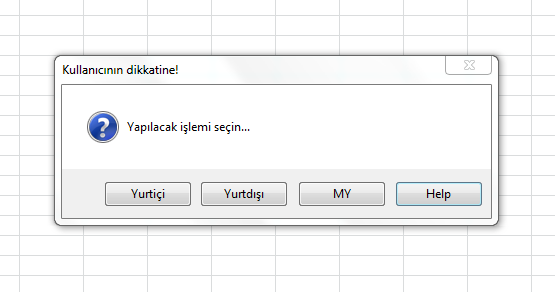
Öyle olacağını söylemiştim zaten..... MsgBox fonksiyonuna 4. buton olarak sadece "Help-Yardım" butonu ilave edilebilir.


.
 
Öyle olacağını söylemiştim zaten..... MsgBox fonksiyonuna 4. buton olarak sadece "Help-Yardım" butonu ilave edilebilir.


.
help yardımın fonksiyonunu değiştirebilirmiyiz peki diğer butnlardaki gibi onada farklı bir işlev tanımlana bilirmi.
 
Hayır, tanımlanamaz.... sadece yardım dosyanızı açar.

.
 
Ekledim.

Merhaba Muzaffer Bey

Farklı bir işlem için userform un başlatılmasını makroda olduğu gibi bir butona bağlayabilirmiyim.
 
Aşağıdaki kodu nerede çalıştırırsanız çalıştırın her türlü olur.

Kod:
Private Sub CommandButton1_Click()
    Dim BenimMsgbox As New UserForm2
    BenimMsgbox.Label1.Caption = "Mesajımızı buraya yazıyoruz."
    BenimMsgbox.CommandButton1.Caption = "1. Buton"
    BenimMsgbox.CommandButton2.Caption = "2. Buton"
    BenimMsgbox.CommandButton3.Caption = "3. Buton"
    BenimMsgbox.Show
    Select Case HangiButonaTiklandi
        Case "CommandButton1"
            MsgBox "1. butona tıklandı"
        Case "CommandButton2"
            MsgBox "2. butona tıklandı"
        Case "CommandButton3"
            MsgBox "3. butona tıklandı"
    End Select
End Sub
 
Bilgilendirmeleriniz ve ilginiz çok teşekkür ederim.
 
Geri
Üst