



-
DİKKAT DOSYA İndirmek/Yüklemek için ÜCRETLİ ALTIN ÜYELİK Gereklidir!
Altın Üyelik Hakkında Bilgi
Çok eski bir web tarayıcısı kullanıyorsunuz. Bu veya diğer siteleri görüntülemekte sorunlar yaşayabilirsiniz..
Tarayıcınızı güncellemeli veya alternatif bir tarayıcı kullanmalısınız.
Tarayıcınızı güncellemeli veya alternatif bir tarayıcı kullanmalısınız.
Mail gönderimi hk.
- Konbuyu başlatan theabir
- Başlangıç tarihi

- Katılım
- 24 Nisan 2005
- Mesajlar
- 3,683
- Excel Vers. ve Dili
- Office 2016 EN 64 Bit
merhabalar ekli dosyanın içerisinde mail gönder butonu yer almaktadır, bu butona tıklandığında maili göndermesini istiyorum, yardımlarınız talep ederim.
Mail gönderme ile ilgili tam olarak yapmak istediğiniz işlem nedir?
Kişiye özel toplu mail mi, mutabakat mı? v.b.
Sayfayı mı? Excel dosyasını mı? Belirli bir alanı mı? mail göndermek istiyorsunuz?
Mail gönderme ile ilgili tam olarak yapmak istediğiniz işlem nedir?
Kişiye özel toplu mail mi, mutabakat mı? v.b.
Sayfayı mı? Excel dosyasını mı? Belirli bir alanı mı? mail göndermek istiyorsunuz?
Sayın asri, sayfadaki dolu hücreleri maile metin olarak ekleyecek kişi de tek kişi cc de birden fazla kişi konu sabit olacak. teşekkür ederim.
Haluk
Özel Üye
- Katılım
- 7 Temmuz 2004
- Mesajlar
- 12,398
- Excel Vers. ve Dili
- 64 Bit 2010 - İngilizce
+
Google Sheets
+
JScript
Aşağıdaki kodu bir deneyin;
Kod:
Sub Test()
    Dim OutlookApp As Object, OutlookMsg As Object
    Dim FSO As Object
    Dim BodyText As Object
    Dim MyRange As Range
    Dim TempFile As String
    Dim strHTMLBody As String
    Dim NoA As Long

    NoA = Cells(65536, 1).End(xlUp).Row

    TempFile = "D:\TempHTML.htm"

    Set FSO = CreateObject("Scripting.FilesystemObject")


            Set MyRange = ActiveSheet.Range("A1" & ":B" & NoA)

            If MyRange Is Nothing Then Exit Sub
            ActiveWorkbook.PublishObjects.Add _
            (4, TempFile, MyRange.Parent.Name, MyRange.Address, 0, "", "").Publish True

            Set BodyText = FSO.OpenTextFile(TempFile, 1)

            strHTMLBody = strHTMLBody & BodyText.ReadAll

       '     Kill TempFile1


    Set OutlookApp = CreateObject("Outlook.Application")
    Set OutlookMsg = OutlookApp.CreateItem(0)

    With OutlookMsg
        .HTMLBody = strHTMLBody
        .Subject = "Bu e-postanın konusu falan filandır"
        .To = "alibaba@ciftlik.com.tr"
        .CC = "yedicuceler@masallardiyari.com; pamukprenses@masallardiyari.com"
        '.Send
        .display
    End With


    Set BodyText = Nothing
    Set OutlookMsg = Nothing
    Set OutlookApp = Nothing
    Set MyRange = Nothing
    Set FSO = Nothing
End SubAşağıdaki kodu bir deneyin;
Kod:Sub Test() Dim OutlookApp As Object, OutlookMsg As Object Dim FSO As Object Dim BodyText As Object Dim MyRange As Range Dim TempFile As String Dim strHTMLBody As String Dim NoA As Long NoA = Cells(65536, 1).End(xlUp).Row TempFile = "D:\TempHTML.htm" Set FSO = CreateObject("Scripting.FilesystemObject") Set MyRange = ActiveSheet.Range("A1" & ":B" & NoA) If MyRange Is Nothing Then Exit Sub ActiveWorkbook.PublishObjects.Add _ (4, TempFile, MyRange.Parent.Name, MyRange.Address, 0, "", "").Publish True Set BodyText = FSO.OpenTextFile(TempFile, 1) strHTMLBody = strHTMLBody & BodyText.ReadAll ' Kill TempFile1 Set OutlookApp = CreateObject("Outlook.Application") Set OutlookMsg = OutlookApp.CreateItem(0) With OutlookMsg .HTMLBody = strHTMLBody .Subject = "Bu e-postanın konusu falan filandır" .To = "alibaba@ciftlik.com.tr" .CC = "yedicuceler@masallardiyari.com; pamukprenses@masallardiyari.com" '.Send .display End With Set BodyText = Nothing Set OutlookMsg = Nothing Set OutlookApp = Nothing Set MyRange = Nothing Set FSO = Nothing End Sub
Haluk bey hata verdi, ben yapamamış olabilirim.

Verdiği hata nedir ? Ben buradan sizin bilgisayarı göremiyorum
Belki sizin hard disk'de "D" bölümü yoktur. Kodun bu kısmını düzenleyin ....
TempFile = "C:\TempHTML.htm"
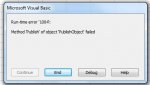
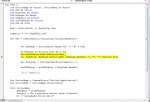
ilgili alanı düzenledim, fakat aynı hata devam ediyor. hata ekteki gibidir.
Ekli dosyalar
-
Sizlere daha iyi bir deneyim sunabilmek icin sitemizde çerez konumlandırmaktayız, web sitemizi kullanmaya devam ettiğinizde çerezler ile toplanan kişisel verileriniz Veri Politikamız / Bilgilendirmelerimizde belirtilen amaçlar ve yöntemlerle mevzuatına uygun olarak kullanılacaktır.