

• DİKKAT

    DOSYA İndirmek/Yüklemek için ÜCRETLİ ALTIN ÜYELİK Gereklidir!
    Altın Üyelik Hakkında Bilgi

ListBox1'deki kayıtları güncelleme

  • Konbuyu başlatan Konbuyu başlatan GAZOZ_55
  • Başlangıç tarihi Başlangıç tarihi
Katılım
25 Ağustos 2018
Mesajlar
64
Excel Vers. ve Dili
Excel 2016, Türkçe.
1538372729956.png

Merhaba arkadaşlar,
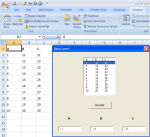
ListBox1'de herhangi bir satıra tıkladığımızda A, B ve C değerleri TextBox'lara doluyor. Bu TextBox'ların değerlerini değiştirip Güncelle butonuna tıkladığımız zaman bu yeni verilerin hem ListBox'ta hem de Excel'deki hücrelerde değiştiğini görmek mümkün mü?
 

Ekli dosyalar

Son düzenleme:
Merhaba bu gibi durumlarda hücrelerin indis değerini almak gerekir yani satır numaralarını önceden listbox nesnesine almak bu durumda RowSource yöntemi ile alınmak isteniyorsa veriler ya item yöntemiyle alınmalı (10 karekterden fazla olmaz) yada ikinci bir listbox nesnesine satır numaralarını almak gerekiyor.
 
İkinci bir ListBox nesnesine satır numaralarını alarak yapabilir misiniz?
 
Merhaba.
Bir fikir. İstenilen bu mu acaba?
TEXTBOXlara yazıldıkça.
Rich (BB code):
Private Sub TextBox1_Change()
Cells(ListBox1.ListIndex + 2, 1) = TextBox1
    ListBox1.RowSource = Range("A2:C" & Range("A" & Rows.Count).End(xlUp).Row).Address
End Sub

Private Sub TextBox2_Change()
Cells(ListBox1.ListIndex + 2, 2) = TextBox2
    ListBox1.RowSource = Range("A2:C" & Range("A" & Rows.Count).End(xlUp).Row).Address
End Sub

Private Sub TextBox3_Change()
Cells(ListBox1.ListIndex + 2, 3) = TextBox3
    ListBox1.RowSource = Range("A2:C" & Range("A" & Rows.Count).End(xlUp).Row).Address
End Sub
 
Düğme ile yapmak isterseniz; form üzerine 1 adet LABEL ekleyin
(ben Label4 dedim, bu nesnenin yazı rengini formun arkaplan rengiyle aynı yaparsanız veya başka bir nesnenin arkasına konumlandırısanız görünmez).
Kırmızı satırı, ListBox1_Click kod blokunda, End Sub satırından hemen öncesine ekleyin,
Düğmeye ait olarak da aşağıdaki kodu kullanın.

Rich (BB code):
Label4.Caption = ListBox1.ListIndex

Private Sub CommandButton1_Click()
For txt = 1 To 3
    Cells(Label4.Caption + 2, txt) = Controls("TextBox" & txt)
Next
    ListBox1.RowSource = Range("A2:C" & Range("A" & Rows.Count).End(xlUp).Row).Address
End Sub
 
Buyurun dosyanız ekte
userforma bir adet label4 ve listbox2 nesnesi ekleyiniz kodlar

Rich (BB code):
Private Sub CommandButton1_Click()

If Label4 > 0 Then
ListBox1.RowSource = ""
sat = Label4
Cells(sat, 1).Value = TextBox1.Value
Cells(sat, 2).Value = TextBox2.Value
Cells(sat, 3).Value = TextBox3.Value
ListBox1.ColumnCount = 3
ListBox1.RowSource = Range("A2:C" & Range("A" & Rows.Count).End(xlUp).Row).Address
MsgBox "işlem tamam"
End If
End Sub


Private Sub Listbox1_Click()
If ListBox1.ListIndex <> -1 Then
With ListBox1
TextBox1.Value = .List(.ListIndex, 0)
TextBox2.Value = .List(.ListIndex, 1)
TextBox3.Value = .List(.ListIndex, 2)
End With
Label4 = ListBox2.List(ListBox1.ListIndex)
End If

End Sub


Private Sub UserForm_Initialize()
ListBox1.ColumnCount = 3
ListBox1.RowSource = Range("A2:C" & Range("A" & Rows.Count).End(xlUp).Row).Address
For j = 2 To Cells(Rows.Count, 1).End(xlUp).Row
ListBox2.AddItem j
Next j
End Sub
 

Ekli dosyalar

Son düzenleme:
Merhaba.
Bir fikir. İstenilen bu mu acaba?
TEXTBOXlara yazıldıkça.
Rich (BB code):
Private Sub TextBox1_Change()
Cells(ListBox1.ListIndex + 2, 1) = TextBox1
    ListBox1.RowSource = Range("A2:C" & Range("A" & Rows.Count).End(xlUp).Row).Address
End Sub

Private Sub TextBox2_Change()
Cells(ListBox1.ListIndex + 2, 2) = TextBox2
    ListBox1.RowSource = Range("A2:C" & Range("A" & Rows.Count).End(xlUp).Row).Address
End Sub

Private Sub TextBox3_Change()
Cells(ListBox1.ListIndex + 2, 3) = TextBox3
    ListBox1.RowSource = Range("A2:C" & Range("A" & Rows.Count).End(xlUp).Row).Address
End Sub
Teşekkürler hocam, tam olarak istediğim buydu.
 
Buyurun dosyanız ekte
userforma bir adet label4 ve listbox2 nesnesi ekleyiniz kodlar

Kod:
Private Sub CommandButton1_Click()

If Label4 > 0 Then
ListBox1.RowSource = ""
sat = Label4

Cells(sat, 1).Value = TextBox1.Value
Cells(sat, 2).Value = TextBox2.Value
Cells(sat, 3).Value = TextBox3.Value
ListBox1.ColumnCount = 3
ListBox1.RowSource = Range("A2:C" & Range("A" & Rows.Count).End(xlUp).Row).Address
MsgBox "işlem tamam"
End If
End Sub

Private Sub Listbox1_Click()
    If ListBox1.ListIndex <> -1 Then
        With ListBox1
            TextBox1.Value = .List(.ListIndex, 0)
            TextBox2.Value = .List(.ListIndex, 1)
            TextBox3.Value = .List(.ListIndex, 2)
        End With
       
        Label4 = ListBox2.List(ListBox1.ListIndex)
    End If
   
End Sub


Private Sub UserForm_Initialize()


    ListBox1.ColumnCount = 3
    ListBox1.RowSource = Range("A2:C" & Range("A" & Rows.Count).End(xlUp).Row).Address
   
    For j = 2 To Cells(Rows.Count, 1).End(xlUp).Row
    ListBox2.AddItem j
    Next j

End Sub
Size de teşekkür ederim Halit bey. Bu da işimi görüyor.
 
Düğme ile yapmak isterseniz; form üzerine 1 adet LABEL ekleyin
(ben Label4 dedim, bu nesnenin yazı rengini formun arkaplan rengiyle aynı yaparsanız veya başka bir nesnenin arkasına konumlandırısanız görünmez).
Kırmızı satırı, ListBox1_Click kod blokunda, End Sub satırından hemen öncesine ekleyin,
Düğmeye ait olarak da aşağıdaki kodu kullanın.

Rich (BB code):
Label4.Caption = ListBox1.ListIndex

Private Sub CommandButton1_Click()
For txt = 1 To 3
    Cells(Label4.Caption + 2, txt) = Controls("TextBox" & txt)
Next
    ListBox1.RowSource = Range("A2:C" & Range("A" & Rows.Count).End(xlUp).Row).Address
End Sub
Teşekkürler.
 
RowSource yöntemiyle textbox nesnelerinden hücrelere düzeltme yapamazsınız.
RowSource özelliğinin içini boşaltmak gerek
 
Yanlış anlamayın ama; kullandığınız OK. kısaltması yerine Türkçe bir kelime kullanmanızınn daha yerinde olacağını söylemeliyim.

Kolay gelsin, önemli olan ihtiyacın görülmesi.
İyi çalışmalar dilerim.
.
 
6 ve 10 nolu mesajlarımda yazdığım kod ve mesajlarıma açıklık getirmek için sizin dosyanızdaki verileri 5. satırdan başlayarak userforma aldırdım diğer taraftan benim kullandığım listboxın Column özelliği ile ilgili userform ekledim irdeleyiniz.
 

Ekli dosyalar

6 ve 10 nolu mesajlarımda yazdığım kod ve mesajlarıma açıklık getirmek için sizin dosyanızdaki verileri 5. satırdan başlayarak userforma aldırdım diğer taraftan benim kullandığım listboxın Column özelliği ile ilgili userform ekledim irdeleyiniz.
Teşekkürler.
 
Geri
Üst