



- Katılım
- 12 Eylül 2004
- Mesajlar
- 885
- Excel Vers. ve Dili
- Excel 2019 Türkçe (Ev)
Excel 2013 Türkçe (Okul)
Herkese merhaba,
Bu kodlar ile aşağıdaki ekteki Userform üzerinde bulunan optionbuttonlar ile veri kaydediyorum.İstediğim ComboBox2 seçimini de ilgili sayfaya (B Sütununa aktarmak).Bu kodda veri aktarımı 4.satır 2.sütundan sonra başlıyor, yeni durumda ise 4. satır ve 1. sütundan itibaren seçili öğrenci adı ile optionbuttonlardaki verilerin aktarılmasını istiyorum.
Kod:
Private Sub CommandButton1_Click()
If ComboBox2 = "" Or ComboBox1 = "" Then Exit Sub
Set S = Sheets(ComboBox1.Value)
kişi = S.Cells(ComboBox2.ListIndex + 4, 2).Value
kişisat = ComboBox2.ListIndex + 4
If ComboBox1.Value = "DAVRANIŞ" Then
    sutsayısı = 42
Else
    sutsayısı = WorksheetFunction.Match("TOPLAM", S.Range("3:3"), 0) - 3
End If

For lbl = 1 To sutsayısı
    a = (lbl - 1) * 3 + 1: aa = (lbl - 1) * 3 + 3
            If UserForm20.Controls("OptionButton" & a) = False And _
            UserForm20.Controls("OptionButton" & a + 1) = False And _
            UserForm20.Controls("OptionButton" & a + 2) = False Then

            cevap = 0
        Else
            With UserForm20
                If .Controls("OptionButton" & a) = True Then cevap = 1
                If .Controls("OptionButton" & a + 1) = True Then cevap = 2
                If .Controls("OptionButton" & a + 2) = True Then cevap = 3
            End With
        End If
S.Cells(kişisat, lbl + 2) = cevap
Next
ComboBox2 = ""
For opt = 1 To sutsayısı * 3

    With UserForm20

        .Controls("Optionbutton" & opt) = False
    End With
Next

MsgBox "Seçilen " & ComboBox1.Value & " dersi için;" & vbLf & _
        kişi & " satırına notlar kaydedildi." & vbLf & vbLf & _
        "Yeni bir öğrenci seçerek işleme devam edebilirsiniz.."
End Sub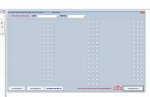
 ))
))