

• DİKKAT

    DOSYA İndirmek/Yüklemek için ÜCRETLİ ALTIN ÜYELİK Gereklidir!
    Altın Üyelik Hakkında Bilgi

EXCELL'i REHBERE DÖNÜŞTÜRMEK (excell'den .vcf'ye)

Katılım
11 Mayıs 2016
Mesajlar
34
Excel Vers. ve Dili
Türkçe
Elimde resimdeki gibi birkaç yüz kişilik excell rehberi var ve sürekli güncelleniyor. Bu rehberi android uygulamaları kullanmadan telefona aktarmak istiyorum. Bunun için vcard (.vcf) formatı işimi kolaylaştırıyor doğal olarak.

Bu rehberi .vcf biçimine, Türkçe karakter sorunu yaşanmadan nasıl dönüştürebilirim veya aktarabilirim excell ortamında?
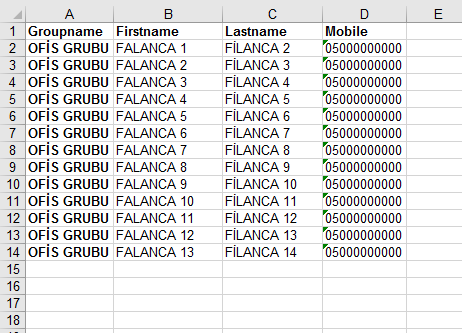
LZ6BX1.png
 
Merhaba,
Bende örnek bir çalışma var ama, kodlarına ulaşamıyorum. Bir siteden bulmuştum. Ama iş görüyor. Saygılar..

Kod:
https://upterabit.com/Uw1/Excel_Contacts.xlsm
 

Ekli dosyalar

Merhaba,
Bende örnek bir çalışma var ama, kodlarına ulaşamıyorum. Bir siteden bulmuştum. Ama iş görüyor. Saygılar..

Kod:
https://upterabit.com/Uw1/Excel_Contacts.xlsm

Bu ücretli dağıtılan kısıtlı bir çalışma. Kaynak kodları da şifreli olduğu için düzenleme ya da yapılamıyor kodlar üzerinde. Doğal olarak işimizi görmez.

Yardımınıza Teşekkür ederim.


Soru güncel arkadaşlar
 
Çalışmanızı inceledim oldukça başarılı ancak gruplandırma seçeneği göremedim. Aşağıdaki sizin Makroya ne ekleyelim?
Kişi gruplarını Gruplama yani kategorileme yapması lazım mutlaka.

Kod:
Dim ensonsatir, ensonsutun As Long

Dim xbegin, xver, xn, xfn, xtelcell, xtelwork, xtelfax, xemail, xadres, xorg, xtitle As String
Dim xurl, xend As String

Sub ensonsatirne()
  If WorksheetFunction.CountA(Cells) > 0 Then
     ensonsatir = Cells.Find(What:="*", After:=[A1], SearchOrder:=xlByRows, SearchDirection:=xlPrevious).Row
     ensonsutun = Cells.Find(What:="*", After:=[A1], SearchOrder:=xlByColumns, SearchDirection:=xlPrevious).Column
  Else
     ensonsatir = Rows.Count
     ensonsutun = Columns.Count
  End If
  
End Sub

Sub rehber_menu()
  MsgBox ("İşlemi tamamlandı mesajı alana kadar bekleyiniz!")
  xver = Cells(4, 4).Value
  Application.ScreenUpdating = False
  Call Rehber_Hazirla
  Call vcf_dosya_olustur
  Application.ScreenUpdating = True
  MsgBox ("Rehber hazırlama işlemi tamamlandı.")
  
End Sub

Sub Rehber_Hazirla()
  Sheets("Rehber").Select
  Range("A10:A65000").Select
  Selection.ClearContents
  Range("A10").Select
    
satir = 0
xbegin = "BEGIN:VCARD"
'xver = "VERSION:2.1"
xn = "N;CHARSET=UTF-8;ENCODING=QUOTED-PRINTABLE:;"
xfn = "FN;CHARSET=UTF-8;ENCODING=QUOTED-PRINTABLE:"
xtelcell = "TEL;CELL:"
xtelwork = "TEL;WORK:"
xtelfax = "TEL;WORK;FAX;PREF:"
xemail = "EMAIL;PREF:"
xadres = "ADR;WORK;CHARSET=UTF-8;ENCODING=QUOTED-PRINTABLE:;;"
xorg = "ORG;CHARSET=UTF-8;ENCODING=QUOTED-PRINTABLE:"
xtitile = "TITLE;CHARSET=UTF-8;ENCODING=QUOTED-PRINTABLE:"
xurl = "URL:"
xend = "End:VCARD"

satir = 0
Sheets("Liste").Select
Call ensonsatirne
sonsatirliste = ensonsatir
For listei = 2 To sonsatirliste
  Sheets("Rehber").Select
  satir = satir + 1
  Cells(satir, 1).Value = xbegin
  satir = satir + 1
  Cells(satir, 1).Value = xver
  
For listekolon = 1 To 12
  
  Sheets("Liste").Select
  cumle = Cells(listei, listekolon).Value
  If listekolon = 3 Or listekolon = 4 Or listekolon = 5 Or listekolon = 6 Then GoTo son
  kelime = ""
  For i = 1 To Len(cumle)
     harf = Mid(cumle, i, 1)
     Sheets("Kod").Select
     Call ensonsatirne
     sonsatirkod = ensonsatir
     For j = 1 To sonsatirkod
        oku = Cells(j, 2).Text
        If harf = oku Then
           kelime = kelime & Cells(j, 3).Value
        End If
     Next j
     Sheets("Kod").Select
 
  Next i
son:
  Sheets("Rehber").Select

  If listekolon = 1 Then
    satir = satir + 1
    Cells(satir, 1).Value = xn & kelime
  End If
  If listekolon = 2 Then
    satir = satir + 1
    Cells(satir, 1).Value = xfn & kelime
  End If
  
  If listekolon = 3 Then
    satir = satir + 1
    Cells(satir, 1).Value = xtelcell & cumle
  End If
  
  If listekolon = 4 Then
    satir = satir + 1
    Cells(satir, 1).Value = xtelwork & cumle
  End If
  
  If listekolon = 5 Then
    satir = satir + 1
    Cells(satir, 1).Value = xtelfax & cumle
  End If
  
  If listekolon = 6 Then
    satir = satir + 1
    Cells(satir, 1).Value = xemail & cumle
  End If
  
  If listekolon = 7 Then
    satir = satir + 1
    Cells(satir, 1).Value = xadres & kelime
  End If
    
  If listekolon = 8 Then
    satir = satir + 1
    Cells(satir, 1).Value = xorg & kelime
  End If
     
  If listekolon = 9 Then
    satir = satir + 1
    Cells(satir, 1).Value = xtitile & kelime
  End If
    
  If listekolon = 10 Then
    satir = satir + 1
    Cells(satir, 1).Value = xurl & cumle
  End If

  Next listekolon
    satir = satir + 1
    Cells(satir, 1).Value = xend
  Next listei
  
End Sub

Sub vcf_dosya_olustur()
    Dim i As Integer
    yol = ActiveWorkbook.Path & "\"
    
    Open yol & "rehberiniz.vcf" For Output As #1
    Call ensonsatirne
    For i = 1 To ensonsatir
      Print #1, Cells(i, 1).Value
    Next i
    Close
End Sub
 
Çalışmanızı inceledim oldukça başarılı ancak gruplandırma seçeneği göremedim. Aşağıdaki sizin Makroya ne ekleyelim?
Kişi gruplarını Gruplama yani kategorileme yapması lazım mutlaka.

Bu şekide bir talep hiç gelmemişti. Farklı bir gözle bakmak lazım demekki.
Ekleyince bilgi veririm
 
Çalışmanızı inceledim oldukça başarılı ancak gruplandırma seçeneği göremedim. Aşağıdaki sizin Makroya ne ekleyelim?
Kişi gruplarını Gruplama yani kategorileme yapması lazım mutlaka.


hocam maksimum kaç kayıt yapabiliyor?
100 bin tane numarayı tek seferde vcf haline getirebilir mi?
 
Çalışmanızı inceledim oldukça başarılı ancak gruplandırma seçeneği göremedim. Aşağıdaki sizin Makroya ne ekleyelim?
Kişi gruplarını Gruplama yani kategorileme yapması lazım mutlaka.

Kod:
Dim ensonsatir, ensonsutun As Long

Dim xbegin, xver, xn, xfn, xtelcell, xtelwork, xtelfax, xemail, xadres, xorg, xtitle As String
Dim xurl, xend As String

Sub ensonsatirne()
  If WorksheetFunction.CountA(Cells) > 0 Then
     ensonsatir = Cells.Find(What:="*", After:=[A1], SearchOrder:=xlByRows, SearchDirection:=xlPrevious).Row
     ensonsutun = Cells.Find(What:="*", After:=[A1], SearchOrder:=xlByColumns, SearchDirection:=xlPrevious).Column
  Else
     ensonsatir = Rows.Count
     ensonsutun = Columns.Count
  End If

End Sub

Sub rehber_menu()
  MsgBox ("İşlemi tamamlandı mesajı alana kadar bekleyiniz!")
  xver = Cells(4, 4).Value
  Application.ScreenUpdating = False
  Call Rehber_Hazirla
  Call vcf_dosya_olustur
  Application.ScreenUpdating = True
  MsgBox ("Rehber hazırlama işlemi tamamlandı.")

End Sub

Sub Rehber_Hazirla()
  Sheets("Rehber").Select
  Range("A10:A65000").Select
  Selection.ClearContents
  Range("A10").Select
  
satir = 0
xbegin = "BEGIN:VCARD"
'xver = "VERSION:2.1"
xn = "N;CHARSET=UTF-8;ENCODING=QUOTED-PRINTABLE:;"
xfn = "FN;CHARSET=UTF-8;ENCODING=QUOTED-PRINTABLE:"
xtelcell = "TEL;CELL:"
xtelwork = "TEL;WORK:"
xtelfax = "TEL;WORK;FAX;PREF:"
xemail = "EMAIL;PREF:"
xadres = "ADR;WORK;CHARSET=UTF-8;ENCODING=QUOTED-PRINTABLE:;;"
xorg = "ORG;CHARSET=UTF-8;ENCODING=QUOTED-PRINTABLE:"
xtitile = "TITLE;CHARSET=UTF-8;ENCODING=QUOTED-PRINTABLE:"
xurl = "URL:"
xend = "End:VCARD"

satir = 0
Sheets("Liste").Select
Call ensonsatirne
sonsatirliste = ensonsatir
For listei = 2 To sonsatirliste
  Sheets("Rehber").Select
  satir = satir + 1
  Cells(satir, 1).Value = xbegin
  satir = satir + 1
  Cells(satir, 1).Value = xver

For listekolon = 1 To 12

  Sheets("Liste").Select
  cumle = Cells(listei, listekolon).Value
  If listekolon = 3 Or listekolon = 4 Or listekolon = 5 Or listekolon = 6 Then GoTo son
  kelime = ""
  For i = 1 To Len(cumle)
     harf = Mid(cumle, i, 1)
     Sheets("Kod").Select
     Call ensonsatirne
     sonsatirkod = ensonsatir
     For j = 1 To sonsatirkod
        oku = Cells(j, 2).Text
        If harf = oku Then
           kelime = kelime & Cells(j, 3).Value
        End If
     Next j
     Sheets("Kod").Select

  Next i
son:
  Sheets("Rehber").Select

  If listekolon = 1 Then
    satir = satir + 1
    Cells(satir, 1).Value = xn & kelime
  End If
  If listekolon = 2 Then
    satir = satir + 1
    Cells(satir, 1).Value = xfn & kelime
  End If

  If listekolon = 3 Then
    satir = satir + 1
    Cells(satir, 1).Value = xtelcell & cumle
  End If

  If listekolon = 4 Then
    satir = satir + 1
    Cells(satir, 1).Value = xtelwork & cumle
  End If

  If listekolon = 5 Then
    satir = satir + 1
    Cells(satir, 1).Value = xtelfax & cumle
  End If

  If listekolon = 6 Then
    satir = satir + 1
    Cells(satir, 1).Value = xemail & cumle
  End If

  If listekolon = 7 Then
    satir = satir + 1
    Cells(satir, 1).Value = xadres & kelime
  End If
  
  If listekolon = 8 Then
    satir = satir + 1
    Cells(satir, 1).Value = xorg & kelime
  End If
   
  If listekolon = 9 Then
    satir = satir + 1
    Cells(satir, 1).Value = xtitile & kelime
  End If
  
  If listekolon = 10 Then
    satir = satir + 1
    Cells(satir, 1).Value = xurl & cumle
  End If

  Next listekolon
    satir = satir + 1
    Cells(satir, 1).Value = xend
  Next listei

End Sub

Sub vcf_dosya_olustur()
    Dim i As Integer
    yol = ActiveWorkbook.Path & "\"
  
    Open yol & "rehberiniz.vcf" For Output As #1
    Call ensonsatirne
    For i = 1 To ensonsatir
      Print #1, Cells(i, 1).Value
    Next i
    Close
End Sub


Kodun Excele aktarılmış şeklinde varsa paylaşırsanız memnun oluruz
 
Merhaba. iOS için türkçe karakter sorunu olmayacak şekilde isim, soyisim, telefon numarası şeklinde vcf oluşturmak istiyorum. Mevcuttakilerin hepsini denedim, Türkçe karakter sorunu var. 15 nolu mesajdaki ekte ise isim soyisim tek sütunda yazılmış. Yardımcı olabilir misiniz?
 
Geri
Üst