- Katılım
- 23 Mayıs 2011
- Mesajlar
- 5,509
- Excel Vers. ve Dili
- Microsoft 365 TR-EN
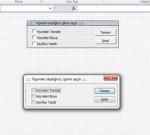
Diyalog sayfası ile menü (form) oluşturma konusuna örnek. Önce olmasını istediğiniz formun tasarımını yapıp sonra da seçime göre istediğiniz makroyu çalıştırabilirsiniz.
Faydalı olması dileğiyle.. k::
k::
"
Faydalı olması dileğiyle..
k::
Kod:
Sub Dialog_Sayfası_ile_Menü_Oluşturma()
    Dim Rky As Integer, Dial As DialogSheet, Check As CheckBox
    Application.ScreenUpdating = False
    Set Dial = ActiveWorkbook.DialogSheets.Add:  Rky = 40
    Dial.CheckBoxes.Add 78, 40, 150, 16.5: Dial.CheckBoxes(1).Text = "Hücreleri Temizle"
    Dial.CheckBoxes.Add 78, Rky + 15, 150, 16.5: Dial.CheckBoxes(2).Text = "Hücreleri Boya"
    Dial.CheckBoxes.Add 78, Rky + 30, 150, 16.5: Dial.CheckBoxes(3).Text = "Sayfayı Yazdır"
    Dial.Buttons.Left = 240
    With Dial.DialogFrame
        .Height = Application.Max(68, Dial.DialogFrame.Top + Rky - 34)
        .Width = 230
        .Caption = "..::.. Yapmak istediğiniz işlemi seçin ..::.."
    End With
    Dial.Buttons("Button 2").BringToFront
    Dial.Buttons("Button 3").BringToFront
    Sayfa1.Select
    Application.ScreenUpdating = True
    If Dial.Show Then
        For Each Check In Dial.CheckBoxes
            If Check.Value = xlOn Then
                Select Case Check.Name
                    Case Is = "Check Box 4"
                        MsgBox "..:... Hücreler Temizlendi ..::..", _
                        vbInformation + vbInformation, "Excel"
                    Case Is = "Check Box 5"
                        MsgBox "..:... Hücreler Boyandı ..::..", _
                        vbInformation + vbInformation, "Excel"
                    Case Is = "Check Box 6"
                        MsgBox "..:... Sayfa Yazdırıldı ..::..", _
                        vbInformation + vbInformation, "Excel"
                End Select
            End If
        Next Check
    End If
    Application.DisplayAlerts = False
    Dial.Delete: Sayfa1.Activate
End Sub