



-
DİKKAT DOSYA İndirmek/Yüklemek için ÜCRETLİ ALTIN ÜYELİK Gereklidir!
Altın Üyelik Hakkında Bilgi
Çok eski bir web tarayıcısı kullanıyorsunuz. Bu veya diğer siteleri görüntülemekte sorunlar yaşayabilirsiniz..
Tarayıcınızı güncellemeli veya alternatif bir tarayıcı kullanmalısınız.
Tarayıcınızı güncellemeli veya alternatif bir tarayıcı kullanmalısınız.
A1 hücresinin kopyalanıp veri girilen hücreye yapıştırılması
- Konbuyu başlatan DMR 7
- Başlangıç tarihi

- Katılım
- 23 Mayıs 2011
- Mesajlar
- 5,509
- Excel Vers. ve Dili
- Microsoft 365 TR-EN
Bu kodları sayfanın kod penceresine yapıştırarak kullanabilirsiniz..
Kod:
[SIZE="2"]Private Sub Worksheet_Change(ByVal Target As Range)
    If Target.Column = 1 And Target.Row > 1 Then
        Application.EnableEvents = False
        Range("A1").Copy Target
        Application.EnableEvents = True
    End If
End Sub[/SIZE]- Katılım
- 4 Haziran 2005
- Mesajlar
- 15,622
- Excel Vers. ve Dili
- Ofis 365 Türkçe
Merhaba,
Bu isteği pek mantıklı bulmadım, nerede kullanılabilir ki? Merak ettim doğrusu.
A sütununda bir değişiklik yapıldığında A1 hücresini oraya kopyalamaktansa A sütununda her hangi bir hücreye çift tıklamakla da (A1 hücresi hariç) A1 hücresini kopyalayabilirsiniz.
Bu isteği pek mantıklı bulmadım, nerede kullanılabilir ki? Merak ettim doğrusu.
A sütununda bir değişiklik yapıldığında A1 hücresini oraya kopyalamaktansa A sütununda her hangi bir hücreye çift tıklamakla da (A1 hücresi hariç) A1 hücresini kopyalayabilirsiniz.
Kod:
Private Sub Worksheet_BeforeDoubleClick(ByVal Target As Range, Cancel As Boolean)

    If Intersect(Target, [A:A]) And Target.Row = 1 Then Exit Sub
    Target.Value = Range("A1")

End Sub
- Katılım
- 14 Eylül 2017
- Mesajlar
- 129
- Excel Vers. ve Dili
- 2016 / Tr
Merhaba,
Bu isteği pek mantıklı bulmadım, nerede kullanılabilir ki? Merak ettim doğrusu.
A sütununda bir değişiklik yapıldığında A1 hücresini oraya kopyalamaktansa A sütununda her hangi bir hücreye çift tıklamakla da (A1 hücresi hariç) A1 hücresini kopyalayabilirsiniz.
Kod:Private Sub Worksheet_BeforeDoubleClick(ByVal Target As Range, Cancel As Boolean) If Intersect(Target, [A:A]) And Target.Row = 1 Then Exit Sub Target.Value = Range("A1") End Sub
hocam yardımınız için teşekkür ederim ancak mantıklı bulmamak için önce bi sorunu anlamanız gerekirdi. şirkette ürün ağaçlarının kademeleriyle uğraşıyorum. bazen öyle bir durum oluyor ki 50 satırın hepsinin kademesinin birer tane kaydırılıp boyanması diğerlerinin boyalarının ve hücre içeriğinin silinmesi gerekiyor. ben a-b-c-d-e-f----- sütunlarının ilk satırlarına istediğim ağaç seviyesini yerleştirdim. tüm ağacı komple kesip bir sağa yapıştırdığımda otomatik olarak tüm ağaç seviyeleri taşınmış olacak. şirketteki tüm ürünlerin ağaçlarının kalem kalem bu şekilde revizyona uğrayacağını ve defalarca değişiklik yapılacağını varsayar isek, bu basite indirgediğiniz 2 satırlık kod bana saatler kazandıracak.
yine mantıklı bulmazsanız daha detaylı açıklayabilirim.
saygılarımla
- Katılım
- 14 Eylül 2017
- Mesajlar
- 129
- Excel Vers. ve Dili
- 2016 / Tr
Bu kodları sayfanın kod penceresine yapıştırarak kullanabilirsiniz..
Kod:[SIZE="2"]Private Sub Worksheet_Change(ByVal Target As Range) If Target.Column = 1 And Target.Row > 1 Then Application.EnableEvents = False Range("A1").Copy Target Application.EnableEvents = True End If End Sub[/SIZE]
teşekkür ederim deneyeceğim
- Katılım
- 14 Eylül 2017
- Mesajlar
- 129
- Excel Vers. ve Dili
- 2016 / Tr
Bu kodları sayfanın kod penceresine yapıştırarak kullanabilirsiniz..
Kod:[SIZE="2"]Private Sub Worksheet_Change(ByVal Target As Range) If Target.Column = 1 And Target.Row > 1 Then Application.EnableEvents = False Range("A1").Copy Target Application.EnableEvents = True End If End Sub[/SIZE]
denedim hocam. işe yarıyor ancak bi sıkıntı oldu. ben oraya herhangi bir veri girersem a1 hücresinin copy paste olmasını istiyorum. o hücreden aynı zamanda veri silip hücrenin boyasını kaldırabilmem de gerekiyor. hücrede hiçbir şey yapmadan enter'a basmak bile orayı direk kopyalıyor. geri nasıl silebilirim ?
- Katılım
- 14 Eylül 2017
- Mesajlar
- 129
- Excel Vers. ve Dili
- 2016 / Tr
Merhaba,
Bu isteği pek mantıklı bulmadım, nerede kullanılabilir ki? Merak ettim doğrusu.
A sütununda bir değişiklik yapıldığında A1 hücresini oraya kopyalamaktansa A sütununda her hangi bir hücreye çift tıklamakla da (A1 hücresi hariç) A1 hücresini kopyalayabilirsiniz.
Kod:Private Sub Worksheet_BeforeDoubleClick(ByVal Target As Range, Cancel As Boolean) If Intersect(Target, [A:A]) And Target.Row = 1 Then Exit Sub Target.Value = Range("A1") End Sub
sizin kodlarınızı çalıştıramadım
- Katılım
- 14 Eylül 2017
- Mesajlar
- 129
- Excel Vers. ve Dili
- 2016 / Tr
http://s7.dosya.tc/server/6c0yim/Deneme.zip.html
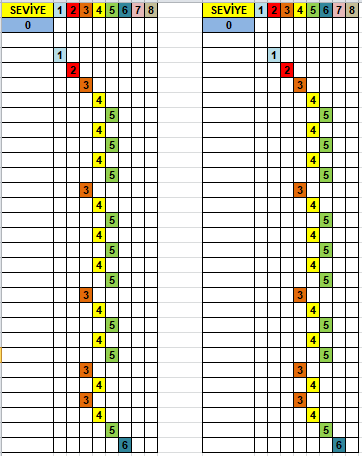
anlatmak istediğim şu idi. soldaki bloğu olduğu gibi bir sütun sağa kaydırdım. hepsinin numarası birer artıp, renkleri ilk satırdaki gibi olmalı. istediğim zaman silmem gerekiyor.
anlatmak istediğim şu idi. soldaki bloğu olduğu gibi bir sütun sağa kaydırdım. hepsinin numarası birer artıp, renkleri ilk satırdaki gibi olmalı. istediğim zaman silmem gerekiyor.
Son düzenleme:
Merhaba
Ek dosyadaki gibi denermisiniz?
http://s7.dosya.tc/server/o9s9zr/Deneme.zip.html
Ek dosyadaki gibi denermisiniz?
http://s7.dosya.tc/server/o9s9zr/Deneme.zip.html
Kod:
[SIZE="2"]Private Sub Worksheet_Change(ByVal Target As Range)
If Selection.Cells.Count <> 1 Then Exit Sub
If Target.Value = "" Then Exit Sub
If Intersect(Target, [B:I]) Is Nothing Then Exit Sub
Application.EnableEvents = False
If WorksheetFunction.CountIf(Range("B" & Target.Row & ":I" & Target.Row), "") < 7 Then
MsgBox "Bu satırda zaten veri var"
Target.Value = ""
Application.EnableEvents = True
Exit Sub
End If
[COLOR="Red"]Range("B" & Target.Row & ":I" & Target.Row).Clear[/COLOR]
Cells(1, Target.Column).Copy Target
Application.EnableEvents = True
End Sub[/SIZE]
Son düzenleme:
- Katılım
- 14 Eylül 2017
- Mesajlar
- 129
- Excel Vers. ve Dili
- 2016 / Tr
Merhaba
Ek dosyadaki gibi denermisiniz?
http://s7.dosya.tc/server/o9s9zr/Deneme.zip.html
Kod:[SIZE="2"]Private Sub Worksheet_Change(ByVal Target As Range) If Selection.Cells.Count <> 1 Then Exit Sub If Target.Value = "" Then Exit Sub If Intersect(Target, [B:I]) Is Nothing Then Exit Sub Application.EnableEvents = False If WorksheetFunction.CountIf(Range("B" & Target.Row & ":I" & Target.Row), "") < 7 Then MsgBox "Bu satırda zaten veri var" Target.Value = "" Application.EnableEvents = True Exit Sub End If Range("B" & Target.Row & ":I" & Target.Row).ClearFormats Cells(1, Target.Column).Copy Target Application.EnableEvents = True End Sub[/SIZE]
Sayın Plint, gerçekten çok teşekkür ederim. o satıra yeni bir veri girildiğinde istediğim işlemi yapıyor.
2 küçük şey daha istesem bununla ilgili;
İlki: Örnek exceldeki tüm satırları kesip 2 sağa veya 1 sola yapıştırsak ve yapıştırdığımız sütunların baş hücrelerine dönüşseler olur mu ?
kesip veya kopyalayıp yapıştırdığımızda olmuyor.
İkincisi: Herhangi bir satırda bir rakam girildiğinde o hücre hariç kalan 7 hücrenin çerçeveleri siliniyor.
Bu ikisi düzeltilebilir mi?
- Katılım
- 14 Eylül 2017
- Mesajlar
- 129
- Excel Vers. ve Dili
- 2016 / Tr
Merhaba
Çerçevelerin silinmemesi isteğiniz için; yukarıdaki (9.mesajdaki) değişen kırmızı bölüm gibi kullanın.
Birinci isteğiniz:
"B:I" aralığında çalışan kodlar mesela "L:I" aralığındada çalışsın istiyorsunuz?
9. mesajdaki gibi kullandım hocam. amacım çercevelerin silinmemesi değil. o satırın biçiminin silinip, yukarıdaki kutuyu kopyaladıktan sonra, silinen çerçevelerin tekrar getirilmesi. neyse bu madde çok mühim değil manuel yapabilirim.

ilk istediğim. aralığın değişmesi değil hocam. yine "B:I" aralığında hali hazırda girilmiş numaraları kopyalayıp bir sağa yapıştırmak. örnek veriyorum. "B4:G30" aralığını komple seçip, kestikten sonra "C4:H30" a yapıştırmak istiyorum. bunu yaptığımda numaralar değişmiyor biçimleriyle. tek tek tüm kutulara birşey girip enterlamam gerekiyor.
ilginize teşekkür ederim
Ek dosyada buna göre ekleme yapmaya çalıştım, bakarsınızo satırın biçiminin silinip, yukarıdaki kutuyu kopyaladıktan sonra, silinen çerçevelerin tekrar getirilmesi.
Bu anlatımınıza göre ek dosyayı deneyinizörnek veriyorum. "B4:G30" aralığını komple seçip, kestikten sonra "C4:H30" a yapıştırmak istiyorum. bunu yaptığımda numaralar değişmiyor biçimleriyle. tek tek tüm kutulara birşey girip enterlamam gerekiyor.
"B4:G30" aralığını kesip/kopyalayıp,yapıştıracağınız aralığı seçip; "CTRL+b" ile yapıştırın.
Kopyaladıktan sonra yapıştırılacak bölümde tek hücre seçip yapıştırmak için aşağıdaki "kes_kopya" makrosunda kırmızı bölümleri silip deneyin.
(eğer bu kombinasyonun sakıncası varsa buton veya düğme ile yaparız)
http://s3.dosya.tc/server13/wwtwqw/Deneme1.zip.html
Kodlar
"Buçalışmakitabı"(thisworkbook) kod sayfası:
Kod:
[SIZE="2"]Private Sub Workbook_BeforeClose(Cancel As Boolean)
Application.OnKey "^{b}"
End Sub

Private Sub Workbook_Open()
Application.OnKey "^{b}", "kes_kopya"
End Sub[/SIZE]
Kod:
[SIZE="2"]Sub kes_kopya()
[COLOR="Red"]If Selection.Cells.Count > 1 Then[/COLOR]
If Intersect(ActiveCell, [B:I]) Is Nothing Or Application.CutCopyMode = 0 Then Exit Sub
Selection.PasteSpecial
For Each j In Selection.Cells
If j.Row = 1 Then MsgBox "Kes-kopyala 2.satırdan itibaren olmalıdır": Application.CutCopyMode = False: Exit Sub
If j.Value <> "" Then
x = j.Address
With Range("B" & j.Row & ":I" & j.Row)
.ClearFormats
.Value = ""
End With
Cells(1, j.Column).Copy Range(x)
Range("B" & j.Row & ":I" & j.Row).Borders.Weight = xlThin
End If
Next
[COLOR="Red"]End If[/COLOR]
End Sub[/SIZE]
Kod:
[SIZE="2"]Private Sub Worksheet_Change(ByVal Target As Range)
If Selection.Cells.Count <> 1 Then Exit Sub
If Target.Value = "" Then Exit Sub
If Intersect(Target, [B:I]) Is Nothing Then Exit Sub
Application.EnableEvents = False
If WorksheetFunction.CountIf(Range("B" & Target.Row & ":I" & Target.Row), "") < 7 Then
MsgBox "Bu satırda zaten veri var"
Target.Value = ""
Application.EnableEvents = True
Exit Sub
End If
[COLOR="Blue"]With Range("B" & Target.Row & ":I" & Target.Row)
.ClearFormats
.Value = ""
End With
Range("A" & Target.Row & ":I" & Target.Row).Borders.Weight = xlThin[/COLOR]
Cells(1, Target.Column).Copy Target
Application.EnableEvents = True
End Sub
[/SIZE]- Katılım
- 14 Eylül 2017
- Mesajlar
- 129
- Excel Vers. ve Dili
- 2016 / Tr
"B4:G30" aralığını kesip/kopyalayıp,yapıştıracağınız aralığı seçip; "CTRL+b" ile yapıştırın.
Kopyaladıktan sonra yapıştırılacak bölümde tek hücre seçip yapıştırmak için aşağıdaki "kes_kopya" makrosunda kırmızı bölümleri silip deneyin.
(eğer bu kombinasyonun sakıncası varsa buton veya düğme ile yaparız)
hocam çerçeve olayı olmuş. ama sanırım diğer kısmı çalıştırmayı ben beceremedim. makroda belirttiğin kırmızı satırları sildim. hücreleri kesip tek bir hücreye ctrl+b ile yapıştırmak istedim ve aşağıdaki debug uyarısı geldi ekrana. neyi yanlış yapıyorum ki?
bu arada tekrar tekrar teşekkür ederim emeğiniz için.

Son düzenleme:
- Katılım
- 14 Eylül 2017
- Mesajlar
- 129
- Excel Vers. ve Dili
- 2016 / Tr
Merhaba
"Kes-yapıştırda" tek hücreyi denememiştim
Hata veren satırda:
"Selection pastespecial" yerineKod:activesheet.paste
Merhabalar hocam, allah razı olsun mükemmel olmuş
)
- Katılım
- 14 Eylül 2017
- Mesajlar
- 129
- Excel Vers. ve Dili
- 2016 / Tr
Merhaba
"Kes-yapıştırda" tek hücreyi denememiştim
Hata veren satırda:
"Selection pastespecial" yerineKod:activesheet.paste
hocam bu kodlar, herhangi bir geri dönüş yapmak istediğimizde "ctrl+z" ye izin verebilir mi?
Ek dosyayı deneyin, geri alma işleminde hata ile karşılaşırsanız, variant yerinehocam bu kodlar, herhangi bir geri dönüş yapmak istediğimizde "ctrl+z" ye izin verebilir mi?
bir yardımcı sütun veya sayfa ile yaparız
http://s3.dosya.tc/server13/9nmcsy/Deneme2.zip.html
Kod:
[SIZE="2"]Private Sub Worksheet_BeforeRightClick(ByVal Target As Range, Cancel As Boolean)
If Application.CutCopyMode = 0 Then Call deg
End Sub
ilgili sayfa kodları
Private Sub Worksheet_Change(ByVal Target As Range)
If mr <> Empty Then Exit Sub
If Selection.Cells.Count <> 1 Then Exit Sub
If Intersect(Target, [B:I]) Is Nothing Then Exit Sub
If Target.Value = "" Then Exit Sub
Application.EnableEvents = False
If WorksheetFunction.CountIf(Range("B" & Target.Row & ":I" & Target.Row), "") < 7 Then
MsgBox "Bu satırda zaten veri var"
Target.Value = ""
Application.EnableEvents = True
Exit Sub
End If
With Range("B" & Target.Row & ":I" & Target.Row)
.ClearFormats
.Value = ""
End With
Range("A" & Target.Row & ":I" & Target.Row).Borders.Weight = xlThin
Cells(1, Target.Column).Copy Target
Application.EnableEvents = True
End Sub[/SIZE]
Kod:
[SIZE="2"]
Sub kes_kopya()
'If Selection.Cells.Count > 1 Then
If Intersect(ActiveCell, [B:I]) Is Nothing Or Application.CutCopyMode = 0 Then Exit Sub
ActiveSheet.Paste
For Each j In Selection.Cells
If j.Row = 1 Then MsgBox "Kes-kopyala 2.satırdan itibaren olmalıdır": Application.CutCopyMode = False: Exit Sub
If j.Value <> "" Then
x = j.Address
With Range("B" & j.Row & ":I" & j.Row)
.ClearFormats
.Value = ""
End With
Cells(1, j.Column).Copy Range(x)
 Range(mr).Borders.Weight = xlThin [COLOR="Blue"]'bu satır hata verirse silip, alt satırı kullanın[/COLOR]
'Range("B" & j.Row & ":I" & j.Row).Borders.Weight = xlThin
End If
Next
'End If
End Sub[/SIZE]
Kod:
[SIZE="2"]Public m As Variant
Public mr As String
Sub deg()
mr = Empty
a = Selection.Cells.Row
b = Selection.Cells.Rows.Count + a - 1
m = Range("B" & a & ":I" & b).Value
mr = Range("B" & a & ":I" & b).Address
End Sub
Sub gerial()
If mr <> "" Then
With Range(mr)
.ClearFormats
.Value = ""
.Borders.Weight = xlThin
End With
Range(mr).Value = m
For Each j In Range(mr)
If j.Value <> "" Then Cells(1, j.Column).Copy j
Next
mr = Empty
End If
End Sub[/SIZE]- Katılım
- 14 Eylül 2017
- Mesajlar
- 129
- Excel Vers. ve Dili
- 2016 / Tr
Ek dosyayı deneyin, geri alma işleminde hata ile karşılaşırsanız, variant yerine
bir yardımcı sütun veya sayfa ile yaparız
Kod:Range(mr).Borders.Weight = xlThin [COLOR="Blue"]'bu satır hata verirse silip, alt satırı kullanın[/COLOR] 'Range("B" & j.Row & ":I" & j.Row).Borders.Weight = xlThin
sadece dediğiniz satır hata verdi onu da aşağıdakini kullanarak hallettim.
hata vermiyor hocam ama geri almıyor.
Merhabasadece dediğiniz satır hata verdi onu da aşağıdakini kullanarak hallettim.
hata vermiyor hocam ama geri almıyor.
Kopyalamadan sonra yapılan yapıştırma esnasında kayda aldığı için geri alma işlemi zorluk çıkaracaktır.
Ekte biri yardımcı sayfa ile yapılmış iki dosya bulunuyor
http://s3.dosya.tc/server13/zk52yi/Denemeler.zip.html
-
Sizlere daha iyi bir deneyim sunabilmek icin sitemizde çerez konumlandırmaktayız, web sitemizi kullanmaya devam ettiğinizde çerezler ile toplanan kişisel verileriniz Veri Politikamız / Bilgilendirmelerimizde belirtilen amaçlar ve yöntemlerle mevzuatına uygun olarak kullanılacaktır.