

• DİKKAT

    DOSYA İndirmek/Yüklemek için ÜCRETLİ ALTIN ÜYELİK Gereklidir!
    Altın Üyelik Hakkında Bilgi

Çözüldü İnternet Üzerinden UserForm a bilgi aktarma Hakkında

veysikulte1

Altın Üye
Katılım
23 Ekim 2015
Mesajlar
99
Excel Vers. ve Dili
2016
Merhabalar internet üzerinden userform a Label e dolar ve euro görüntüleme kodu aşağıdaki gibi yaptım kod çalışıyor ancak internet olmadığında hata veriyor. bu kodu nasıl internet olmadığında label caption boş görünsün internet varsa güncellensin. Bu konuda yardımcı olursanız sevinirim. şimdiden teşekkürler.

Kod:
Sub kurgetir()

Dim ie As New InternetExplorer
ie.Visible = False

ie.navigate "https://www.bloomberght.com/doviz"

Do
DoEvents
Loop Until ie.readyState = READYSTATE_COMPLETE

Dim doc As HTMLDocument
Set doc = ie.document

UserForm1.Label49.Caption = doc.getElementsByClassName("LastPrice")(1).innerHTML
UserForm1.Label50.Caption = doc.getElementsByClassName("LastPrice")(2).innerHTML

ie.Quit


End Sub
 
Merhaba Aşağıdaki kodları dener misiniz?
Kod:
Declare Function InternetGetConnectedStateEx Lib "wininet.dll" _
       (ByRef lpdwFlags As Long, ByVal lpszConnectionName As String, _
        ByVal dwNameLen As Integer, ByVal dwReserved As Long) As Long
Dim strConn As String * 255

Sub kurgetir()

Dim ie As New InternetExplorer

If Test_Internet_Connection = True Then

    ie.Visible = False
  
    ie.navigate "https://www.bloomberght.com/doviz"
  
    Do
    DoEvents
    Loop Until ie.readyState = READYSTATE_COMPLETE
  
    Dim doc As HTMLDocument
    Set doc = ie.document
  
    UserForm1.Label49.Caption = doc.getElementsByClassName("LastPrice")(1).innerHTML
    UserForm1.Label50.Caption = doc.getElementsByClassName("LastPrice")(2).innerHTML
  
    ie.Quit
Else
    UserForm1.Label49.Caption = ""
    UserForm1.Label50.Caption = ""
End if
End Sub

Function Test_Internet_Connection() As Boolean
    Dim RetVal As Long
    RetVal = InternetGetConnectedStateEx(RetVal, strConn, 254, 0)
    If RetVal = 1 Then
        Test_Internet_Connection = True
    Else
        Test_Internet_Connection = False
    End If
End Function
 
Son düzenleme:
Merhaba Aşağıdaki kodları dener misiniz?
Kod:
Declare Function InternetGetConnectedStateEx Lib "wininet.dll" _
       (ByRef lpdwFlags As Long, ByVal lpszConnectionName As String, _
        ByVal dwNameLen As Integer, ByVal dwReserved As Long) As Long
Dim strConn As String * 255

Sub kurgetir()

Dim ie As New InternetExplorer

If Test_Internet_Connection = True Then

    ie.Visible = False
   
    ie.navigate "https://www.bloomberght.com/doviz"
   
    Do
    DoEvents
    Loop Until ie.readyState = READYSTATE_COMPLETE
   
    Dim doc As HTMLDocument
    Set doc = ie.document
   
    UserForm1.Label49.Caption = doc.getElementsByClassName("LastPrice")(1).innerHTML
    UserForm1.Label50.Caption = doc.getElementsByClassName("LastPrice")(2).innerHTML
   
    ie.Quit
Else
    UserForm1.Label49.Caption = ""
    UserForm1.Label50.Caption = ""
End Sub

Function Test_Internet_Connection() As Boolean
    Dim RetVal As Long
    RetVal = InternetGetConnectedStateEx(RetVal, strConn, 254, 0)
    If RetVal = 1 Then
        Test_Internet_Connection = True
    Else
        Test_Internet_Connection = False
    End If
End Function


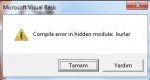
Hocam kodu ekleyince artık userform hiç açılmadı ekteki hatayı alıyor kapanıyor. dosyayı kopyalamıştım :)
 

Ekli dosyalar

  • Adsız.jpg
    Adsız.jpg
    16.9 KB · Görüntüleme: 5
yaptığınız çalışmayı paylaşmanızda bir sakınca yoksa paylaşabilir misiniz?
öğrenmek amaçlı incelemek istiyorum.
 
Merhaba 1. kodu Userform içindeki butona 2. kodu boş bir modüle kopyalayıp dener misiniz.
Kod:
Private Sub CommandButton1_Click()

Dim ie As New InternetExplorer

If Test_Internet_Connection = True Then

    ie.Visible = False
    
    ie.navigate "https://www.bloomberght.com/doviz"
    
    Do
    DoEvents
    Loop Until ie.readyState = READYSTATE_COMPLETE
    
    Dim doc As HTMLDocument
    Set doc = ie.document
    
    UserForm1.Label49.Caption = doc.getElementsByClassName("LastPrice")(1).innerHTML
    UserForm1.Label50.Caption = doc.getElementsByClassName("LastPrice")(2).innerHTML
    
    ie.Quit
Else
    UserForm1.Label49.Caption = ""
    UserForm1.Label50.Caption = ""
End If

End Sub

Kod:
Declare Function InternetGetConnectedStateEx Lib "wininet.dll" _
       (ByRef lpdwFlags As Long, ByVal lpszConnectionName As String, _
        ByVal dwNameLen As Integer, ByVal dwReserved As Long) As Long
Dim strConn As String * 255

Function Test_Internet_Connection() As Boolean
    Dim RetVal As Long
    RetVal = InternetGetConnectedStateEx(RetVal, strConn, 254, 0)
    If RetVal = 1 Then
        Test_Internet_Connection = True
    Else
        Test_Internet_Connection = False
    End If
End Function
 
Merhaba 1. kodu Userform içindeki butona 2. kodu boş bir modüle kopyalayıp dener misiniz.
Kod:
Private Sub CommandButton1_Click()

Dim ie As New InternetExplorer

If Test_Internet_Connection = True Then

    ie.Visible = False
   
    ie.navigate "https://www.bloomberght.com/doviz"
   
    Do
    DoEvents
    Loop Until ie.readyState = READYSTATE_COMPLETE
   
    Dim doc As HTMLDocument
    Set doc = ie.document
   
    UserForm1.Label49.Caption = doc.getElementsByClassName("LastPrice")(1).innerHTML
    UserForm1.Label50.Caption = doc.getElementsByClassName("LastPrice")(2).innerHTML
   
    ie.Quit
Else
    UserForm1.Label49.Caption = ""
    UserForm1.Label50.Caption = ""
End If

End Sub

Kod:
Declare Function InternetGetConnectedStateEx Lib "wininet.dll" _
       (ByRef lpdwFlags As Long, ByVal lpszConnectionName As String, _
        ByVal dwNameLen As Integer, ByVal dwReserved As Long) As Long
Dim strConn As String * 255

Function Test_Internet_Connection() As Boolean
    Dim RetVal As Long
    RetVal = InternetGetConnectedStateEx(RetVal, strConn, 254, 0)
    If RetVal = 1 Then
        Test_Internet_Connection = True
    Else
        Test_Internet_Connection = False
    End If
End Function

Hocam bu şekilde çalışıyor ancak butona bağlı olmasını istemiyorum userform açılınca internet bağlantısı yoksa boş görünsün internet bağlantısı varsa görünsün
 
Ozaman 1. kodu aşağıdaki gibi değiştiriniz.
Kod:
Private Sub UserForm_Initialize()
Dim ie As New InternetExplorer

If Test_Internet_Connection = True Then

    ie.Visible = False
    
    ie.navigate "https://www.bloomberght.com/doviz"
    
    Do
    DoEvents
    Loop Until ie.readyState = READYSTATE_COMPLETE
    
    Dim doc As HTMLDocument
    Set doc = ie.document
    
    UserForm1.Label49.Caption = doc.getElementsByClassName("LastPrice")(1).innerHTML
    UserForm1.Label50.Caption = doc.getElementsByClassName("LastPrice")(2).innerHTML
    ie.Quit
Else
    UserForm1.Label49.Caption = ""
    UserForm1.Label50.Caption = ""
    MsgBox "Internet Yok"
End If
End Sub
 
Ozaman 1. kodu aşağıdaki gibi değiştiriniz.
Kod:
Private Sub UserForm_Initialize()
Dim ie As New InternetExplorer

If Test_Internet_Connection = True Then

    ie.Visible = False
   
    ie.navigate "https://www.bloomberght.com/doviz"
   
    Do
    DoEvents
    Loop Until ie.readyState = READYSTATE_COMPLETE
   
    Dim doc As HTMLDocument
    Set doc = ie.document
   
    UserForm1.Label49.Caption = doc.getElementsByClassName("LastPrice")(1).innerHTML
    UserForm1.Label50.Caption = doc.getElementsByClassName("LastPrice")(2).innerHTML
    ie.Quit
Else
    UserForm1.Label49.Caption = ""
    UserForm1.Label50.Caption = ""
    MsgBox "Internet Yok"
End If
End Sub


Çok Teşekkür ederim tam istediğim gibi oldu (y)(y)(y)(y)
 
Geri
Üst