

• DİKKAT

    DOSYA İndirmek/Yüklemek için ÜCRETLİ ALTIN ÜYELİK Gereklidir!
    Altın Üyelik Hakkında Bilgi

User Formda Süzme Sonrası Güncelleme Hatası Alıyorum

yenilik025

Altın Üye
Katılım
28 Eylül 2005
Mesajlar
233
Excel Vers. ve Dili
2007
Merhabalar. Herkese iyi geceler.

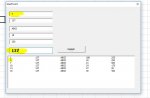
User Formda Süzme işlemi gerçekleştikten
Sonra Değiştirmek istediğim
Kaydı seçtiğimde Bilgiler Textboxlara yerleştikten sonra

Güncelleme de başka satırlar güncelleniyor ve A sütunundaki sıra ıd bozuluyor

Bunu nasıl düzeltmeliyim.
 

Ekli dosyalar

Aşağıdaki şekilde deneyin.
Kod:
Dim degisken As Long
Private Sub CommandButton1_Click()
    'ListBox1.RowSource = ""
    a = degisken
    Cells(a + 1, 1) = TextBox1
    For i = 2 To 5
     Cells(a + 1, i) = Controls("TextBox" & i).Value
    Next
    ListBox1.RowSource = "a1:e100"
    For i = 1 To 5
       Controls("TextBox" & i).Value = ""
    Next
    TxtAra = ""
End Sub

İkinci sorunsa filtreleme aşamasında listboxda 1. satırı seçtirmiyor. 1. satıra başlıkların gelmesi gerekli.
Filtreleme kodlarını aşağıdaki şekilde değiştirirseniz ilk satıra başlıkları ekler.
Kod:
Private Sub TxtAra_Change()
Application.ScreenUpdating = False
Dim sat, s As Variant
Dim deg1, deg2 As String
s = 1
With cls
ListBox1.RowSource = ""
End With
ListBox1.AddItem
ListBox1.List(0, 0) = Cells(1, "A")
ListBox1.List(0, 1) = Cells(1, "B")
ListBox1.List(0, 2) = Cells(1, "C")
ListBox1.List(0, 3) = Cells(1, "D")
ListBox1.List(0, 4) = Cells(1, "E")

For sat = 2 To Cells(65536, "B").End(xlUp).Row

deg1 = UCase(Replace(Replace(Cells(sat, "B"), "ı", "I"), "i", "İ"))
deg3 = UCase(Replace(Replace(Cells(sat, "a"), "ı", "I"), "i", "İ"))
deg2 = UCase(Replace(Replace(TxtAra, "ı", "I"), "i", "İ"))


If deg1 & deg3 Like "*" & deg2 & "*" Then

ListBox1.AddItem

ListBox1.List(s, 0) = Cells(sat, "A")
ListBox1.List(s, 1) = Cells(sat, "B")
ListBox1.List(s, 2) = Cells(sat, "C")
ListBox1.List(s, 3) = Cells(sat, "D")
ListBox1.List(s, 4) = Cells(sat, "E")

s = s + 1
End If
Next

Application.ScreenUpdating = True


End Sub
 
Son düzenleme:
Hocam hata devam ediyor.

Hocam teşekkürler ancak,
Değiştirdiğimiz kodda sayfamızın en üst satırına sadece ekleme yapıyor,
Halbuki var olan bilgiyi güncelleme yapması gerkiyor bunu yine yapmıyor.

Aşağıdaki şekilde deneyin.
Kod:
Dim degisken As Long
Private Sub CommandButton1_Click()
    'ListBox1.RowSource = ""
    a = degisken
    Cells(a + 1, 1) = TextBox1
    For i = 2 To 5
     Cells(a + 1, i) = Controls("TextBox" & i).Value
    Next
    ListBox1.RowSource = "a1:e100"
    For i = 1 To 5
       Controls("TextBox" & i).Value = ""
    Next
    TxtAra = ""
End Sub

İkinci sorunsa filtreleme aşamasında listboxda 1. satırı seçtirmiyor. 1. satıra başlıkların gelmesi gerekli.
Filtreleme kodlarını aşağıdaki şekilde değiştirirseniz ilk satıra başlıkları ekler.
Kod:
Private Sub TxtAra_Change()
Application.ScreenUpdating = False
Dim sat, s As Variant
Dim deg1, deg2 As String
s = 1
With cls
ListBox1.RowSource = ""
End With
ListBox1.AddItem
ListBox1.List(0, 0) = Cells(1, "A")
ListBox1.List(0, 1) = Cells(1, "B")
ListBox1.List(0, 2) = Cells(1, "C")
ListBox1.List(0, 3) = Cells(1, "D")
ListBox1.List(0, 4) = Cells(1, "E")

For sat = 2 To Cells(65536, "B").End(xlUp).Row

deg1 = UCase(Replace(Replace(Cells(sat, "B"), "ı", "I"), "i", "İ"))
deg3 = UCase(Replace(Replace(Cells(sat, "a"), "ı", "I"), "i", "İ"))
deg2 = UCase(Replace(Replace(TxtAra, "ı", "I"), "i", "İ"))


If deg1 & deg3 Like "*" & deg2 & "*" Then

ListBox1.AddItem

ListBox1.List(s, 0) = Cells(sat, "A")
ListBox1.List(s, 1) = Cells(sat, "B")
ListBox1.List(s, 2) = Cells(sat, "C")
ListBox1.List(s, 3) = Cells(sat, "D")
ListBox1.List(s, 4) = Cells(sat, "E")

s = s + 1
End If
Next

Application.ScreenUpdating = True


End Sub
 
Hocam çok teşekkür ederim.
Evet filtre sonrasında çalışıyor doğru,
ancak listeden direk herhangi bir bilgiyi seçim yapıp güncelle dediğimizde
yani filtre yapmadan güncelle dediğimizde o zaman hata veriyordu ancak kullanıcıyı arama
kutusuna yönlendirerek kendimce küçük bir çözüm buldum diyebilirim.Teşekkür ederim.

Private Sub CommandButton1_Click()

If TxtAra.Value = "" Then
MsgBox " Arama Boş Geçilemez !!! " 'Veri Boş ise Büton Gizledim .

CommandButton1.Visible = False
Exit Sub
End If


Private Sub TxtAra_Change()

CommandButton1.Visible = True 'Veri Girildiğinde Aktif Hale Geldi.
 
Son düzenleme:
Geri
Üst