sinnernekolens
Altın Üye
- Katılım
- 23 Temmuz 2009
- Mesajlar
- 310
- Excel Vers. ve Dili
- Ofis 2019 - Türkçe 64bit
Değerli arkadaşlar aşağıdaki kod ile veri çekiyorum. Yalnız H10 hücresini sildiğim zaman hata veriyor. hatayı nasıl çözebilirim.
Yardımlarınızı rica ederim
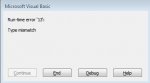
Hataya baktığımda bu kısım sarı oluyor.
If WorksheetFunction.CountIf(Sheets("GEMIVERI").Range("B2 " & son), Target) = 0 Then
Yardımlarınızı rica ederim
Hataya baktığımda bu kısım sarı oluyor.
If WorksheetFunction.CountIf(Sheets("GEMIVERI").Range("B2
" & son), Target) = 0 Then
Kod:
Private Sub Worksheet_Change(ByVal Target As Range)
If Intersect(Target, [H10]) Is Nothing Then Exit Sub
son = Sheets("GEMIVERI").Cells(Rows.Count, "B").End(3).Row
If WorksheetFunction.CountIf(Sheets("GEMIVERI").Range("B2:P" & son), Target) = 0 Then
[N3] = "!!DIKKAT!! Gemi sistemde kayıtlı değil."
MsgBox "!!DIKKAT!! Yazdığınız gemi sistemde kayıtlı değildir. " & Chr(10) & _
    "Eğer yeni bir gemiyse bilgileri girdikten sonra Kaydet düğmesine basınız.", vbOKOnly
GoTo 10
End If
[N3] = "!!DIKKAT!! Gemi sistemde bulundu, bilgileri getirildi."
[H11] = WorksheetFunction.VLookup(Target, Sheets("GEMIVERI").Range("B2:P" & son), 2, 0)
[H12] = WorksheetFunction.VLookup(Target, Sheets("GEMIVERI").Range("B2:P" & son), 3, 0)
[H13] = WorksheetFunction.VLookup(Target, Sheets("GEMIVERI").Range("B2:P" & son), 4, 0)
[H14] = WorksheetFunction.VLookup(Target, Sheets("GEMIVERI").Range("B2:P" & son), 5, 0)
[H15] = WorksheetFunction.VLookup(Target, Sheets("GEMIVERI").Range("B2:P" & son), 6, 0)
[H16] = WorksheetFunction.VLookup(Target, Sheets("GEMIVERI").Range("B2:P" & son), 7, 0)
[H17] = WorksheetFunction.VLookup(Target, Sheets("GEMIVERI").Range("B2:P" & son), 8, 0)
[H18] = WorksheetFunction.VLookup(Target, Sheets("GEMIVERI").Range("B2:P" & son), 9, 0)
[H19] = WorksheetFunction.VLookup(Target, Sheets("GEMIVERI").Range("B2:P" & son), 10, 0)
[H20] = WorksheetFunction.VLookup(Target, Sheets("GEMIVERI").Range("B2:P" & son), 11, 0)
[H21] = WorksheetFunction.VLookup(Target, Sheets("GEMIVERI").Range("B2:P" & son), 12, 0)
[H22] = WorksheetFunction.VLookup(Target, Sheets("GEMIVERI").Range("B2:P" & son), 13, 0)
[H23] = WorksheetFunction.VLookup(Target, Sheets("GEMIVERI").Range("B2:P" & son), 14, 0)
[H24] = WorksheetFunction.VLookup(Target, Sheets("GEMIVERI").Range("B2:P" & son), 15, 0)
10:

End Sub