



-
DİKKAT DOSYA İndirmek/Yüklemek için ÜCRETLİ ALTIN ÜYELİK Gereklidir!
Altın Üyelik Hakkında Bilgi
Çok eski bir web tarayıcısı kullanıyorsunuz. Bu veya diğer siteleri görüntülemekte sorunlar yaşayabilirsiniz..
Tarayıcınızı güncellemeli veya alternatif bir tarayıcı kullanmalısınız.
Tarayıcınızı güncellemeli veya alternatif bir tarayıcı kullanmalısınız.
texboxda tarih
- Konbuyu başlatan EmirhanG
- Başlangıç tarihi
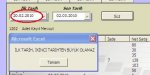
Set s2 = Sheets("sayfa1")
Frame5.Visible = False
Frame6.Visible = False
brnc = Format(ilk.Value, dd, mm, yyyy)
iknc = Format(son.Value, dd, mm, yyyy)
If ilk.Value = "" Or son.Value = "" Then
MsgBox "İlk ve son tarih belirleyiniz."
Exit Sub
End If
If brnc > iknc Then
MsgBox "İLK TARİH, İKİNCİ TARİHTEN BÜYÜK OLAMAZ"
Exit Sub
End If
Frame5.Visible = False
Frame6.Visible = False
brnc = Format(ilk.Value, dd, mm, yyyy)
iknc = Format(son.Value, dd, mm, yyyy)
If ilk.Value = "" Or son.Value = "" Then
MsgBox "İlk ve son tarih belirleyiniz."
Exit Sub
End If
If brnc > iknc Then
MsgBox "İLK TARİH, İKİNCİ TARİHTEN BÜYÜK OLAMAZ"
Exit Sub
End If

- Katılım
- 1 Mart 2005
- Mesajlar
- 22,239
- Excel Vers. ve Dili
- Win7 Home Basic TR 64 Bit
Ofis-2010-TR 32 Bit
Aşağıdaki gibi deneyiniz.Olmuyorsa ilk ve son textboxların gerçekten ilkmi sonmu olduğunu kontrol edin.Ben buradan göremiyeceğim için bu kontrolu siz yapacaksınızSet s2 = Sheets("sayfa1")
Frame5.Visible = False
Frame6.Visible = False
brnc = Format(ilk.Value, dd, mm, yyyy)
iknc = Format(son.Value, dd, mm, yyyy)
If ilk.Value = "" Or son.Value = "" Then
MsgBox "İlk ve son tarih belirleyiniz."
Exit Sub
End If
If brnc > iknc Then
MsgBox "İLK TARİH, İKİNCİ TARİHTEN BÜYÜK OLAMAZ"
Exit Sub
End If
Kod:
dim brnc as date,iknc as date
brnc = Format(cdate(ilk.Value), dd, mm, yyyy)
iknc = Format(cdate(son.Value), dd, mm, yyyy)hocam kusura kalmayın sebebini anlayamadım ama dosya ekleyemiyorum...
Sub süz()
dim brnc as date,iknc as date
Set s1 = Sheets("veri")
Frame5.Visible = False
Frame6.Visible = False
brnc = Format(CDate(ilk.Value), dd, mm, yyyy)
iknc = Format(CDate(son.Value), dd, mm, yyyy)
If ilk.Value = "" Or son.Value = "" Then
MsgBox "İlk ve son tarih belirleyiniz."
Exit Sub
End If
If brnc > iknc Then
MsgBox "İLK TARİH, İKİNCİ TARİHTEN BÜYÜK OLAMAZ"
Exit Sub
End If
ListView1.ListItems.Clear
For a = 2 To s1.Range("c65536").End(3).Row
If CDate(s1.Cells(a, "b")) >= brnc And CDate(s1.Cells(a, "b")) <= iknc Then
ListView1.ListItems.Add , , s1.Cells(a, 1)
ListView1.ListItems(ListView1.ListItems.Count).SubItems(1) = s1.Cells(a, 2)
ListView1.ListItems(ListView1.ListItems.Count).SubItems(2) = s1.Cells(a, 3)
ListView1.ListItems(ListView1.ListItems.Count).SubItems(3) = s1.Cells(a, 4)
ListView1.ListItems(ListView1.ListItems.Count).SubItems(4) = s1.Cells(a, 5)
ListView1.ListItems(ListView1.ListItems.Count).SubItems(5) = s1.Cells(a, 6)
ListView1.ListItems(ListView1.ListItems.Count).SubItems(6) = Format(s1.Cells(a, 7), "#,##0.00")
ListView1.ListItems(ListView1.ListItems.Count).SubItems(7) = Format(s1.Cells(a, 8), "#,##0.00")
ListView1.ListItems(ListView1.ListItems.Count).SubItems(8) = Format(s1.Cells(a, 9), "#,##0.00")
say = say + 1
Label1 = say & " Adet Kayıt mevcut"
End If
Next
UserForm_Activate
ilk = ""
son = ""
End Sub
Sub süz()
dim brnc as date,iknc as date
Set s1 = Sheets("veri")
Frame5.Visible = False
Frame6.Visible = False
brnc = Format(CDate(ilk.Value), dd, mm, yyyy)
iknc = Format(CDate(son.Value), dd, mm, yyyy)
If ilk.Value = "" Or son.Value = "" Then
MsgBox "İlk ve son tarih belirleyiniz."
Exit Sub
End If
If brnc > iknc Then
MsgBox "İLK TARİH, İKİNCİ TARİHTEN BÜYÜK OLAMAZ"
Exit Sub
End If
ListView1.ListItems.Clear
For a = 2 To s1.Range("c65536").End(3).Row
If CDate(s1.Cells(a, "b")) >= brnc And CDate(s1.Cells(a, "b")) <= iknc Then
ListView1.ListItems.Add , , s1.Cells(a, 1)
ListView1.ListItems(ListView1.ListItems.Count).SubItems(1) = s1.Cells(a, 2)
ListView1.ListItems(ListView1.ListItems.Count).SubItems(2) = s1.Cells(a, 3)
ListView1.ListItems(ListView1.ListItems.Count).SubItems(3) = s1.Cells(a, 4)
ListView1.ListItems(ListView1.ListItems.Count).SubItems(4) = s1.Cells(a, 5)
ListView1.ListItems(ListView1.ListItems.Count).SubItems(5) = s1.Cells(a, 6)
ListView1.ListItems(ListView1.ListItems.Count).SubItems(6) = Format(s1.Cells(a, 7), "#,##0.00")
ListView1.ListItems(ListView1.ListItems.Count).SubItems(7) = Format(s1.Cells(a, 8), "#,##0.00")
ListView1.ListItems(ListView1.ListItems.Count).SubItems(8) = Format(s1.Cells(a, 9), "#,##0.00")
say = say + 1
Label1 = say & " Adet Kayıt mevcut"
End If
Next
UserForm_Activate
ilk = ""
son = ""
End Sub
Son düzenleme:
- Katılım
- 1 Mart 2005
- Mesajlar
- 22,239
- Excel Vers. ve Dili
- Win7 Home Basic TR 64 Bit
Ofis-2010-TR 32 Bit
hocam kusura kalmayın sebebini anlayamadım ama dosya ekleyemiyorum...
Sub süz()
Set s1 = Sheets("veri")
Frame5.Visible = False
Frame6.Visible = False
brnc = Format(CDate(ilk.Value), dd, mm, yyyy)
iknc = Format(CDate(son.Value), dd, mm, yyyy)
If ilk.Value = "" Or son.Value = "" Then
MsgBox "İlk ve son tarih belirleyiniz."
Exit Sub
End If
If brnc > iknc Then
MsgBox "İLK TARİH, İKİNCİ TARİHTEN BÜYÜK OLAMAZ"
Exit Sub
End If
ListView1.ListItems.Clear
For a = 2 To s1.Range("c65536").End(3).Row
If CDate(s1.Cells(a, "b")) >= brnc And CDate(s1.Cells(a, "b")) <= iknc Then
ListView1.ListItems.Add , , s1.Cells(a, 1)
ListView1.ListItems(ListView1.ListItems.Count).SubItems(1) = s1.Cells(a, 2)
ListView1.ListItems(ListView1.ListItems.Count).SubItems(2) = s1.Cells(a, 3)
ListView1.ListItems(ListView1.ListItems.Count).SubItems(3) = s1.Cells(a, 4)
ListView1.ListItems(ListView1.ListItems.Count).SubItems(4) = s1.Cells(a, 5)
ListView1.ListItems(ListView1.ListItems.Count).SubItems(5) = s1.Cells(a, 6)
ListView1.ListItems(ListView1.ListItems.Count).SubItems(6) = Format(s1.Cells(a, 7), "#,##0.00")
ListView1.ListItems(ListView1.ListItems.Count).SubItems(7) = Format(s1.Cells(a, 8), "#,##0.00")
ListView1.ListItems(ListView1.ListItems.Count).SubItems(8) = Format(s1.Cells(a, 9), "#,##0.00")
say = say + 1
Label1 = say & " Adet Kayıt mevcut"
End If
Next
UserForm_Activate
ilk = ""
son = ""
End Sub
Hani bu satır yok.Bu satırı niye koymadınız?
Kod:
dim brnc as date,iknc as date- Katılım
- 1 Mart 2005
- Mesajlar
- 22,239
- Excel Vers. ve Dili
- Win7 Home Basic TR 64 Bit
Ofis-2010-TR 32 Bit
Ben göremedim.hocam kod sayfasının başında ekli ama
Sub SUZ ile başlayan satırların hemen altına koyun.2nci satır o olsun.
Yine çalışmıyorsa,mutlaka comboboxları yanlış koydunuz.O zman comboboxların birbirileri ile yerlerini değiştirin.

-
Sizlere daha iyi bir deneyim sunabilmek icin sitemizde çerez konumlandırmaktayız, web sitemizi kullanmaya devam ettiğinizde çerezler ile toplanan kişisel verileriniz Veri Politikamız / Bilgilendirmelerimizde belirtilen amaçlar ve yöntemlerle mevzuatına uygun olarak kullanılacaktır.