



-
DİKKAT DOSYA İndirmek/Yüklemek için ÜCRETLİ ALTIN ÜYELİK Gereklidir!
Altın Üyelik Hakkında Bilgi
Çok eski bir web tarayıcısı kullanıyorsunuz. Bu veya diğer siteleri görüntülemekte sorunlar yaşayabilirsiniz..
Tarayıcınızı güncellemeli veya alternatif bir tarayıcı kullanmalısınız.
Tarayıcınızı güncellemeli veya alternatif bir tarayıcı kullanmalısınız.
Soru alanları otomatik kopyalama
- Konbuyu başlatan incsoft
- Başlangıç tarihi
Dosyanızda birleştirilmiş hücreler ve hatalı hücreler var. Ben örnek olması açısından 72. satıra kadar çalışan bir makro yazdım. Kontrol edip kendi dosyanıza göre uyarlarsınız.
Kod:
Sub aktar()

Application.ScreenUpdating = False

For t = 3 To 72

    If Cells(t, "B") = "" And Cells(t, "C") <> "" Then Cells(t, "E") = Cells(t, "C")
    If Cells(t, "B") <> "" And Cells(t, "C") Then Cells(t, "E") = Cells(t, "B")
Next

Range("B3:C72").Select
Selection.ClearContents
Range("A1").Select
Application.ScreenUpdating = True

End SubSub aktar()
Application.ScreenUpdating = False
For t = 3 To 135
If Cells(t, "G") = "" And Cells(t, "H") <> "" Then Cells(t, "J") = Cells(t, "H")
If Cells(t, "G") <> "" And Cells(t, "H") Then Cells(t, "J") = Cells(t, "G")
Next
Range("G3:I11;G13:I40;G42:I72;G80:I135").Select
Selection.ClearContents
Range("R1").Select
Application.ScreenUpdating = True
End Sub
bu kodla revize ettim olmadı hocam
Application.ScreenUpdating = False
For t = 3 To 135
If Cells(t, "G") = "" And Cells(t, "H") <> "" Then Cells(t, "J") = Cells(t, "H")
If Cells(t, "G") <> "" And Cells(t, "H") Then Cells(t, "J") = Cells(t, "G")
Next
Range("G3:I11;G13:I40;G42:I72;G80:I135").Select
Selection.ClearContents
Range("R1").Select
Application.ScreenUpdating = True
End Sub
bu kodla revize ettim olmadı hocam
Ekli dosyalar
Tablonuza göre güncelledim. Aşağıdaki şekilde deneyiniz.
Kod:
Sub aktar()

Application.ScreenUpdating = False

For t = 3 To 72
If Cells(t, "G") = "" And Cells(t, "H") <> "" Then Cells(t, "J") = Cells(t, "H")
If Cells(t, "G") <> "" And Cells(t, "H") Then Cells(t, "J") = Cells(t, "G")
Next

For t = 80 To 135
If Cells(t, "G") = "" And Cells(t, "H") <> "" Then Cells(t, "J") = Cells(t, "H")
If Cells(t, "G") <> "" And Cells(t, "H") Then Cells(t, "J") = Cells(t, "G")
Next

Range("G3:I11").Select
Selection.ClearContents
Range("G13:I40").Select
Selection.ClearContents
Range("G42:I72").Select
Selection.ClearContents
Range("G80:I135").Select
Selection.ClearContents
Range("R1").Select
Application.ScreenUpdating = True

End Sub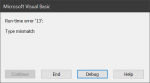
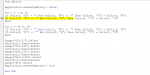
Tablonuza göre güncelledim. Aşağıdaki şekilde deneyiniz.
Kod:Sub aktar() Application.ScreenUpdating = False For t = 3 To 72 If Cells(t, "G") = "" And Cells(t, "H") <> "" Then Cells(t, "J") = Cells(t, "H") If Cells(t, "G") <> "" And Cells(t, "H") Then Cells(t, "J") = Cells(t, "G") Next For t = 80 To 135 If Cells(t, "G") = "" And Cells(t, "H") <> "" Then Cells(t, "J") = Cells(t, "H") If Cells(t, "G") <> "" And Cells(t, "H") Then Cells(t, "J") = Cells(t, "G") Next Range("G3:I11").Select Selection.ClearContents Range("G13:I40").Select Selection.ClearContents Range("G42:I72").Select Selection.ClearContents Range("G80:I135").Select Selection.ClearContents Range("R1").Select Application.ScreenUpdating = True End Sub
hocam yeni hata nedendir acaba?
Orijinal dosyanız buysa problemsiz çalışıyor.
Orjinal dosya bu değil hocam sağda ve aşağıda bazı hücreler var ancak alanlar birebir aynı. Bu dosyada çalışıp birebir aynı olan dosyaya adapte edince neden olmuyor çözemedim hocam.
Orijinal dosyanız buysa problemsiz çalışıyor.
orjinal dosyada sağ tarafta ve aşağıda bulunan yerleri boşaltınca aktarıyor diğer türlü aktarmıyor kafayı yedirdi hocam.
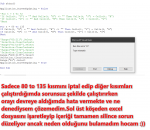
Orijinal dosyanız buysa problemsiz çalışıyor.
Sanırım sorunu buldum hocam ama çözüm bulamadım.
1.AYAR ve 2.AYAR kısımlarına sayı girilirse sorun yok ancak mesela Tip kısmında sayı var 1.AYAR kısmın A 125 yazıyor o zaman aktarmıyor.
Kodda hata yapmışız. Sanırım şimdi probleminiz çözülecek.
Kod:
Sub aktar()

Application.ScreenUpdating = False

For t = 3 To 72
If Cells(t, "G") = "" And Cells(t, "H") <> "" Then Cells(t, "J") = Cells(t, "H")
If Cells(t, "G") <> "" And Cells(t, "H") <> "" Then Cells(t, "J") = Cells(t, "G")
Next

For t = 80 To 135
If Cells(t, "G") = "" And Cells(t, "H") <> "" Then Cells(t, "J") = Cells(t, "H")
If Cells(t, "G") <> "" And Cells(t, "H") Then Cells(t, "J") = Cells(t, "G")
Next

Range("G3:I11").Select
Selection.ClearContents
Range("G13:I40").Select
Selection.ClearContents
Range("G42:I72").Select
Selection.ClearContents
Range("G80:I135").Select
Selection.ClearContents
Range("R1").Select
Application.ScreenUpdating = True

End SubKodda hata yapmışız. Sanırım şimdi probleminiz çözülecek.
Kod:Sub aktar() Application.ScreenUpdating = False For t = 3 To 72 If Cells(t, "G") = "" And Cells(t, "H") <> "" Then Cells(t, "J") = Cells(t, "H") If Cells(t, "G") <> "" And Cells(t, "H") <> "" Then Cells(t, "J") = Cells(t, "G") Next For t = 80 To 135 If Cells(t, "G") = "" And Cells(t, "H") <> "" Then Cells(t, "J") = Cells(t, "H") If Cells(t, "G") <> "" And Cells(t, "H") Then Cells(t, "J") = Cells(t, "G") Next Range("G3:I11").Select Selection.ClearContents Range("G13:I40").Select Selection.ClearContents Range("G42:I72").Select Selection.ClearContents Range("G80:I135").Select Selection.ClearContents Range("R1").Select Application.ScreenUpdating = True End Sub
Burda ne gibi bir değişiklik yaptınız hocam? Kodu incelediğimde sanki bir değişiklik yok gibi gördüm. Orjinal dosyam işyerimde olduğundan dolayı dolayı deneyemedim yarın deneyeceğim sadece kodları bire bir kıyaslama yaptım ancak bir değişiklik göremeyince merak ettim sadece

And ten sonra gelen koşula bir koşul eklememişsiniz.Kod:If Cells(t, "G") <> "" And Cells(t, "H") Then Cells(t, "J") = Cells(t, "G")
Benim gördüğüm budur.
mesela ne gibi hocam? Bu komutla rakamlarla gayet güzel aktarıyor ancak harfli olanlarda hata veriyor.
And ten sonra gelen koşula bir koşul eklememişsiniz.Kod:If Cells(t, "G") <> "" And Cells(t, "H") Then Cells(t, "J") = Cells(t, "G")
Benim gördüğüm budur.
keşke sizler gibi uzman olabilsem hocam hemen yapacağım ama yapamıyorum
İlk şartta <> "" kullanmışsınız. 2nci için bir şart kullanmamışsınız.
If Cells(t, "G") <> "" And Cells(t, "H") <> "" Then Cells(t, "J") = Cells(t, "G")
komutunu
If Cells(t, "G") = "" And Cells(t, "H") <> "" Then Cells(t, "J") = Cells(t, "G") şeklinde değiştirdim bu seferde hata vermedi ama harfleri aktarmadı hocam
Hata vermediğine göre bir mantık hatası yapmış olabilirsiniz.
hocam zahmet olmazsa ekteki dosyadan bakabilirmisiniz?
Ekli dosyalar
-
Sizlere daha iyi bir deneyim sunabilmek icin sitemizde çerez konumlandırmaktayız, web sitemizi kullanmaya devam ettiğinizde çerezler ile toplanan kişisel verileriniz Veri Politikamız / Bilgilendirmelerimizde belirtilen amaçlar ve yöntemlerle mevzuatına uygun olarak kullanılacaktır.