• DİKKAT

    DOSYA İndirmek/Yüklemek için ÜCRETLİ ALTIN ÜYELİK Gereklidir!
    Altın Üyelik Hakkında Bilgi

Seçilen Hücreleri Mail Göndermek.

Katılım
17 Ağustos 2016
Mesajlar
118
Excel Vers. ve Dili
2013 Türkçe
Arkadaşlar merhaba,

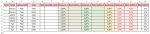
Ekteki dosyada kırmızı ile işaretlediğim A-B-C-D-E-F-G-H-J-K-M-O-P-V ve AA hücrelerini S hücresine ekleyeceğim bir gönder butonu ile benim belirleyeceğim bir mail adresine göndermek istiyorum. örnek olarak B3 hücresinde yapacağım değişiklikler sonrası gönder butonuna bastığım zaman güncel komisyon oranları başlıklı bir mail gönderilmesini istiyorum gönderilmesini istediğim verilerin karışıklık olmaması adına ekran görüntüsü resmini ekliyorum.

NOT: Bu dosya üzerine yeni veri girişleri ve eklemelerde yapılacak şekilde yönlendirmeniz ricadır.

Teşekkürler.
 

Ekli dosyalar

  • Capture.JPG
    Capture.JPG
    69.1 KB · Görüntüleme: 40
  • Ürün.xlsm
    Ürün.xlsm
    19.7 KB · Görüntüleme: 25
Arkadaşlar aşağıdaki kodu benim istediğim şekilde sutünları seçmeli olacak şekilde nasıl değişiriz?

Kod:
Sub Send_Range()
   
   ' Select the range of cells on the active worksheet.
   ActiveSheet.Range("A1:B5").Select
   
   ' Show the envelope on the ActiveWorkbook.
   ActiveWorkbook.EnvelopeVisible = True
   
   ' Set the optional introduction field thats adds
   ' some header text to the email body. It also sets
   ' the To and Subject lines. Finally the message
   ' is sent.
   With ActiveSheet.MailEnvelope
      .Introduction = "This is a sample worksheet."
      .Item.To = "E-Mail_Address_Here"
      .Item.Subject = "My subject"
      .Item.Send
   End With
End Sub
 
Gönderme işlemi satır bazında mı olacak? Yoksa sayfadaki tüm alan mı gönderilecek?

Eğer tüm alan gönderilecekse tek bir buton yeterli olacaktır. Satır bazında olacaksa ilgili satıra çift tıklanarak mail gönderilebilir. Bu sebeple "S" sütununa gerek yok gibi duruyor.
 
Gönderme işlemi satır bazında mı olacak? Yoksa sayfadaki tüm alan mı gönderilecek?

Eğer tüm alan gönderilecekse tek bir buton yeterli olacaktır. Satır bazında olacaksa ilgili satıra çift tıklanarak mail gönderilebilir. Bu sebeple "S" sütununa gerek yok gibi duruyor.

Korhan bey merhaba,

İlgili dosyadaki benim belirleyeceğim satır bazında seçili olan sütunların gönderilmesini istiyorum. örnek olarak gönder butonuna tıklandığında ilgili satırda belirtilen sütunların gönderimesini istiyorum.

Örneğin ekteki görselde bulunan Gönder butonuna tıkladığım zaman ilgili satırda belirtilen A-B-C-D-E-F-G-H-J-K-M-O-P-V ve AA gönderilmesini amaçlıyorum.
 

Ekli dosyalar

  • Ekran Alıntısı.JPG
    Ekran Alıntısı.JPG
    72.2 KB · Görüntüleme: 12
Son düzenleme:
Aşağıdaki şekilde istediğiniz hücreleri seçebilirsiniz.
Kod:
Sub Mail_Selection_Range_Outlook_Body()
'http://msdn.microsoft.com/en-us/library/office/ff519602(v=office.11).aspx#odc_office_UseExcelObjectModeltoSendMailPart2_MailingRangeSelectionBody

' You need to use this module with the RangetoHTML subroutine.
' Works in Excel 2000, Excel 2002, Excel 2003, Excel 2007, Excel 2010, Outlook 2000, Outlook 2002, Outlook 2003, Outlook 2007, and Outlook 2010.
    Dim rng As Range, mailRng As Range
    Dim OutApp As Object
    Dim OutMail As Object
    Dim adres As String
    
    Set rng = Nothing
    On Error Resume Next
    'Only send the visible cells in the selection.
    'Set rng = Selection.SpecialCells(xlCellTypeVisible)
    'You can also use a range with the following statement.
    'Set rng = Sheets("YourSheet").Range("D4:D12").SpecialCells(xlCellTypeVisible)
    On Error GoTo 0
    
    Set mailRng = Range(Cells(ActiveCell.Row, 1), Cells(ActiveCell.Row, 2))
    Set rng = Union(ActiveSheet.Range("A:H,J:J,K:K,M:M,O:O,P:P,V:V,AA:AA"), mailRng)
    If rng Is Nothing Then
        MsgBox "Seçilen hücreler ""aralık"" değil veya sayfa koruması var. " & _
               vbNewLine & "Düzeltip yeniden deneyin.", vbOKOnly
        Exit Sub
    End If
    
    adres = Application.InputBox("Mail adresi giriniz", "MAİL")
    If adres = vbNullString Then
        MsgBox "Mail adresi girmediniz. " & vbNewLine & "Uygulamadan çıkılıyor.", vbOKOnly
        Exit Sub
    End If
    
    With Application
        .EnableEvents = False
        .ScreenUpdating = False
    End With
    
    Set OutApp = CreateObject("Outlook.Application")
    Set OutMail = OutApp.CreateItem(0)
    
    On Error Resume Next
    With OutMail
        .To = adres
        '.To = "emailadresi@gmail.com"
        .CC = ""
        .BCC = ""
        .Subject = "Aşağıdaki  numara ve satır no belirtilen işlemler hakkında lütfen gerekeni yapınız."
        .HTMLBody = RangetoHTML(rng)
        .Display 'email'i sadece görüntüler. gönder butonuna basarak gönderiniz.
        '.Send 'email'i gönderir. ancak güvenlik uyarısı mesajı gelir. onaylayarak devam edilir.
    End With
    On Error GoTo 0
    
    With Application
        .EnableEvents = True
        .ScreenUpdating = True
    End With
    
    Set OutMail = Nothing
    Set OutApp = Nothing
End Sub

Function RangetoHTML(rng As Range)
' Works in Excel 2000, Excel 2002, Excel 2003, Excel 2007, Excel 2010, Outlook 2000, Outlook 2002, Outlook 2003, Outlook 2007, and Outlook 2010.
    Dim fso As Object
    Dim ts As Object
    Dim TempFile As String
    Dim TempWB As Workbook

    TempFile = Environ$("temp") & "/" & Format(Now, "dd-mm-yy h-mm-ss") & ".htm"
 
    ' Copy the range and create a workbook to receive the data.
    rng.Copy
    Set TempWB = Workbooks.Add(1)
    With TempWB.Sheets(1)
        .Cells(1).PasteSpecial Paste:=8
        .Cells(1).PasteSpecial xlPasteValues, , False, False
        .Cells(1).PasteSpecial xlPasteFormats, , False, False
        .Cells(1).Select
        Application.CutCopyMode = False
        On Error Resume Next
        .DrawingObjects.Visible = True
        .DrawingObjects.Delete
        On Error GoTo 0
    End With
 
    ' Publish the sheet to an .htm file.
    With TempWB.PublishObjects.Add( _
         SourceType:=xlSourceRange, _
         Filename:=TempFile, _
         Sheet:=TempWB.Sheets(1).Name, _
         Source:=TempWB.Sheets(1).UsedRange.Address, _
         HtmlType:=xlHtmlStatic)
        .Publish (True)
    End With
 
    ' Read all data from the .htm file into the RangetoHTML subroutine.
    Set fso = CreateObject("Scripting.FileSystemObject")
    Set ts = fso.GetFile(TempFile).OpenAsTextStream(1, -2)
    RangetoHTML = ts.ReadAll
    ts.Close
    RangetoHTML = Replace(RangetoHTML, "align=center x:publishsource=", _
                          "align=left x:publishsource=")
 
    ' Close TempWB.
    TempWB.Close savechanges:=False
 
    ' Delete the htm file.
    Kill TempFile
 
    Set ts = Nothing
    Set fso = Nothing
    Set TempWB = Nothing
End Function
 
ilgilendiğiniz için çok teşekkür ederim ; Q VE R SÜTUNUNDA BULUNAN MAİL ADRESLERİNE BULUNDUGU SATIRI GÖNDEREREK EKRANI KAPATSA ..OUTLOOK 'U GÖRMEME GEREK YOK... DÜZENLEYİP GÖNDERİRSENİZ SEVİNİRİM.
 
ilgilendiğiniz için çok teşekkür ederim ; Q VE R SÜTUNUNDA BULUNAN MAİL ADRESLERİNE BULUNDUGU SATIRI GÖNDEREREK EKRANI KAPATSA ..OUTLOOK 'U GÖRMEME GEREK YOK... DÜZENLEYİP GÖNDERİRSENİZ SEVİNİRİM.

outlook ayarlarından program erişim kısmına evet seçtiğinizde ve kodların içerisinde " 'Send " yazan kodun başındaki ' işareti kaldırdığınızda otomatik gönderir.
 

Ekli dosyalar

bu kodda iş görebilir. yapanın eline sağlık seçtiğin hücreyi mail gönderiyor.

Kod:
Sub Mail_Selection_Range_Outlook_Body()
'For Tips see: http://www.rondebruin.nl/win/winmail/Outlook/tips.htm
'Don't forget to copy the function RangetoHTML in the module.
'Working in Excel 2000-2016
    Dim rng As Range
    Dim OutApp As Object
    Dim OutMail As Object

    Set rng = Nothing
    On Error Resume Next
    'Only the visible cells in the selection
    Set rng = Selection.SpecialCells(xlCellTypeVisible)
    'You can also use a fixed range if you want
    'Set rng = Sheets("YourSheet").Range("D4:D12").SpecialCells(xlCellTypeVisible)
    On Error GoTo 0

    If rng Is Nothing Then
        MsgBox "The selection is not a range or the sheet is protected" & _
               vbNewLine & "please correct and try again.", vbOKOnly
        Exit Sub
    End If

    With Application
        .EnableEvents = False
        .ScreenUpdating = False
    End With

    Set OutApp = CreateObject("Outlook.Application")
    Set OutMail = OutApp.CreateItem(0)

    On Error Resume Next
    With OutMail
        .To = "ron@debruin.nl"
        .CC = ""
        .BCC = ""
        .Subject = "This is the Subject line"
        .HTMLBody = RangetoHTML(rng)
        .Send   'or use .Display
    End With
    On Error GoTo 0

    With Application
        .EnableEvents = True
        .ScreenUpdating = True
    End With

    Set OutMail = Nothing
    Set OutApp = Nothing
End Sub


Function RangetoHTML(rng As Range)
' Changed by Ron de Bruin 28-Oct-2006
' Working in Office 2000-2016
    Dim fso As Object
    Dim ts As Object
    Dim TempFile As String
    Dim TempWB As Workbook

    TempFile = Environ$("temp") & "\" & Format(Now, "dd-mm-yy h-mm-ss") & ".htm"

    'Copy the range and create a new workbook to past the data in
    rng.Copy
    Set TempWB = Workbooks.Add(1)
    With TempWB.Sheets(1)
        .Cells(1).PasteSpecial Paste:=8
        .Cells(1).PasteSpecial xlPasteValues, , False, False
        .Cells(1).PasteSpecial xlPasteFormats, , False, False
        .Cells(1).Select
        Application.CutCopyMode = False
        On Error Resume Next
        .DrawingObjects.Visible = True
        .DrawingObjects.Delete
        On Error GoTo 0
    End With

    'Publish the sheet to a htm file
    With TempWB.PublishObjects.Add( _
         SourceType:=xlSourceRange, _
         Filename:=TempFile, _
         Sheet:=TempWB.Sheets(1).Name, _
         Source:=TempWB.Sheets(1).UsedRange.Address, _
         HtmlType:=xlHtmlStatic)
        .Publish (True)
    End With

    'Read all data from the htm file into RangetoHTML
    Set fso = CreateObject("Scripting.FileSystemObject")
    Set ts = fso.GetFile(TempFile).OpenAsTextStream(1, -2)
    RangetoHTML = ts.readall
    ts.Close
    RangetoHTML = Replace(RangetoHTML, "align=center x:publishsource=", _
                          "align=left x:publishsource=")

    'Close TempWB
    TempWB.Close savechanges:=False

    'Delete the htm file we used in this function
    Kill TempFile

    Set ts = Nothing
    Set fso = Nothing
    Set TempWB = Nothing
End Function
 
Merhaba excelden secili alanı mail ile göndermek ok. peki mailin otomatik gitmesini nasıl engelleyebiliriz. hücre satır secilsin gönder dedigimizde outlook ta sayfaya yapıstırsın ama kontrol edip gönder tusuna ben basayım. bunu kısıtlı bilgimle bir türlü yapamadım. yardımcı olursanız sevinirim
 
En son mesajdaki kod bloğunda aşağıdaki satır sizin istediğiniz işlemi yapmaktadır.

.Send 'or use .Display

Bu satırı aşağıdaki gibi düzenlerseniz maili göndermez. Sizin onayınızı bekler.

.Display
 
En son mesajdaki kod bloğunda aşağıdaki satır sizin istediğiniz işlemi yapmaktadır.

.Send 'or use .Display

Bu satırı aşağıdaki gibi düzenlerseniz maili göndermez. Sizin onayınızı bekler.

.Display

çok tesekkür ederim. şu göremedigim detay kaçtane excele can verdi inanamazsınız :) izninizle birsey daha sormak istiyorum.

yukardaki makroyla hersey ok suan. acılan bos maile secilen kısımda yapısıyor. ama maildeki imza cıkmıyor. bunu eklerken sanırım Subject altına birsey eklemem lazım. ne yazmalıyım. ve logo ekleyebilirmiyim. yada mevcut imzayı resim olarakda ekleyebilirim. hangisi daha kolaysa.
musait oldugunuzda paylasırsanız sevinirim.

To = "ron@debruin.nl"
.CC = ""
.BCC = ""
.Subject = "This is the Subject line"

.HTMLBody = RangetoHTML(rng)
.Display
 
Aşağıdaki gibi deneyiniz.

C++:
.Display
.To = "maili_göndereceğiniz_adres"
.CC = ""
.BCC = ""
.Subject = "This is the Subject line"
.HTMLBody = RangetoHTML(rng) & vbLf & VbLf & .HTMLBody
 
Merhaba tesekkür ederim. paylastıgınızla degil ama formulu arastırıp benzeriyle çözdüm :)
 
Geri
Üst