

• DİKKAT

    DOSYA İndirmek/Yüklemek için ÜCRETLİ ALTIN ÜYELİK Gereklidir!
    Altın Üyelik Hakkında Bilgi

Soru Tablo formatı değiştirme hk.

Katılım
20 Mayıs 2016
Mesajlar
86
Excel Vers. ve Dili
2010
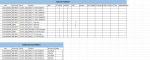
Merhaba, aşağıdaki resimdeki gibi bir mevcut format tablom var ben bunu istenilen sql formatı başlıklı tablo şekline çevirmeye çalışıyorum fakat bir türlü yapamadım.
245727


burda ürüne ait kol,oturak,gövde,sırt,klapa,sırt minderi,oturak minderi,orta süs,alt süs,mekanizma komponentlerinden her hangi birine giriş yapılmış olabilir.
mevcut örneğimde 2 komponenti olan ürünler denk gelmiş.
mevcut format şeklinde 10.000 satır giriş verim mevcut.bunu makroyla istenilen sql formatı şekline çevirebilir miyim?
Örnek excel'im ektedir.

Yardımlarınızı rica ederim.
 

Ekli dosyalar

Rapor sayfası oluşturun.
Kod:
Sub test()
    
    Dim veri, i&, ii As Byte, iii As Byte, say&
    
    With Sheets("Sayfa1").Range("A2").CurrentRegion
        veri = .Offset(1).Resize(.Rows.Count - 1).Value
    End With
    
    ReDim yVeri(1 To UBound(veri) * 10, 1 To 6)

    For i = 2 To UBound(veri)
        For ii = 5 To 14
            If veri(i, ii) <> "" Then
                say = say + 1
                For iii = 1 To 4
                    yVeri(say, iii) = veri(i, iii)
                Next iii
                yVeri(say, 5) = veri(1, ii)
                yVeri(say, 6) = veri(i, ii)
            End If
        Next ii
    Next i

    With Sheets("Rapor")
        .Cells.ClearContents
        .Range("A1").Resize(say, 4).Value = Sheets("Sayfa1").Range("A2").Resize(, 4).Value
        .Range("E1").Resize(say, 2).Value = Array("Komponent", "Adet")
        .Range("A2").Resize(say, 6).Value = yVeri
        .Range("A1").CurrentRegion.EntireColumn.AutoFit
    End With

End Sub
 
Rapor sayfası oluşturun.
Kod:
Sub test()
   
    Dim veri, i&, ii As Byte, iii As Byte, say&
   
    With Sheets("Sayfa1").Range("A2").CurrentRegion
        veri = .Offset(1).Resize(.Rows.Count - 1).Value
    End With
   
    ReDim yVeri(1 To UBound(veri) * 10, 1 To 6)

    For i = 2 To UBound(veri)
        For ii = 5 To 14
            If veri(i, ii) <> "" Then
                say = say + 1
                For iii = 1 To 4
                    yVeri(say, iii) = veri(i, iii)
                Next iii
                yVeri(say, 5) = veri(1, ii)
                yVeri(say, 6) = veri(i, ii)
            End If
        Next ii
    Next i

    With Sheets("Rapor")
        .Cells.ClearContents
        .Range("A1").Resize(say, 4).Value = Sheets("Sayfa1").Range("A2").Resize(, 4).Value
        .Range("E1").Resize(say, 2).Value = Array("Komponent", "Adet")
        .Range("A2").Resize(say, 6).Value = yVeri
        .Range("A1").CurrentRegion.EntireColumn.AutoFit
    End With

End Sub


Hocam mükemmelsiniz.keşke sıfırdan şöyle yazabilsek
 
Kod:
Sub aktar()
Dim son
Dim i
Dim j
Dim say
Dim son2
son2 = Sheets("Sayfa2").Cells(Rows.Count, 1).End(3).Row
son = Sheets("Sayfa1").Cells(Rows.Count, 1).End(3).Row
say = 2
Sheets("Sayfa2").Range("A2:F" & son2).ClearContents
For i = 3 To son
For j = 5 To 14
If Sheets("Sayfa1").Cells(i, j) <> "" Then
Sheets("Sayfa2").Cells(say, 1).Value = Sheets("Sayfa1").Cells(i, 1).Value
Sheets("Sayfa2").Cells(say, 2).Value = Sheets("Sayfa1").Cells(i, 2).Value
Sheets("Sayfa2").Cells(say, 3).Value = Sheets("Sayfa1").Cells(i, 3).Value
Sheets("Sayfa2").Cells(say, 4).Value = Sheets("Sayfa1").Cells(i, 4).Value
Sheets("Sayfa2").Cells(say, 5).Value = Sheets("Sayfa1").Cells(2, j).Value
Sheets("Sayfa2").Cells(say, 6).Value = Sheets("Sayfa1").Cells(i, j).Value
say = say + 1
End If
Next
Next
End Sub
 

Ekli dosyalar

Veysel hocam izninle alternatif
 
Geri
Üst