

• DİKKAT

    DOSYA İndirmek/Yüklemek için ÜCRETLİ ALTIN ÜYELİK Gereklidir!
    Altın Üyelik Hakkında Bilgi

Satır silmek

Katılım
5 Eylül 2007
Mesajlar
1,247
Excel Vers. ve Dili
ofis 2010
iyi akşamlar; borç ve alacaktaki eşit tutarları satır bazında siliniyor. birden fazla firmada aynı tutar olduğunda sorun yaşıyorum. Silme işleminde F v G hücresi yanında D hücresindeki firmanın da aynı olması sorunumu çözecektir. Kullandığım makro
Kod:
Sub SATIR_SIL()
Set wf = Application.WorksheetFunction
Application.DisplayAlerts = False
For sat = 2 To Cells(Rows.Count, 1).End(3).Row
    If Cells(sat, "F") > 0 And wf.CountIf(Range("G:G"), Cells(sat, "F")) > 0 Then
        gsat = wf.Match(Cells(sat, "F"), Range("G:G"), 0)
        Range("A" & sat & ":J" & sat).Delete Shift:=xlUp
        If sat < gsat Then gsat = gsat - 1
        Range("A" & gsat & ":J" & gsat).Delete Shift:=xlUp
        sat = sat - 1
    End If
Next
Application.DisplayAlerts = True

End Sub
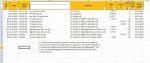
Hayırlı akşamlar
 

Ekli dosyalar

  • satır silme.xlsx
    satır silme.xlsx
    135.2 KB · Görüntüleme: 6
  • satır silme.jpg
    satır silme.jpg
    222.7 KB · Görüntüleme: 8
Merhaba.

Bir de aşağıdaki kod'u deneyin bakalım.
Kontrol C, F, G sütunlarına göre yapılıyor ve bu üçünün birleşimi
(F veya G'den biri boş olacağına göre C,F birleşimi ile C,G birleşimi anlamına geliyor)
çift sayıda adet olanlar siliniyor.
Yeni sütun koşulu eklemek isterseniz, kırmızı renklendirdiğim kısıma yeni sütuna ilişkin ekleme ( & Cells(s, "B") gibi ) yapabilirsiniz.
.
Kod:
[B][COLOR="blue"]Sub AYNI_SATIR_SIL()[/COLOR][/B]
Application.ScreenUpdating = False: Application.Calculation = xlCalculationManual
son = Cells(Rows.Count, 1).End(3).Row
Columns("K:L").Insert Shift:=xlToRight
    For s = 2 To son
        Cells(s, "K") =[COLOR="Red"] Cells(s, "C") & Cells(s, "F") & Cells(s, "G")[/COLOR]
    Next
    With Range("L2:L" & son)
        .Formula = "=COUNTIF($K$2:$K$" & son & ",K2)": .Value = .Value
    End With
    For sat = son To 2 Step -1
        If WorksheetFunction.IsEven(Cells(sat, "L").Value) = True Then Rows(sat).Delete Shift:=xlUp
    Next
     Columns("K:L").Delete Shift:=xlToLeft
Application.ScreenUpdating = True: Application.Calculation = xlCalculationAutomatic
MsgBox "İŞLEM TAMAMLANDI"
[B][COLOR="Blue"]End Sub[/COLOR][/B]
 
Sorunsuz çalışıyor

Merhaba.

Bir de aşağıdaki kod'u deneyin bakalım.
Kontrol C, F, G sütunlarına göre yapılıyor ve bu üçünün birleşimi
(F veya G'den biri boş olacağına göre C,F birleşimi ile C,G birleşimi anlamına geliyor)
çift sayıda adet olanlar siliniyor.
Yeni sütun koşulu eklemek isterseniz, kırmızı renklendirdiğim kısıma yeni sütuna ilişkin ekleme ( & Cells(s, "B") gibi ) yapabilirsiniz.
.
Kod:
[B][COLOR="blue"]Sub AYNI_SATIR_SIL()[/COLOR][/B]
Application.ScreenUpdating = False: Application.Calculation = xlCalculationManual
son = Cells(Rows.Count, 1).End(3).Row
Columns("K:L").Insert Shift:=xlToRight
    For s = 2 To son
        Cells(s, "K") =[COLOR="Red"] Cells(s, "C") & Cells(s, "F") & Cells(s, "G")[/COLOR]
    Next
    With Range("L2:L" & son)
        .Formula = "=COUNTIF($K$2:$K$" & son & ",K2)": .Value = .Value
    End With
    For sat = son To 2 Step -1
        If WorksheetFunction.IsEven(Cells(sat, "L").Value) = True Then Rows(sat).Delete Shift:=xlUp
    Next
     Columns("K:L").Delete Shift:=xlToLeft
Application.ScreenUpdating = True: Application.Calculation = xlCalculationAutomatic
MsgBox "İŞLEM TAMAMLANDI"
[B][COLOR="Blue"]End Sub[/COLOR][/B]

Teşekkürler, kod sorunsuz çalışıyor, iyi çalışmalar.
 
Geri
Üst