

• DİKKAT

    DOSYA İndirmek/Yüklemek için ÜCRETLİ ALTIN ÜYELİK Gereklidir!
    Altın Üyelik Hakkında Bilgi

Soru Makro ile Mail Gönderme İMZA EKLEME

bulentkars

Altın Üye
Katılım
5 Ağustos 2005
Mesajlar
674
Excel Vers. ve Dili
2003 TR
Merhaba,
Aşağıdaki kod ile otomatik olarak mail gönderiyorum. Ancak imzamdaki logo oluşan mail penceresinde çıkmıyor. Sanıyorum sadece text olarak okuyor logo jpg olduğu için okunmuyor. Kodu nasıl değiştir meliyim? Yardımcı olabilirseniz sevinirim. Şimdiden Teşekkürler İyi çalışmalar diliyorum


Kod:
Sub EmailSheet()


    Dim OutlookApp As Object, OutlookMsg As Object
    Dim FSO As Object, BodyText As Object
    Dim MyRange As Range, TempFile As String
      
    On Error Resume Next
    Set MyRange = ActiveSheet.Range("W1:W4")
    If MyRange Is Nothing Then Exit Sub
    Set FSO = CreateObject("Scripting.FilesystemObject")
  
    TempFile = "C:\Planlama\TempHTML.htm"
    ActiveWorkbook.PublishObjects.Add _
    (4, TempFile, MyRange.Parent.Name, MyRange.Address, 0, "", "").Publish True
 
    
    Set OutlookApp = CreateObject("Outlook.Application")
    Set OutlookMsg = OutlookApp.CreateItem(0)
    Set BodyText = FSO.OpenTextFile(TempFile, 1)
    
        With OutlookMsg
            .HTMLBody = BodyText.ReadAll
            
            .To = Range("V2").Text  'Kime
            .cc = Range("V3").Text  'Bilgi
            .Subject = Range("V4").Text   ' Konu
          
            .Display


        End With
        
 Kill TempFile
 
    
    Set BodyText = Nothing
    Set OutlookMsg = Nothing
    Set OutlookApp = Nothing
    Set FSO = Nothing
    

End Sub
 
Bu şekilde dener misiniz? Normalde yeni mailde imzanız varsayıyorum.

.HTMLBody = .HTMLBody + BodyText.ReadAll
 
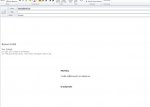
Tamam şimdi oldu.. şöyle bir sıkıntı oldu sadece imza kopyalanan metinin altında kalıyor, bunu yapma şansımız varsa güzel olur, yoksa eğer sürükle bırak ile yapabilirim. Aşağıdaki görüntü gibi oluyor236591
 
236593

C#:
Sub EmailSheet()

    Dim OutlookApp As Object, OutlookMsg As Object
    Dim FSO As Object, BodyText As Object
    Dim MyRange As Range, TempFile As String
     
    On Error Resume Next
    Set MyRange = ActiveSheet.Range("A1:D4")
    If MyRange Is Nothing Then Exit Sub
    Set FSO = CreateObject("Scripting.FilesystemObject")

    TempFile = "C:\temp\TempHTML.htm"
    ActiveWorkbook.PublishObjects.Add _
    (4, TempFile, MyRange.Parent.Name, MyRange.Address, 0, "", "").Publish True

    Set OutlookApp = CreateObject("Outlook.Application")
    Set OutlookMsg = OutlookApp.CreateItem(0)
    Set BodyText = FSO.OpenTextFile(TempFile, 1)
   
        With OutlookMsg
            .Display
            .HTMLBody = BodyText.ReadAll & .HTMLBody           
            .To = Range("V2").Text  'Kime
            .cc = Range("V3").Text  'Bilgi
            .Subject = Range("V4").Text   ' Konu           
        End With
       
Kill TempFile

   
    Set BodyText = Nothing
    Set OutlookMsg = Nothing
    Set OutlookApp = Nothing
    Set FSO = Nothing
   

End Sub
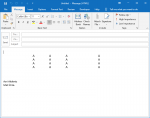
 
Şimdi oldu.. Çok çok teşekkür ediyorum. sadece kopyalanan yazı üst sol köşeye gelmiyor mu? sürükle bırak ile yapıyorum, olursa süper olur. yoksa buda işimi görürür
 
C#:
Sub EmailSheet()
    Dim OutlookApp As Object, OutlookMsg As Object
    Dim fso As Object, BodyText As Object
    Dim MyRange As Range, TempFile As String
      
    On Error Resume Next
    Set MyRange = ActiveSheet.Range("A1:D4")
    
    Set OutlookApp = CreateObject("Outlook.Application")
    Set OutlookMsg = OutlookApp.CreateItem(0)
    With OutlookMsg
         .Display
         .HTMLBody = "Merhabalar, " & "<BR>" & RangetoHTML(MyRange) & "<BR>" & "İyi çalışmalar " & "<BR>" & .HTMLBody
            
         .To = Range("V2").Text  'Kime
         .cc = Range("V3").Text  'Bilgi
         .Subject = Range("V4").Text   ' Konu
    End With
    
    Set BodyText = Nothing
    Set OutlookMsg = Nothing
    Set OutlookApp = Nothing
    Set fso = Nothing
End Sub

Function RangetoHTML(rng As Range)
  Dim fso As Object
  Dim ts As Object
  Dim TempFile As String
  Dim TempWB As Workbook
  TempFile = Environ$("temp") & "\" & Format(Now, "dd-mm-yy h-mm-ss") & ".htm"
  rng.Copy
  Set TempWB = Workbooks.Add(1)
  With TempWB.Sheets(1)
    .Cells(1).PasteSpecial Paste:=8
    .Cells(1).PasteSpecial xlPasteValues, , False, False
    .Cells(1).PasteSpecial xlPasteFormats, , False, False
    Cells.Select
    Cells.EntireRow.AutoFit
    Cells.EntireColumn.AutoFit
    Application.CutCopyMode = False
    On Error Resume Next
    .DrawingObjects.Visible = True
    .DrawingObjects.Delete
    On Error GoTo 0
  End With
 
  With TempWB.PublishObjects.Add( _
    SourceType:=xlSourceRange, _
    Filename:=TempFile, _
    Sheet:=TempWB.Sheets(1).Name, _
    Source:=TempWB.Sheets(1).UsedRange.Address, _
    HtmlType:=xlHtmlStatic)
    .Publish (True)
  End With
  Set fso = CreateObject("Scripting.FileSystemObject")
  Set ts = fso.GetFile(TempFile).OpenAsTextStream(1, -2)
  RangetoHTML = ts.readall
  ts.Close
  RangetoHTML = Replace(RangetoHTML, "align=center x:publishsource=", _
             "align=left x:publishsource=")
 
  TempWB.Close savechanges:=False
  Kill TempFile
  Set ts = Nothing
  Set fso = Nothing
  Set TempWB = Nothing
End Function
 
Tam İstediğim gibi oldu..Çok Çok Teşekkür ediyorum. Elinize Emeğinize sağlık..
 
Merhaba,
Aşağıdaki kod ile otomatik olarak mail gönderiyorum. Ancak imzamdaki logo oluşan mail penceresinde çıkmıyor. Sanıyorum sadece text olarak okuyor logo jpg olduğu için okunmuyor. Kodu nasıl değiştir meliyim? Yardımcı olabilirseniz sevinirim. Şimdiden Teşekkürler İyi çalışmalar diliyorum


Kod:
Sub EmailSheet()


    Dim OutlookApp As Object, OutlookMsg As Object
    Dim FSO As Object, BodyText As Object
    Dim MyRange As Range, TempFile As String
     
    On Error Resume Next
    Set MyRange = ActiveSheet.Range("W1:W4")
    If MyRange Is Nothing Then Exit Sub
    Set FSO = CreateObject("Scripting.FilesystemObject")
 
    TempFile = "C:\Planlama\TempHTML.htm"
    ActiveWorkbook.PublishObjects.Add _
    (4, TempFile, MyRange.Parent.Name, MyRange.Address, 0, "", "").Publish True

   
    Set OutlookApp = CreateObject("Outlook.Application")
    Set OutlookMsg = OutlookApp.CreateItem(0)
    Set BodyText = FSO.OpenTextFile(TempFile, 1)
   
        With OutlookMsg
            .HTMLBody = BodyText.ReadAll
           
            .To = Range("V2").Text  'Kime
            .cc = Range("V3").Text  'Bilgi
            .Subject = Range("V4").Text   ' Konu
         
            .Display


        End With
       
Kill TempFile

   
    Set BodyText = Nothing
    Set OutlookMsg = Nothing
    Set OutlookApp = Nothing
    Set FSO = Nothing
   

End Sub
Excel örnek dosyası eklermisiniz.. Banada lazım bir örnek şablon
 
Asri Bey Tekrar Merhaba,

Koda Mail gönderisinde "Yüksek Önem Düzeyi" 'ni aktif yapabiliyor muyuz acaba?
 
.

Subject satırının altına ilave edin.

.Importance = 2


.
 
Emir Hüseyin Bey,

Çok Teşekkür ederim.
 
Geri
Üst