- Katılım
- 12 Nisan 2012
- Mesajlar
- 533
- Excel Vers. ve Dili
- Microsoft office professional plus 2019
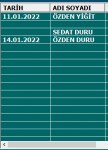
Merhaba.Aşağıdaki kod ile Listview 1.kolonuna sayfadaki B-I sutunları arasında bulunan isimleri tarihe göre süzerek yazdırıyorum.Fakat örneğin "C" sutununda tarihe karşılık gelen hücre boşsa listview 1.sutununda bir satır boşluk yazdırarak listeleme yapıyor.Bu durumu If Then Else metoduyla ortadan kaldırabilir miyiz?Yani "C" sutunu boşsa pas geçip "D" sutununu kontrol edecek eğer orasıda boşsa "E" sutununa bakacak.Böyle bir şey yaparak sorunu düzelteceğimi sanıyorum ama başka bir yolda denenebilir tabi.Yardımcı olacak arkadaşa şimdiden Teşekkür Ederim.
Private Sub CommandButton1_Click()
Dim s As Worksheet
Dim i, son, v As Long
Dim List As Object
With UserForm5.ListView1
Set s = Sheets("Veri")
For i = 2 To s.Cells(Rows.Count, "A").End(xlUp).Row
If s.Cells(i, "b").Value <> "" Then
If CDate(s.Cells(i, "a").Value) >= UserForm5.TextBox1.Value And CDate(s.Cells(i, "a").Value) <= UserForm5.TextBox2.Value Then
Set List = .ListItems.Add(, , s.Cells(i, "a").Text)
List.ListSubItems.Add , , s.Cells(i, "b").Text
UserForm5.ListView1.ListItems.Add.SubItems(1) = s.Cells(i, "c")
UserForm5.ListView1.ListItems.Add.SubItems(1) = s.Cells(i, "d")
End If: End If
Next
End With
Private Sub CommandButton1_Click()
Dim s As Worksheet
Dim i, son, v As Long
Dim List As Object
With UserForm5.ListView1
Set s = Sheets("Veri")
For i = 2 To s.Cells(Rows.Count, "A").End(xlUp).Row
If s.Cells(i, "b").Value <> "" Then
If CDate(s.Cells(i, "a").Value) >= UserForm5.TextBox1.Value And CDate(s.Cells(i, "a").Value) <= UserForm5.TextBox2.Value Then
Set List = .ListItems.Add(, , s.Cells(i, "a").Text)
List.ListSubItems.Add , , s.Cells(i, "b").Text
UserForm5.ListView1.ListItems.Add.SubItems(1) = s.Cells(i, "c")
UserForm5.ListView1.ListItems.Add.SubItems(1) = s.Cells(i, "d")
End If: End If
Next
End With