

• DİKKAT

    DOSYA İndirmek/Yüklemek için ÜCRETLİ ALTIN ÜYELİK Gereklidir!
    Altın Üyelik Hakkında Bilgi

İnternetten PDF dosya indirip excel formatına dönüştürme

Korhan Ayhan

Administrator
Yönetici
Admin
Katılım
15 Mart 2005
Mesajlar
43,829
Excel Vers. ve Dili
Microsoft 365 Tr-En 64 Bit
Merhaba Arkadaşlar,

Aşağıdaki linkteki PDF dosyalarını tarih aralığı vererek indirmek istiyorum.

https://www.antalya.bel.tr/halden-gunluk-fiyatlar

01.08.2017
31.08.2017

Şeklinde tarih aralığı girip indirmek istiyorum.

Bu işlemi yaptıktan sonra indirdiğim PDF dosyalarını ADOBE DC ile excel formatına dönüştürmek istiyorum.

Aşağıdaki resimde işlem adımlarını görebilirsiniz.

Yardımcı olursanız sevinirim.
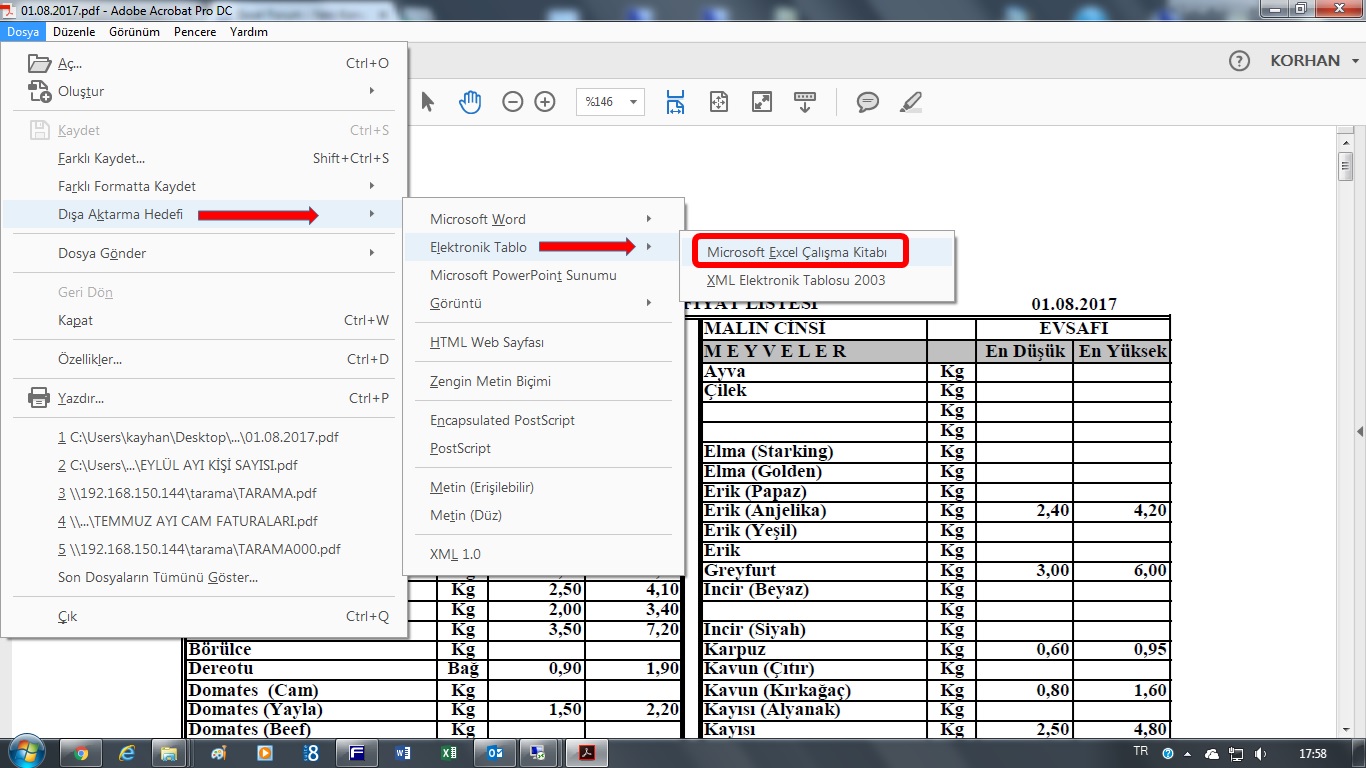
ADOBE_DC_TO_EXCEL.jpg
 
Korhan hocam, süslemedim :)

iki tarih arasındaki pdf dosyalarını bulunduğu klasöre indirir.
xlsx formatına çevirir ve linklerini de sayfaya yazar.

Arda arda pdf den xlsx e çıkarma işlemi sorun oluşturduğundan 10 sn bekleme eklendi.
Bu değer duruma göre değiştirilebilir.

Kod:
#If VBA7 Then
 Declare PtrSafe Sub Sleep Lib "kernel32" (ByVal dwMilliseconds As Long)
#Else
    Declare Sub Sleep Lib "kernel32" (ByVal dwMilliseconds As Long)
#End If


Sub Fiyat_oku()
  Dim url, okunanlink, yol As String
  Dim aranantarih As String
  Dim txt As String
  Dim i, satir, linkbasla, linkbitir As Long
  Dim ilktarih, okunantarih, sontarih As Date
  
  Range("A:B").Clear
  
  yol = ActiveWorkbook.Path & "\"
  url = "https://www.antalya.bel.tr/halden-gunluk-fiyatlar"
  
  tarihtag = "<td class=""PublishedDate"">"
  linkilktag = "<a href="
  linksontag = "target="
  
  ilktarih = CDate(Range("F3"))
  sontarih = CDate(Range("F4"))
  
  With CreateObject("MSXML2.XMLHTTP")
    .Open "GET", url, False
    .Send
    txt = .ResponseText
  End With
  
  satir = 0
  Do
    i = InStr(i + 1, txt, tarihtag)
    If i = 0 Then Exit Do

    okunantarih = CDate(Mid(txt, i + Len(tarihtag), 11))
    linkbasla = InStr(i + 1, txt, linkilktag) + Len(linkilktag)
    linkbitir = InStr(i + 1, txt, linksontag) - 3

    okunanlink = Mid(txt, linkbasla + 1, linkbitir - linkbasla)
    If okunantarih >= ilktarih And okunantarih <= sontarih Then
       satir = satir + 1
       Cells(satir, 1).Value = okunantarih
       Cells(satir, 2).Value = okunanlink
       Call DownloadInternetFile(okunanlink, yol & okunantarih & ".pdf")
       Call SavePDFAs(yol & okunantarih & ".pdf", "xlsx")
       [COLOR=Red]Sleep 10000[/COLOR]
    End If
  Loop
  Msgbox("İşlem tamamlandı")
End Sub

Public Sub DownloadInternetFile(FileURL, SaveFileAs)
    Dim StatusMsg As String, FileSize As String, LastModified As String
    Dim HeaderData As String, StartTime As Date, EndTime As Date, StateTime As Date
    Dim BinaryData As Variant, BinaryData1 As Variant, BinaryData2 As Variant
    Dim BinaryData3 As Variant, BinaryData4 As Variant
    Dim UnformattedData As String, CurrentState As Variant
    Dim i As Integer, tmp As Double
    
    Const adTypeBinary = 1
    Const adSaveCreateNotExist = 1
    Const adSaveCreateOverWrite = 2
        
    Set WSH = CreateObject("WScript.Shell")
    Set HttpObj = CreateObject("Microsoft.XMLHTTP")
    Set BinaryStream = CreateObject("ADODB.Stream")
    CurrentState = -1
    
       
    StartTime = Now()
    HttpObj.Open "GET", FileURL, True
    HttpObj.Send
    
    CurrentState = HttpObj.ReadyState
    Do Until CurrentState = 4
        CurrentState = HttpObj.ReadyState
        DoEvents
    Loop
    
    ' Load the binary data into a variable.
    BinaryData = HttpObj.ResponseBody
    
    ' Specify stream type - we want To save binary data.
    BinaryStream.Type = adTypeBinary
    
    ' Open the stream And write binary data To the object
    BinaryStream.Open
    BinaryStream.Write BinaryData
    
    ' Save binary data To disk
    BinaryStream.SaveToFile SaveFileAs, adSaveCreateOverWrite
    
End Sub


Private Sub SavePDFAs(PDFPath As String, FileExtension As String)
    
    '---------------------------------------------------------------------------------------
    'Saves a PDF file as other format using Adobe Professional.
    
    'In order to use the macro you must enable the Acrobat library from VBA editor:
    'Go to Tools -> References -> Adobe Acrobat xx.0 Type Library, where xx depends
    'on your Acrobat Professional version (i.e. 9.0 or 10.0) you have installed to your PC.
    
    'Alternatively you can find it Tools -> References -> Browse and check for the path
    'C:\Program Files\Adobe\Acrobat xx.0\Acrobat\acrobat.tlb
    'where xx is your Acrobat version (i.e. 9.0 or 10.0 etc.).
    
    'By Christos Samaras
    'Date: 30/03/2013
    'http://www.myengineeringworld.net
    '---------------------------------------------------------------------------------------
    
    Dim objAcroApp      As Acrobat.AcroApp
    Dim objAcroAVDoc    As Acrobat.AcroAVDoc
    Dim objAcroPDDoc    As Acrobat.AcroPDDoc
    Dim objJSO          As Object
    Dim boResult        As Boolean
    Dim ExportFormat    As String
    Dim NewFilePath     As String
        
    'Initialize Acrobat by creating App object.
    Set objAcroApp = CreateObject("AcroExch.App")
    
    'Set AVDoc object.
    Set objAcroAVDoc = CreateObject("AcroExch.AVDoc")
    
    'Open the PDF file.
    boResult = objAcroAVDoc.Open(PDFPath, "")
        
    'Set the PDDoc object.
    Set objAcroPDDoc = objAcroAVDoc.GetPDDoc
    
    'Set the JS Object - Java Script Object.
    Set objJSO = objAcroPDDoc.GetJSObject
    
    'Check the type of conversion.
    Select Case LCase(FileExtension)
        Case "eps": ExportFormat = "com.adobe.acrobat.eps"
        Case "html", "htm": ExportFormat = "com.adobe.acrobat.html"
        Case "jpeg", "jpg", "jpe": ExportFormat = "com.adobe.acrobat.jpeg"
        Case "jpf", "jpx", "jp2", "j2k", "j2c", "jpc": ExportFormat = "com.adobe.acrobat.jp2k"
        Case "docx": ExportFormat = "com.adobe.acrobat.docx"
        Case "doc": ExportFormat = "com.adobe.acrobat.doc"
        Case "png": ExportFormat = "com.adobe.acrobat.png"
        Case "ps": ExportFormat = "com.adobe.acrobat.ps"
        Case "rft": ExportFormat = "com.adobe.acrobat.rft"
        Case "xlsx": ExportFormat = "com.adobe.acrobat.xlsx"
        Case "xls": ExportFormat = "com.adobe.acrobat.spreadsheet"
        Case "txt": ExportFormat = "com.adobe.acrobat.accesstext"
        Case "tiff", "tif": ExportFormat = "com.adobe.acrobat.tiff"
        Case "xml": ExportFormat = "com.adobe.acrobat.xml-1-00"
        Case Else: ExportFormat = "Wrong Input"
    End Select
    
    'Check if the format is correct and there are no errors.
    If ExportFormat <> "Wrong Input" And Err.Number = 0 Then
        
        'Format is correct and no errors.
        
        'Set the path of the new file. Note that Adobe instead of xls uses xml files.
        'That's why here the xls extension changes to xml.
        If LCase(FileExtension) <> "xls" Then
            NewFilePath = WorksheetFunction.Substitute(PDFPath, ".pdf", "." & LCase(FileExtension))
        Else
            NewFilePath = WorksheetFunction.Substitute(PDFPath, ".pdf", ".xml")
        End If
        
        'Save PDF file to the new format.
        boResult = objJSO.SaveAs(NewFilePath, ExportFormat)
        
        'Close the PDF file without saving the changes.
        boResult = objAcroAVDoc.Close(True)
        
        'Close the Acrobat application.
        boResult = objAcroApp.Exit
        
    Else
        
        'Something went wrong, so close the PDF file and the application.
        
        'Close the PDF file without saving the changes.
        boResult = objAcroAVDoc.Close(True)
        
        'Close the Acrobat application.
        boResult = objAcroApp.Exit

    End If
        
    'Release the objects.
    Set objAcroPDDoc = Nothing
    Set objAcroAVDoc = Nothing
    Set objAcroApp = Nothing
        
End Sub
 

Ekli dosyalar

Son düzenleme:
PDF to XLSX kodları eklendi.
Dosya ve kodlar güncellendi.
 
Desteğiniz için teşekkür ederim.
 
Geri
Üst