

• DİKKAT

    DOSYA İndirmek/Yüklemek için ÜCRETLİ ALTIN ÜYELİK Gereklidir!
    Altın Üyelik Hakkında Bilgi

ekstrede düzenleme ?

Katılım
5 Eylül 2007
Mesajlar
1,247
Excel Vers. ve Dili
ofis 2010
iyi akşamlar; ekstrede makro ile düzenleme yapmak istiyorum. A -Tarih, B açıklama ve C tutarları gösteriyor, tutarlarda + ve - değerler var. Bunları farklı sütunlara yazdırmama gerekiyor. Normal raporlamayı örnek kodla yapıyorum farklı sütuna yazdırmayı yapamadım. Örnek dosya ve resmi ekliyorum.
Kod:
Sub aktar()
Set sl = Sheets("garantiT"): Set sk = Sheets("garantiE")
son = sl.Range("a" & Rows.Count).End(3).Row + 1
sat = 2
sl.Range("A2:D" & son).ClearContents
For i = 2 To sk.Range("A" & Rows.Count).End(3).Row
If sk.Cells(i, "A") > "" Then
sl.Cells(sat, "A") = sk.Cells(i, "A")
sl.Cells(sat, "B") = sk.Cells(i, "B")
sl.Cells(sat, "C") = sk.Cells(i, "D")
sl.Cells(sat, "D") = sk.Cells(i, "D")
sat = sat + 1
End If
Next i
Sheets("garantiT").Select
    Sheets("garantiT").Range("A2:d" & Range("d65656").End(3).Row).Font.Name = "Calibri" 'yazı fontu
    Sheets("garantiT").Select
    Sheets("garantiT").Range("A2:d" & Range("d65656").End(3).Row).Font.Size = 11 'yazı tipi boyutu
'Sheets("garantiT").Select ' buda hata veriyor çözemedim
'Sheets("garantiT").Range("c:d" & Range("d65656").End(3).Row).NumberFormat = "#,##0.00"
End Sub
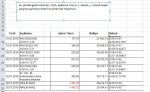
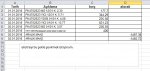
bu kodun neresini değiştirmem gerekiyor, teşekkürler
 

Ekli dosyalar

  • ekstre.xlsx
    ekstre.xlsx
    13.8 KB · Görüntüleme: 4
  • ekstre1.jpg
    ekstre1.jpg
    125.8 KB · Görüntüleme: 5
  • ekstre2.jpg
    ekstre2.jpg
    69.7 KB · Görüntüleme: 5
Merhaba;

Sub analiz()
Application.ScreenUpdating = False
On Error Resume Next
Set s1 = ThisWorkbook.Worksheets("garantiE")
Set s2 = ThisWorkbook.Worksheets("garantiT")
s2.Range("a2:e65536").ClearContents
s2.Range("a2:e65536").Borders.LineStyle = xlNone
For i = 18 To s1.Range("A65536").End(xlUp).Row
If s1.Cells(i, 1) <> "" Then
sonsatir = s2.Range("A65536").End(xlUp).Row + 1
s2.Cells(sonsatir, 1) = s1.Cells(i, 1)
s2.Cells(sonsatir, 2) = s1.Cells(i, 2)
If s1.Cells(i, 4) > 0 Then s2.Cells(sonsatir, 3) = s1.Cells(i, 4)
If s1.Cells(i, 4) < 0 Then s2.Cells(sonsatir, 4) = s1.Cells(i, 4)
s2.Range("A" & sonsatir & ":d" & sonsatir).Font.Name = "Calibri"
s2.Range("A" & sonsatir & ":d" & sonsatir).Font.Size = 11
s2.Range("A" & sonsatir & ":d" & sonsatir).Borders.LineStyle = xlContinuous 'hücre kenarlık
s2.Range("c" & sonsatir & ":d" & sonsatir).NumberFormat = "#,##0.00"
End If
Next i
Application.ScreenUpdating = True
MsgBox "İşlem TAMAM."
End Sub

Şeklinde deneyin.
İyi çalışmalar.
 
Merhaba;

Sub analiz()
Application.ScreenUpdating = False
On Error Resume Next
Set s1 = ThisWorkbook.Worksheets("garantiE")
Set s2 = ThisWorkbook.Worksheets("garantiT")
s2.Range("a2:e65536").ClearContents
s2.Range("a2:e65536").Borders.LineStyle = xlNone
For i = 18 To s1.Range("A65536").End(xlUp).Row
If s1.Cells(i, 1) <> "" Then
sonsatir = s2.Range("A65536").End(xlUp).Row + 1
s2.Cells(sonsatir, 1) = s1.Cells(i, 1)
s2.Cells(sonsatir, 2) = s1.Cells(i, 2)
If s1.Cells(i, 4) > 0 Then s2.Cells(sonsatir, 3) = s1.Cells(i, 4)
If s1.Cells(i, 4) < 0 Then s2.Cells(sonsatir, 4) = s1.Cells(i, 4)
s2.Range("A" & sonsatir & ":d" & sonsatir).Font.Name = "Calibri"
s2.Range("A" & sonsatir & ":d" & sonsatir).Font.Size = 11
s2.Range("A" & sonsatir & ":d" & sonsatir).Borders.LineStyle = xlContinuous 'hücre kenarlık
s2.Range("c" & sonsatir & ":d" & sonsatir).NumberFormat = "#,##0.00"
End If
Next i
Application.ScreenUpdating = True
MsgBox "İşlem TAMAM."
End Sub

Şeklinde deneyin.
İyi çalışmalar.
teşekkür ederim, kod gayet açık ve anlaşılır olmuş, başka işlemlerde de kullanabileceğim açıklıkta. iyi çalışmalar
 
Geri
Üst