

• DİKKAT

    DOSYA İndirmek/Yüklemek için ÜCRETLİ ALTIN ÜYELİK Gereklidir!
    Altın Üyelik Hakkında Bilgi

Aynı Satırları Sutunda Birleştirmek

Katılım
16 Temmuz 2014
Mesajlar
74
Excel Vers. ve Dili
2010 TR
Merhabalar,

Alt alta her satırda son sutun hariç hepsi aynı tekrar bir listem var. Son sutun hariç veriler aynı ve alt alta listeli durumda.
İstediğim şey satırların tek sıra olup son sutunların yan yana listelenmesi.

Yani şu an bu şekilde:
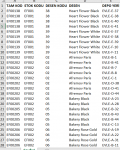
214223

Fakat şöyle olsun istiyorum:

214224

Nasıl mümkün kılabilirim? Örnek dosyayı paylaştım.
 

Ekli dosyalar

Deneyiniz..

Kod:
Sub Test()
    Dim i, bul, OncAdrs
    Application.ScreenUpdating = False
    Range("J2:AA100000").ClearContents
    Range("J2:M" & Cells(Rows.Count, 1).End(3).Row).Value = Range("A2:D" & Cells(Rows.Count, 1).End(3).Row).Value
    Range("J2:M" & Cells(Rows.Count, 1).End(3).Row).RemoveDuplicates Columns:=4
    For i = 2 To Cells(Rows.Count, 10).End(3).Row
        Set bul = Range("A2:A100000").Find(Cells(i, 10), , xlValues, xlWhole)
        If Not bul Is Nothing Then
            OncAdrs = bul.Address
            Do
                Cells(i, Cells(i, Columns.Count).End(1).Column + 1) = Cells(bul.Row, 5)
                Set bul = Range("A2:A100000").FindNext(bul)
            Loop While Not bul Is Nothing And bul.Address <> OncAdrs
        End If
    Next
    Application.ScreenUpdating = True
    MsgBox "Islem Tamam..."
End Sub
 

Ekli dosyalar

Deneyiniz..

Kod:
Sub Test()
    Dim i, bul, OncAdrs
    Application.ScreenUpdating = False
    Range("J2:AA100000").ClearContents
    Range("J2:M" & Cells(Rows.Count, 1).End(3).Row).Value = Range("A2:D" & Cells(Rows.Count, 1).End(3).Row).Value
    Range("J2:M" & Cells(Rows.Count, 1).End(3).Row).RemoveDuplicates Columns:=4
    For i = 2 To Cells(Rows.Count, 10).End(3).Row
        Set bul = Range("A2:A100000").Find(Cells(i, 10), , xlValues, xlWhole)
        If Not bul Is Nothing Then
            OncAdrs = bul.Address
            Do
                Cells(i, Cells(i, Columns.Count).End(1).Column + 1) = Cells(bul.Row, 5)
                Set bul = Range("A2:A100000").FindNext(bul)
            Loop While Not bul Is Nothing And bul.Address <> OncAdrs
        End If
    Next
    Application.ScreenUpdating = True
    MsgBox "Islem Tamam..."
End Sub

İşimi gördü hocam çok teşekkür ederim.
 
Aşağıdaki makroyu deneyiniz. Verilerinizin çokluğuna göre işlem uzun sürebilir:

Sub duzenle() sonA = Cells(Rows.Count, "A").End(3).Row sonJ = Cells(Rows.Count, "J").End(3).Row sonsut = [J1].SpecialCells(xlLastCell).Column Range(Cells(3, "J"), Cells(sonJ, sonsut)).ClearContents Range("A3:D" & sonA).Copy [J3] Range("J2:M" & sonA).RemoveDuplicates Columns:=Array(1, 2, 3), _ Header:=xlYes Application.CutCopyMode = False sonJ = Cells(Rows.Count, "J").End(3).Row Application.ScreenUpdating = False For j = 3 To sonJ For i = 3 To sonA If Cells(i, "A") = Cells(j, "J") And Cells(i, "B") = Cells(j, "K") And _ Cells(i, "C") = Cells(j, "L") And Cells(i, "D") = Cells(j, "M") Then yeni = Cells(j, Columns.Count).End(xlToLeft).Column + 1 Cells(j, yeni) = Cells(i, "E") End If Next Next Application.ScreenUpdating = True MsgBox "İşlem tamamlandı." End Sub
 
Geri
Üst
